Trello Review 2026: Is It Worth It?
Trello is a visual project management tool built around Kanban-style boards, lists, and cards. It's one of the most recognisable names in task management, used by millions of teams from solo freelancers to entire enterprise departments. The Free plan is genuinely useful. It includes unlimited cards, up to 10 boards per workspace, and basic Power-Ups. Paid plans start at $5/user/month (billed annually) and unlock unlimited boards, advanced checklists, and automation. Trello's strength is simplicity. If your workflow is visual and card-based, you'll be up and running in under an hour. Where it falls short is depth. Complex projects with dependencies, Gantt charts, or heavy reporting needs will hit real limits fast. It's best suited to small-to-mid-sized teams who value ease of use over raw power. Overall rating: 4.1/5.
What we love
Watch out for
Trello at a glance
What to test in your Trello trial
14-day free trial of Premium
- Create a board for a real project or workflow and move 20+ cards to test drag-and-drop speed
- Set up a Butler automation rule triggered by card movement (e.g. assign reviewer and add checklist)
- Try Timeline, Calendar, and Table views to see if they fit your scheduling or reporting needs
- Add custom fields and advanced checklists to a card to check if they replace your need for external tools
- Test Power-Ups for time tracking or cross-board reporting to understand what you'd pay extra for long-term
- Before the trial ends, decide if the Premium views justify $10/user/month or if the Free plan covers your workflow
Quick Verdict
Trello earns its place as the go-to entry point for visual project management. Its board-list-card model is intuitive enough that new users rarely need onboarding docs, and the Free plan is one of the most generous in the category. For teams running marketing campaigns, content pipelines, hiring workflows, or product backlogs, Trello delivers real value without a steep learning curve or a big budget.
Trello does have a clear ceiling, though. Once your team needs cross-board reporting, complex task dependencies, or built-in time tracking, you'll either end up stitching together Power-Ups or start eyeing a migration to a more feature-complete platform. If your workflow maps cleanly to Kanban cards, Trello is hard to beat at the price. If it doesn't, be honest with yourself before you commit.
Start Your Free Trial →
What is Trello?
Trello was founded in 2011 by Fog Creek Software and acquired by Atlassian in 2017 for $425 million, a figure that shows just how dominant it had become in the lightweight project management space. Today it sits within Atlassian's broader product lineup alongside Jira, Confluence, and Bitbucket, though it stays deliberately distinct. Jira targets software development teams with complex workflows. Trello is built as the accessible, no-code option for every other department in a business.
At its core, Trello is a Kanban board tool. Work items live on cards, cards sit in lists, and lists sit on boards. That simple model has turned out to be versatile enough to run editorial calendars, CRM pipelines, event planning workflows, and onboarding checklists across companies of all sizes. Trello's position in 2026 is "powerful enough to be useful, simple enough to actually get adopted." That's both its greatest strength and the source of its most common criticism.
Key Features
Feature Checklist
Boards, Lists, and Cards
The basic Trello unit is the card. A card can hold a title, rich-text description, file attachments (up to 250 MB per file on paid plans), cover images, due dates, labels, checklists, and custom fields. Lists act as columns, typically representing stages in a workflow, such as "To Do", "In Progress", and "Done". Boards are the top-level container, usually representing a project, team, or recurring process.
The card itself is what makes this work so well. A product team might use cards to represent features in a sprint backlog. A content team might use them to track blog posts from "Idea" through "Published". Moving a card from one stage to another takes under a second with the drag-and-drop interface. That kind of interaction feels satisfying in daily use and keeps progress visible at a glance.
Automation with Butler
Butler is Trello's native no-code automation engine, and it does more than it lets on at first glance. You can build rules triggered by card movements, due date approaches, button clicks, or calendar schedules. Here's a practical example. When a card is moved to the "In Review" list, Butler can automatically assign it to a specific team member, add a checklist of review criteria, set a due date for 48 hours later, and post a comment tagging the reviewer. All of that happens without any human action beyond dragging the card.
On the Free plan, Butler automations are capped at 250 runs per month per workspace. Standard and Premium plans raise this to unlimited runs, and that's where Butler starts to feel like real workflow automation rather than a light convenience feature. Butler needs no coding knowledge, so operations managers or project coordinators without a technical background can pick it up just as easily.
Multiple Views
One of Trello's most meaningful upgrades in recent years is the move beyond Kanban. Premium and Enterprise plans now include Timeline (Gantt-style), Table, Calendar, Dashboard, and Map views. The Timeline view lets you visualise card start and end dates across a horizontal axis, drag to reschedule, and spot scheduling conflicts. It's a direct answer to the most common complaint that Trello couldn't handle deadline-sensitive projects. Table view renders all cards across a board in a spreadsheet-style grid, useful for bulk editing or reporting. These views sit behind Premium ($10/user/month), so Standard plan users still work mainly from the board view.
Power-Ups and Integrations
Power-Ups are Trello's integration and feature extension layer. The marketplace includes hundreds of options, from native integrations with Slack, Google Drive, Salesforce, and GitHub, to third-party add-ons for time tracking, voting, and custom reporting. The Free plan now includes unlimited Power-Ups (this changed from a one-Power-Up limit in an earlier version), which makes it a lot more useful for teams that depend on tool integrations. The Atlassian ecosystem integrations stand out in particular. Connecting Trello cards to Jira issues or Confluence pages works smoothly, which matters for teams that use Trello for high-level planning while Jira handles execution-level dev work.
Custom Fields and Advanced Checklists
Custom fields are available from the Standard plan upwards and let teams add structured data to cards, including dropdown selectors, text fields, numbers, dates, or checkboxes. A sales team might use custom fields to track deal value, close probability, or lead source directly on each card. Advanced checklists (also Standard and above) let you assign individual checklist items to specific team members with their own due dates, turning a single card into a mini project with trackable subtasks. Together, these two features close much of the gap between Trello and more structured project management tools.
Pricing
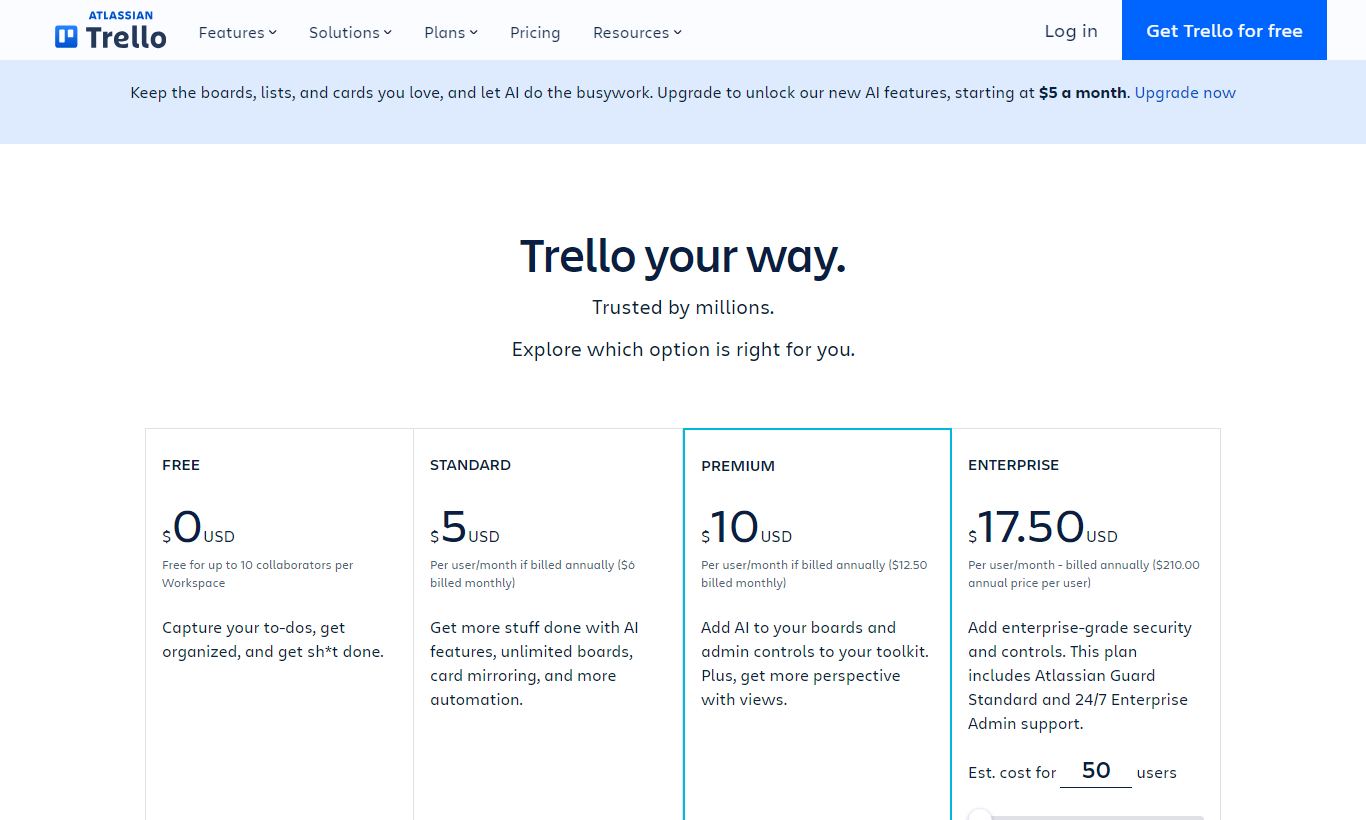
Trello charges per user, per month, across four tiers. The prices below reflect annual billing. Monthly billing costs more.
- Free - $0/user/month: Unlimited cards, up to 10 boards per workspace, unlimited Power-Ups, Butler automation (250 runs/month), file attachments up to 10 MB, 1 active board per workspace for guests.
- Standard - $5/user/month (billed annually, ~$6 month-to-month): Unlimited boards, custom fields, advanced checklists, unlimited storage (250 MB per file), saved searches, and 1,000 Butler automation runs/month per workspace.
- Premium - $10/user/month (billed annually, ~$12.50 month-to-month): Everything in Standard, plus Timeline, Table, Calendar, Dashboard, and Map views, unlimited Butler automation, workspace-level templates, priority support, and admin controls.
- Enterprise - from $17.50/user/month (pricing scales down per user as team size grows, billed annually): Everything in Premium, plus multi-board guests, attachment permissions, power-up administration, SSO, and dedicated account support. Enterprise requires a minimum of 25 users.
Trello gives you a free 14-day trial of Premium. No credit card required. That's the right way to check whether the extra views are worth the price jump. The Free plan has no time limit, and it's a genuine long-term option for small teams running simple workflows.
What We Love
- Onboarding speed: New team members can open a Trello board and start moving cards within minutes. No training sessions, no manual required. That's rare, and it genuinely matters for teams with high turnover or regular contractors.
- Butler automation without code: The rule-builder is one of the most accessible automation tools in project management. Building a multi-step card automation takes under five minutes and requires zero technical knowledge.
- A Free plan that actually works: Unlimited cards, unlimited Power-Ups, and 10 boards make the Free tier functional for small teams running real work. It's not a crippled trial built to force an upgrade.
- Atlassian ecosystem depth: Native two-way sync with Jira lets cross-functional teams use Trello for stakeholder-facing planning while engineers work in Jira, with no duplicated data entry.
- Flexible card structure: A single Trello card can hold descriptions, checklists, custom fields, file attachments, comments, due dates, and labels at once. That makes it versatile enough to serve as a lightweight document, task, and communication thread in one place.
Watch Out For
- Limited reporting out of the box: Even on Premium, Trello's Dashboard view offers only basic widget-based charts. There are no built-in reports for workload distribution, velocity, or time-on-task unless you add a third-party Power-Up. Team leads who need visibility across multiple boards run into this often.
- No native time tracking: Time tracking doesn't exist in Trello's native feature set. Teams that bill by the hour or track effort against estimates have to bring in Power-Ups like Harvest or Clockify, which means extra cost and extra integration work.
- Advanced views locked to Premium: Timeline and Calendar views, features competitors like Asana include at lower price points, require Trello's $10/user/month plan. That can feel steep for a small team that only needs one of those views.
- Scales awkwardly for large, complex projects: Boards with 200+ cards get hard to navigate. There's no native cross-board dependency tracking, and search across multiple boards is weaker than users of more mature platforms would expect.
Who Is It Best For?
The content or marketing team of 3 - 15 people running an editorial calendar, social media pipeline, or campaign tracker will find Trello almost perfectly suited to their needs. The card-per-piece-of-content model maps naturally to their workflow, labels work as content categories, and the calendar view (Premium) gives editors a publication schedule at a glance. Butler can auto-assign review tasks the moment a writer moves a card to "Ready for Edit," which cuts out repeated manual steps every week.
A solo founder or small startup team managing multiple work streams on a tight budget will appreciate what the Free plan covers. Ten boards is enough to run product roadmap, customer feedback, hiring pipeline, and investor relations workflows at the same time. Once the team grows past 5 - 6 people and custom fields become necessary, the $5/user/month Standard plan is one of the better deals on the market.
An operations or HR team inside a mid-size company that already uses Atlassian tools, particularly Jira and Confluence, will benefit from Trello's deep native integrations within that ecosystem. Using Trello boards for onboarding checklists, policy review cycles, or facilities management, while Jira handles IT tickets and Confluence holds documentation, cuts down on tool-switching and keeps information connected.
How Does It Compare?
Trello vs Asana: Asana offers more native project views at lower price points (Timeline is available on Asana's Premium at $10.99/user/month), and its reporting is significantly stronger. Trello wins on simplicity and onboarding speed. Asana wins on structured task dependencies and cross-project visibility. See our full Trello vs Asana breakdown for a feature-by-feature comparison.
Trello vs Monday.com: Monday.com provides a more spreadsheet-like interface with powerful formula columns, time tracking, and dashboards built into its core product. It's more complex to set up than Trello and starts at a higher price floor ($9/user/month, minimum 3 seats). For teams that outgrow Trello's simplicity but don't want to move to enterprise software, Monday.com is the most direct upgrade path. Read our Trello vs Monday.com comparison for more detail.
Final Verdict
Trello is an excellent tool that's honest about what it is. It does visual, card-based task management as well as anyone in the market, delivers one of the strongest free plans available, and gets a team up and running in hours rather than days. The Butler automation engine and Atlassian integrations add real depth for power users without complicating things for everyone else.
It's not the right choice for teams that need serious reporting, built-in time tracking, complex task dependencies, or enterprise-grade project portfolio management. If you're running a 50-person engineering organisation tracking sprint velocity and resource allocation, Jira or Linear will serve you better. But if your team manages work that flows through stages (and most teams' work does), Trello remains one of the most effective tools for keeping that flow visible and moving.
Our recommendation: start on the Free plan, run a real project on it for two weeks, and upgrade to Standard or Premium only once you've hit a specific wall. You'll know the wall when you see it.
Try Trello Free →
FAQ
Is Trello free to use?
Yes. Trello's Free plan is permanent, not a time-limited trial. It includes unlimited cards, up to 10 boards per workspace, unlimited Power-Ups, and basic Butler automation (250 runs/month). It works fine for small teams with straightforward workflows.
How much does Trello cost in 2026?
Trello pricing starts at $0 (Free), then $5/user/month (Standard, billed annually), $10/user/month (Premium, billed annually), and from $17.50/user/month (Enterprise, 25-user minimum, billed annually). Monthly billing costs slightly more.
Is Trello worth it for small businesses?
For most small businesses with visual, stage-based workflows, yes. The Free plan covers a surprising amount, and the Standard plan at $5/user/month adds custom fields and unlimited boards that most growing teams will need. If your workflow requires Gantt charts, go Premium or check out Asana instead.
What is the difference between Trello Standard and Premium?
Standard ($5/user/month) adds unlimited boards, custom fields, and advanced checklists over Free. Premium ($10/user/month) adds Timeline, Table, Calendar, Dashboard, and Map views, plus unlimited Butler automations and workspace-level admin controls. The views are what really set the two apart.
How does Trello compare to Asana?
Trello is simpler, faster to onboard, and better suited to Kanban-style workflows. Asana offers stronger task dependencies, more native views at lower price points, and better reporting. Teams that need project timelines and cross-project visibility tend to prefer Asana. Teams that want fast visual task management tend to prefer Trello.
Does Trello have a Gantt chart?
Yes, but only on Premium and Enterprise plans. The Timeline view acts as a Gantt chart, letting you plot card start and end dates on a horizontal timeline and drag to reschedule. It's not available on the Free or Standard plans.
Can Trello integrate with Jira?
Yes. Trello has a native, two-way integration with Jira as part of the Atlassian ecosystem. You can link Trello cards directly to Jira issues, keeping high-level planning in Trello while execution-level detail lives in Jira, with no manual duplication between the two tools.
Is Trello good for remote teams?
Trello works well for remote teams because of its visual transparency. Anyone on the team can see work status at a glance without needing a status meeting. Card comments, @mentions, and watch notifications keep asynchronous communication tied to specific tasks. If your team also needs video calls or deep document collaboration, pair it with a dedicated tool like Slack or Confluence.
We may earn a commission when you click affiliate links. This never affects our editorial scores.
| Best for | — |
| Category | — |
Answer a few quick questions and we'll match you to the best tool for your needs.
→ Suggest a Tool