
Hive Review 2026: Is It Worth It?
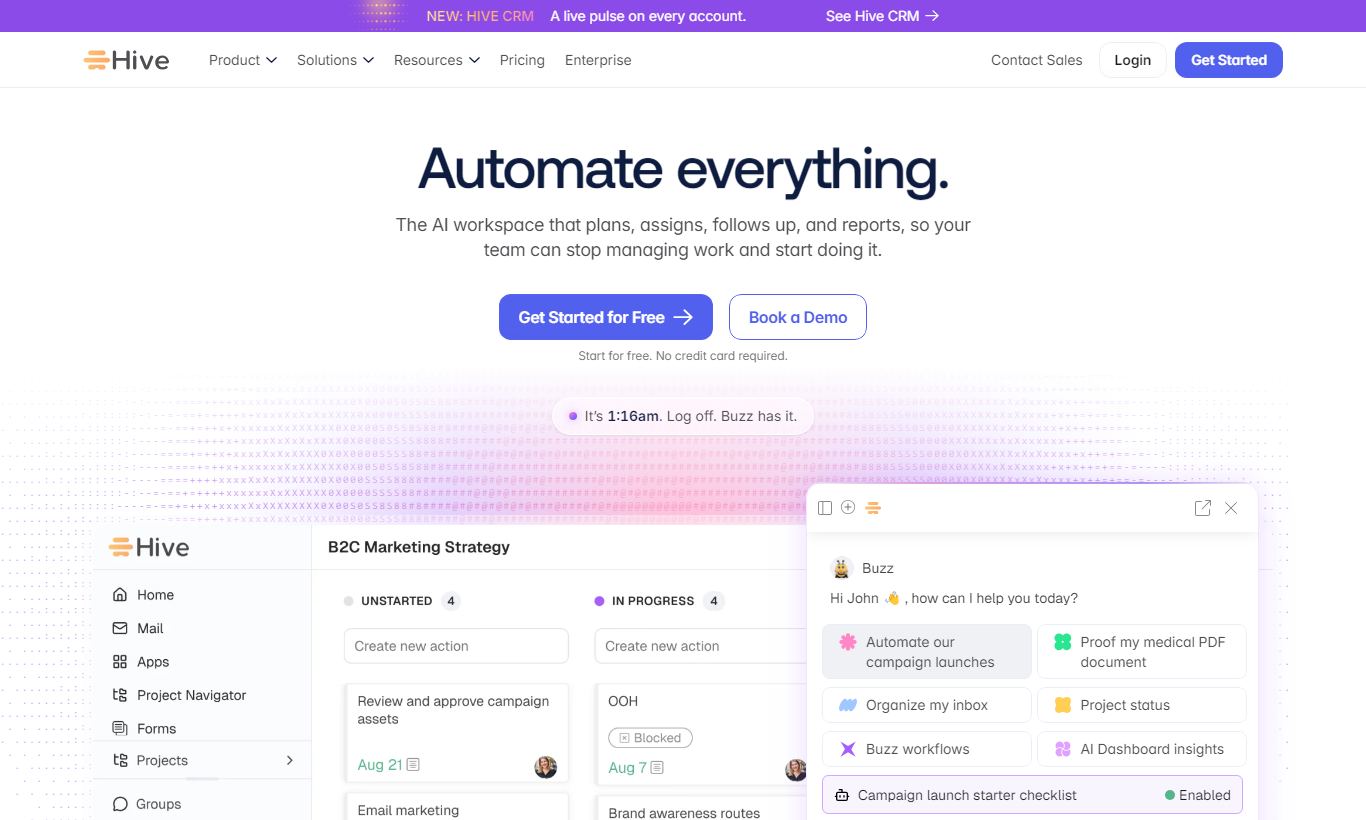
Hive is a flexible project management platform built for teams that need more than a simple to-do list. It offers six different project views (Gantt, Kanban, Calendar, Table, Portfolio, and Summary), native time tracking, built-in messaging, and AI-powered automation, all in one workspace. Pricing starts at $12 per user/month (billed annually), with a free plan for up to 2 users. Hive stands out for its action-card model, which lets teams manage tasks at multiple levels of granularity. It's best suited to mid-sized marketing, creative, and operations teams. The learning curve is steeper than tools like Trello, and the mobile app lags behind the desktop experience. Still, for teams tired of stitching together five different tools, Hive's all-in-one approach delivers real value. That's earned it a strong 4.3 out of 5.
What we love
Watch out for
Hive at a glance
What to test in your Hive trial
14-day free trial available
- Set up a real project in at least two different views (Gantt and Kanban) to test switching without data loss
- Create action cards with subtasks and test time tracking with the timer to see if logging matches your team's workflow
- Upload a design or PDF file to an action card and have a colleague annotate feedback using the proofing tool
- Build one automation rule (like assigning tasks on status change) using the visual builder without code
- Have your team use messaging channels and DMs for one full day to assess if it can replace your Slack usage
- Before the trial ends, decide if the setup complexity is worth the time savings and all-in-one capability for your team
Quick Verdict
Hive earns its place in the crowded project management market by doing something most competitors avoid. It genuinely integrates messaging, task management, time tracking, and AI automation into a single coherent workspace instead of bolting them on as afterthoughts. For a mid-sized team juggling multiple campaigns, client deliverables, or product sprints at once, that cohesion means real time savings and fewer headaches from switching between tools.
Where Hive stumbles is mobile parity and onboarding. New users face a more involved setup than tools like Trello or Monday.com, and the iOS and Android apps are missing several features you'll find on desktop. But if your team is willing to spend a week getting set up properly, Hive pays that investment back many times over. It's one of the most capable all-in-one project platforms at its price point, and the 14-day free trial makes it easy to test that claim yourself.
Start Your Free Trial →What is Hive?
Hive was founded in 2015 and is headquartered in New York City. It was built around a specific frustration: most project management tools force teams to choose between simplicity and power. Hive's founding thesis was that a modern team should be able to manage projects, talk to colleagues, track time against tasks, and automate repetitive workflows all from a single login. The platform targets mid-market teams, typically 10 to 500 users, across marketing agencies, creative studios, operations departments, and software development teams. It competes directly with Asana, Monday.com, and ClickUp, but sets itself apart through its "action card" architecture (every task, subtask, and project milestone lives as an action card that can be viewed through any of six project layouts) and an unusually deep native messaging layer.
Hive has raised over $20 million in funding and serves thousands of teams globally, including well-known names in media and consulting. Its market position is "powerful but approachable": more capable than Trello or Basecamp, but less technically demanding than ClickUp at its most complex configuration.
Key Features
Feature Checklist
Six Project Views (Including Gantt and Portfolio)
Hive's view flexibility is one of its strongest selling points. Every project can be displayed as a Gantt chart, Kanban board, Calendar, Summary card, Table (spreadsheet-style), or Portfolio view, and you can switch between them without losing any data. This matters in practice: a project manager might prefer the Gantt view to track dependencies and timelines, while a designer on the same project prefers the Kanban board to manage their personal queue. Portfolio view is especially useful for team leads overseeing multiple concurrent projects. It gives a single-screen status summary across every active project, making it easy to spot bottlenecks before they become crises. Dependency linking in Gantt view is drag-and-drop and automatically reschedules downstream tasks when an upstream deadline shifts.
Native Messaging and Team Chat
Most project tools treat communication as an afterthought. Hive built its messaging layer to be a first-class feature instead. Every action card has a threaded comment section for task-specific discussion, and Hive also includes Slack-style direct messages, group channels, and the ability to convert any message into an action card with one click. For teams currently paying for both a project tool and Slack, this consolidation can deliver real cost savings. It won't fully replace Slack for power users who depend on its ecosystem of bots and integrations. But for teams whose Slack usage is mostly internal coordination, Hive's messaging holds up as a genuine alternative.
Time Tracking and Timesheets
Hive includes native time tracking directly on action cards. Users start a timer, stop it, or log time manually against any task. Managers can view aggregated timesheets by project, team member, or date range. This data feeds into project budget tracking when dollar rates are configured. For agencies billing clients hourly, or teams that need to see where effort actually goes versus where it was planned, this built-in capability removes the need for a separate tool like Harvest or Toggl. Time tracking is available on the Teams plan and above.
Hive AI (Formerly HiveMind)
Hive's AI layer, rebranded and expanded as Hive AI, brings generative features directly into the workflow. Users can draft action card descriptions, generate project summaries, auto-write status updates, and use AI to suggest next steps based on existing project context. The AI assistant is built into the interface itself rather than tucked into a single panel, so people actually run into it during normal work instead of having to go looking for it. It's not as developed as some standalone AI productivity tools, but its in-context placement makes it more useful day to day than competitors that have bolted GPT-4 integrations onto older interfaces.
Automations and Workflow Rules
Hive's automation engine uses a trigger-condition-action model that will feel familiar to anyone who has used Zapier or Monday.com automations. Common use cases include automatically assigning a task to a specific team member when it moves to a certain status, sending a Slack notification when a due date is missed, or creating a templated set of subtasks whenever a new project is opened from a template. Automations are configured through a visual builder, no code required. The number of automations available varies by plan. The free tier is limited, while Teams and Enterprise plans unlock a lot more automation capacity.
Proofing and Approvals
Hive includes a built-in proofing tool that lets stakeholders annotate directly on images, PDFs, and videos uploaded to action cards. Reviewers can leave pinned comments on specific regions of a file, and the approval workflow tracks version history and sign-off status. For creative and marketing teams that currently route feedback through email chains or tools like Frame.io, this native proofing feature saves real time and keeps creative feedback attached to the relevant project task instead of buried in an inbox.
Pricing
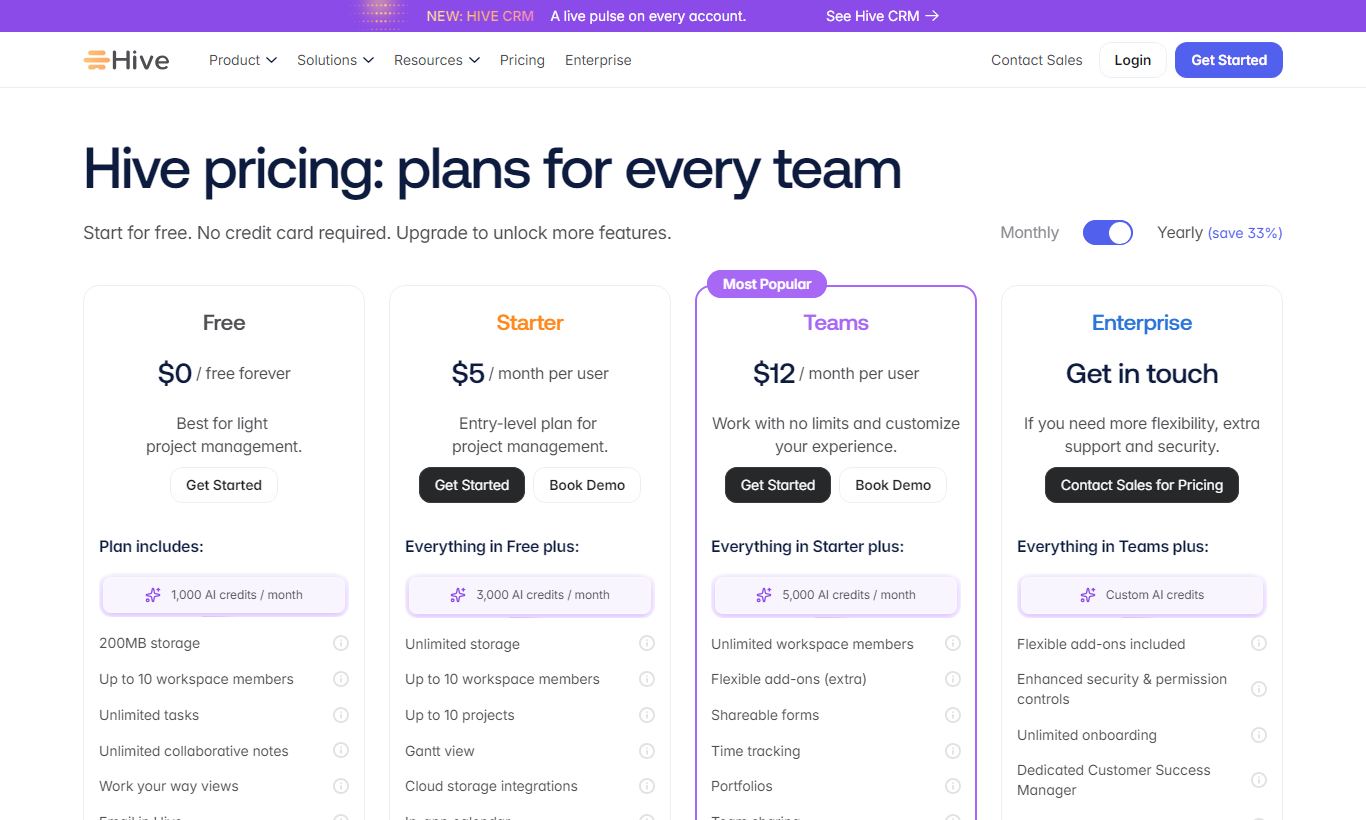
Hive offers four pricing tiers. All prices below reflect per-user, per-month costs when billed annually. Monthly billing costs about 20% more.
- Free: $0. Up to 2 users. Includes unlimited tasks and projects, 200MB storage, and Kanban and Summary views only. No time tracking, no automations, no Gantt. Good for solo freelancers checking out the platform.
- Starter: $7/user/month (annual). Up to 10 users. Adds all six project views, integrations, and basic automations. Storage increases to 2GB. Still no time tracking or proofing.
- Teams: $12/user/month (annual). Unlimited users. This is the tier we'd recommend for most teams. It includes time tracking, timesheets, proofing and approvals, advanced automations, portfolio view, custom roles, and 100GB storage. A 14-day free trial is available on this plan.
- Enterprise: Custom pricing. Adds SSO, SAML, advanced security controls, a dedicated customer success manager, custom contracts, and SLA guarantees. Contact Hive sales for a quote.
The Teams plan at $12/user/month is where Hive gets genuinely compelling. Moving from Starter to Teams adds time tracking and proofing, and those two features set Hive apart from cheaper competitors. For a team of 10, that's $120/month, roughly what you'd pay for Asana's Business plan and less than Monday.com's Pro tier at the same team size.
What We Love
- Six interchangeable project views: Switch between Gantt, Kanban, Calendar, Table, Portfolio, and Summary on any project without reformatting data. That's a genuine rarity at this price point.
- Native time tracking with timesheets: Timer-based or manual time logging on individual tasks, plus manager-level timesheet reporting by project, user, or date range. No third-party integration needed.
- Built-in proofing and approvals: Annotate images, PDFs, and videos directly inside action cards, with version control and sign-off tracking. This kills the email-based feedback loops that creative teams usually get stuck with.
- Contextual AI assistant: Hive AI is built into the interface itself, drafting descriptions, generating status updates, and suggesting next steps. It's not tucked away in a separate panel.
- Unified messaging layer: Direct messages, group channels, and task-linked comments all work as first-class features. Teams whose main need is internal project coordination can drop Slack entirely.
Watch Out For
- Mobile app lags the desktop experience: The iOS and Android apps work fine but are missing several desktop features, including some automation management and advanced proofing tools. It's a consistent complaint in user reviews on G2 and Capterra.
- Steeper initial setup than competitors: Hive's flexibility cuts both ways. New teams without a dedicated admin to configure templates, automations, and user roles can feel overwhelmed in the first two weeks, especially compared to simpler tools like Trello or Basecamp.
- Automation limits on lower tiers: The Free and Starter plans restrict automation capacity, so smaller teams or those watching budget closely won't get one of Hive's strongest features without upgrading to Teams.
- Reporting depth is limited below Enterprise: Custom reporting and advanced analytics require the Enterprise tier or integration with external BI tools. Mid-tier users who need detailed cross-project reporting may find the built-in dashboards fall short.
Who Is It Best For?
Marketing and creative agencies managing 5 - 50 person teams: Hive's proofing, approvals, and Kanban-to-Gantt view flexibility map directly onto how agency work flows, from brief to production to client sign-off. The native messaging layer cuts the need for a separate Slack subscription, and portfolio view lets account managers track all client projects from one screen.
Operations managers running cross-functional company initiatives: A head of operations overseeing quarterly OKRs across HR, finance, and product at the same time will get real use out of Portfolio view, dependency-linked Gantt charts, and the ability to assign tasks across departments without losing visibility. The Teams plan's custom roles and permissions let them control what each department can see.
Software product teams adopting agile practices without full Jira complexity: A startup or scale-up engineering team that finds Jira too complex but has outgrown Trello will find Hive's sprint-planning tools, automation rules, and time tracking a comfortable middle ground. That's especially true if the team also has non-technical stakeholders who need to check project status without learning a specialist tool.
How Does It Compare?
Hive vs. Asana: Asana has a more polished onboarding experience and a larger integration ecosystem. It lacks Hive's native time tracking, built-in messaging, and proofing tools at comparable price tiers, though. Teams that want fewer tools in their stack will lean toward Hive. See our full Hive vs Asana breakdown for a detailed feature-by-feature comparison.
Hive vs. ClickUp: ClickUp offers similarly broad functionality, and it's more customisable too. That comes at the cost of a much steeper learning curve and a more cluttered interface, though. Hive's UX is cleaner and easier to standardise across a team. Organisations that need extreme granular configuration will prefer ClickUp. Those who want power without chaos will prefer Hive. Read our Hive vs ClickUp comparison for specifics on pricing, automations, and reporting.
Final Verdict
Hive is a well-built, genuinely capable project management platform that earns its 4.3 rating. Its six-view flexibility, native time tracking, built-in proofing, and contextual AI make it one of the most complete offerings in the $10 - $15/user/month tier. The catch is real. Onboarding takes real effort, the mobile apps need work, and deep reporting requires an Enterprise upgrade. But for marketing teams, creative agencies, and operations leads currently paying for a project tool plus Slack plus a time tracker plus a proofing tool, Hive's consolidation pitch makes financial and operational sense.
If your team has 10 or more people, runs concurrent projects across multiple stakeholders, and is tired of switching between tools all day, start your 14-day free trial and spend the first week migrating one real project. By day seven, you'll know whether Hive is your long-term home.
Try Hive Free →FAQ
How much does Hive cost per month?
Hive's Teams plan, the most popular tier, costs $12 per user per month billed annually, or about $14 per user per month if you pay monthly. There's a free plan for up to 2 users, and a Starter plan at $7/user/month (annual).
Does Hive have a free plan?
Yes. It supports up to 2 users with unlimited projects and tasks, but storage caps at 200MB and you're limited to Kanban and Summary views. No time tracking, automations, or proofing features come with it.
Is Hive worth it for small teams?
For a team of 2, the free plan is worth trying. For teams of 3 to 10, the Starter plan at $7/user/month is a solid deal. But Hive's standout features, time tracking, proofing, and advanced automations, only show up on the Teams plan at $12/user/month. That's the tier where the cost actually pays for itself.
How does Hive compare to Asana?
Hive includes native time tracking and built-in messaging that Asana doesn't offer at comparable price tiers. Asana has smoother onboarding and a bigger library of third-party integrations. Teams that want to consolidate tools and get time tracking built in tend to prefer Hive. Teams that care more about integrations and quick setup often go with Asana.
Does Hive integrate with Slack?
Yes. Hive connects natively with Slack, so notifications, task creation, and status updates pass between the two platforms. Hive also has its own built-in messaging system, and some teams use it to replace Slack entirely, cutting down on tool sprawl and subscription costs.
Is there a Hive free trial?
Yes. Hive gives you a 14-day free trial of the Teams plan, covering every premium feature: time tracking, proofing, advanced automations, portfolio view, and custom roles. No credit card needed to start.
What project views does Hive support?
Hive offers six project views: Gantt, Kanban, Calendar, Table (spreadsheet), Summary, and Portfolio. You can switch between them on any project without losing data. Gantt and Portfolio views require the Teams plan or higher.
Can Hive replace Slack for internal communication?
For a lot of teams, yes. Hive has direct messaging, group channels, and threaded comments tied to specific tasks. If your Slack use is mostly internal project coordination, Hive's messaging will likely cover it. If you depend on Slack's bot ecosystem, third-party app integrations, or large external channel networks, you'll probably still need Slack running alongside Hive.
We may earn a commission when you click affiliate links. This never affects our editorial scores.
| Best for | Productivity platform for teams |
| Category | Project Management |
Answer a few quick questions and we'll match you to the best tool for your needs.
→ Suggest a Tool