
Harvest Review 2026: Is It Worth It?
Harvest is a time-tracking and project-management tool built for service-based businesses that bill by the hour. Declan Doyle and Danny Wen founded it in 2006, and it combines time tracking, project budgeting, and invoicing in one tightly integrated platform. The Free plan covers one seat and two projects, which is enough to get a feel for how it works. The Pro plan runs $13.75 per seat/month (billed annually) and unlocks unlimited projects and teammates. Harvest's strength is linking tracked hours directly to client invoices and budget forecasts, so freelancers, agencies, and consultancies get real value from it. It's not a full project-management suite. You won't find Gantt charts or sprint boards here. But if your main need is knowing where billable time goes, Harvest handles that with very little friction. Overall rating: 4.2 out of 5.
What we love
Watch out for
Harvest at a glance
What to test in your Harvest trial
30-day free trial, no credit card required
- Start a timer from your main work tool (Asana, Jira, Trello, or GitHub) and verify it tracks time without switching apps
- Log time across three different projects and convert one week of hours into a client invoice in under two minutes
- Set a budget alert threshold at 80 percent on a test project and check that you receive an email before it overruns
- Pair Harvest with your existing project-management tool and confirm the workflow doesn't require constant app switching
- Export a timesheet report to CSV and test whether you need custom pivoting that Harvest's built-in reports don't provide
Quick Verdict
Harvest earns its place in the toolkit of any service business that lives or dies by billable hours. It doesn't try to be Asana or Jira, and that focus is exactly what makes it good. The time-tracking interface is fast enough that even time-averse team members actually use it. Budget alerts fire before a project bleeds into unprofitability, and the invoicing pipeline turns logged hours into a payable document in under two minutes. If your business charges clients by the hour or by project, Harvest will tighten your financial visibility right away.
The caveats are real, though. Per-seat pricing climbs steeply for mid-sized teams. The reporting suite is functional rather than deep, and there's no native task-management board, so you'll need to pair Harvest with a tool like Asana or Trello to manage actual work. Teams that need a single all-in-one platform will find Harvest incomplete. But for the audience it's built for (freelancers, agencies, and professional-services firms) it's one of the most polished and reliable tools in the category.
Start Your Free Trial →What is Harvest?
Harvest was founded in 2006 by Declan Doyle and Danny Wen in New York City. It launched as a pure time-tracking tool for creative agencies and freelancers frustrated by spreadsheet timesheets, and over the past 18 years it has grown into a platform that covers the full billing lifecycle: time capture, project budgeting, expense tracking, invoicing, and payment collection. It's bootstrapped and independently run, which is rare in the SaaS world, and that independence probably explains why the product has stayed focused instead of sprawling. Harvest reports serving more than 70,000 businesses across industries including software, marketing, legal, and consulting.
The platform suits any business where time is the thing being sold. A ten-person UX agency tracking retainer hours, a solo management consultant invoicing a Fortune 500 client, a thirty-person software shop watching burn against a fixed-fee contract: these are Harvest's natural users. It's browser-based, with native iOS and Android apps, a Mac menubar timer, and browser extensions for Chrome and Firefox. Integrations with Asana, Jira, Basecamp, Trello, Slack, QuickBooks, and Xero mean it fits into most existing workflows without much fuss.
Key Features
Feature Checklist
Time Tracking
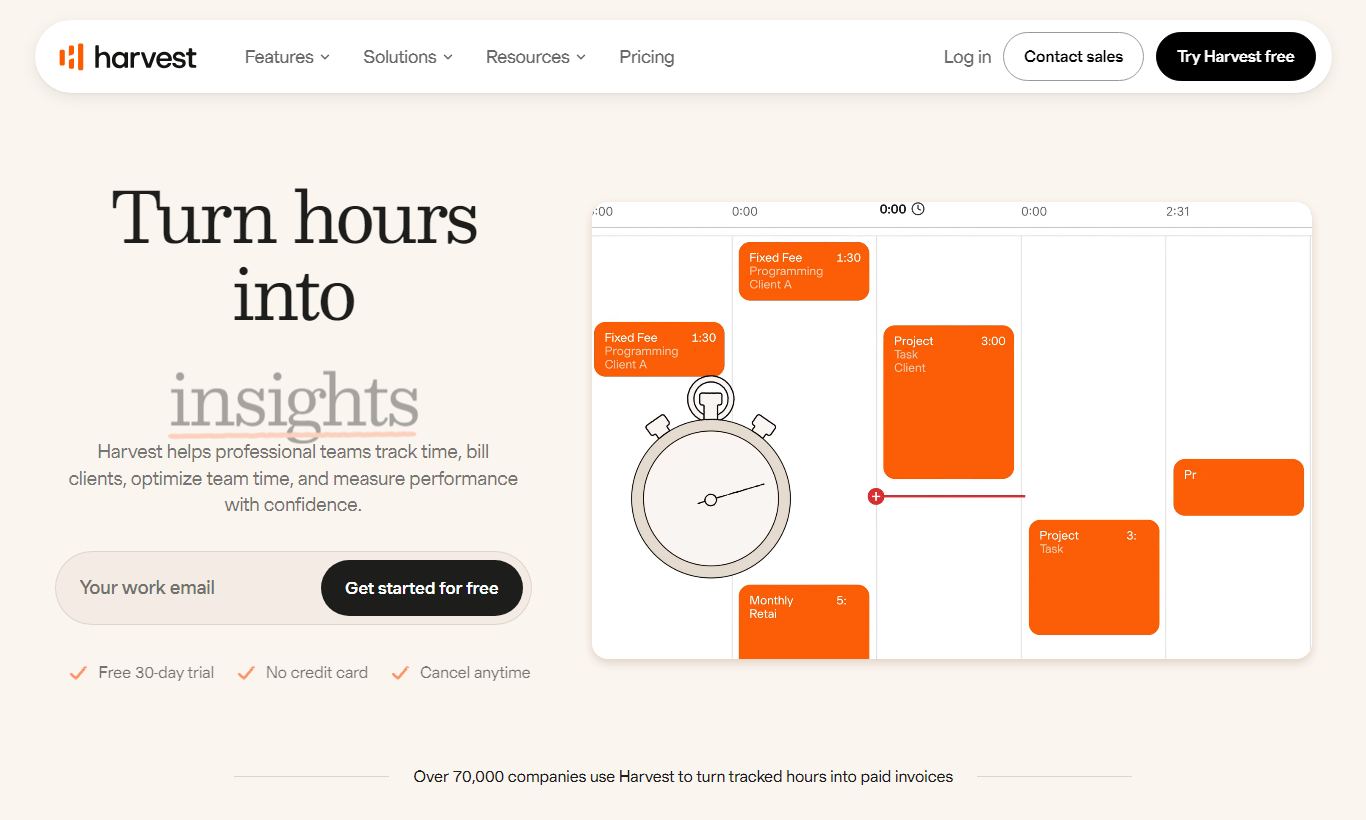
Harvest's time-tracking interface is simple by design: start a one-click timer from any browser tab, the Mac menubar app, or the mobile app, and assign it to a project and task in seconds. You can also fill in a weekly timesheet grid by hand, which suits team members who enter their hours in one batch at day's end. The timer keeps running across page refreshes and browser closes, so a forgotten timer won't silently lose hours. On mobile, you can switch between multiple active timers, which matters for consultants splitting their day across several clients. The browser extensions let you start a Harvest timer directly from an Asana task, a GitHub issue, or a Basecamp to-do without leaving that tool, so you stay in context.
Project Budgeting and Budget Alerts
Every project in Harvest can be given a budget expressed in hours, money, or a combination of both. As the team logs time, Harvest calculates budget consumption in real time. When a project hits a configurable threshold, say 80% of its budget, it automatically emails the project manager. That sounds simple, but in practice it heads off the single most common profitability problem for agencies: finding out a project is over budget only after you're already two weeks past the threshold. You can set different bill rates for different roles within a project, so a senior developer's hours burn budget faster than a junior's. Fixed-fee projects and time-and-materials projects are both supported natively.
Invoicing and Online Payments
Creating an invoice from tracked time takes about ninety seconds. You select a client, choose the date range, and Harvest pulls in all uninvoiced hours with their bill rates and line-item descriptions attached. You can edit line items, add expenses, and apply discounts before sending directly from the platform. Invoices can carry your logo and colours. Clients pay online via Stripe or PayPal, and Harvest takes no cut of payments beyond those processors' standard fees. Sent invoices show "Viewed" status once the client has opened the email, which kills the awkward "did you receive it?" follow-up call. Recurring invoices can be scheduled for retainer arrangements.
Expense Tracking
Team members can log project expenses from the mobile app by photographing a receipt, or from the browser by entering the amount and category by hand. Expenses attach to the relevant project and client, and they flow into invoices alongside billable hours. You can mark an expense as billable (passed through to the client) or non-billable (absorbed internally). For a ten-person consultancy that regularly bills travel and software costs to clients, this cuts out a separate expense-tracking tool and the reconciliation headache that comes with it.
Reporting and Capacity Planning
Harvest's reporting covers four main areas: time (what was tracked, by whom, on which projects), budget (remaining hours and dollars per project), uninvoiced amounts (revenue earned but not yet billed), and team capacity (who's over- or under-utilised across upcoming projects). The Forecast integration, a separate but Harvest-owned scheduling tool, adds a visual capacity planner where managers drag projects onto team members' weeks and see utilisation percentages update in real time. Forecast is sold separately at $10 per seat/month (with a free tier for up to 5 people) and integrates natively with Harvest data, which makes the combination worth considering for agencies juggling multiple simultaneous projects.
Pricing
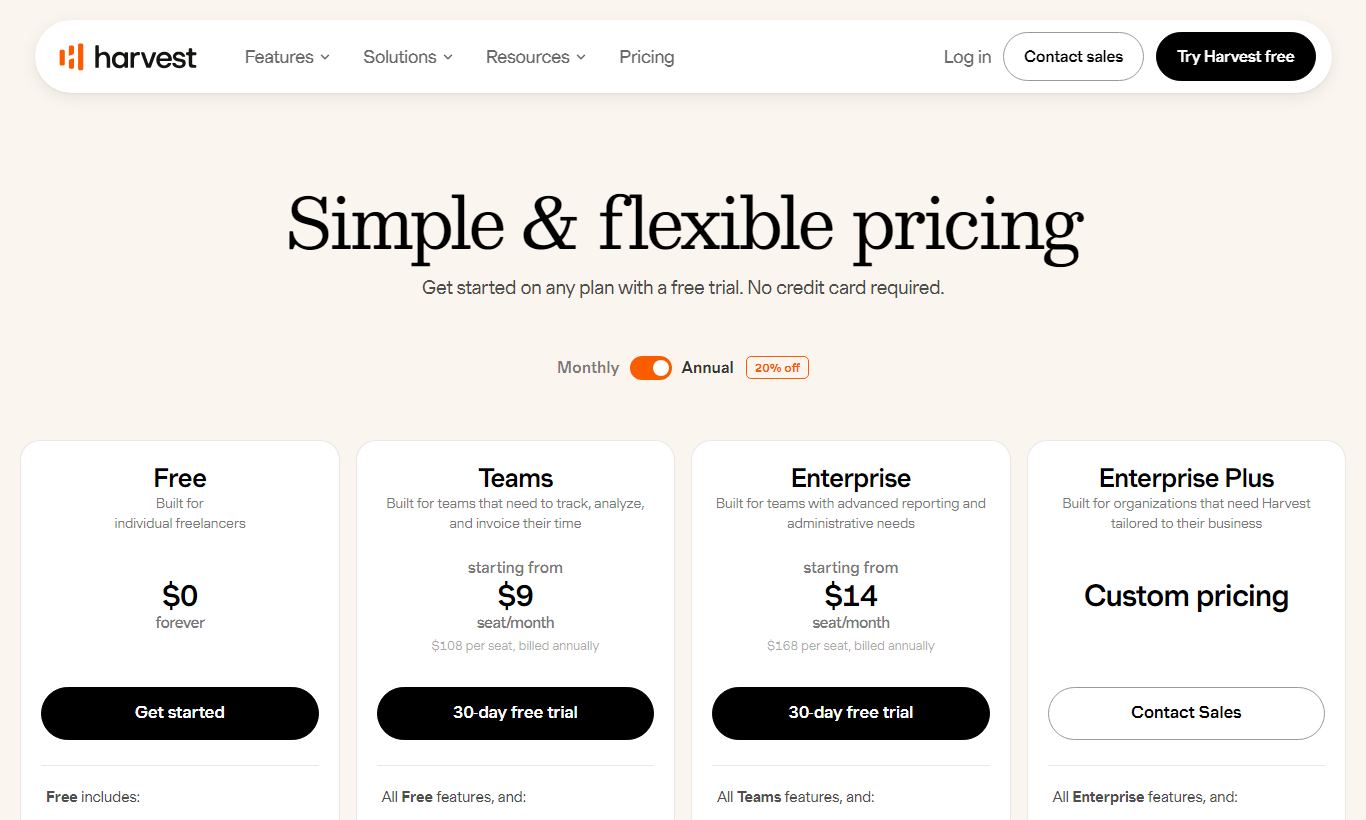
Harvest offers two plans. The Free plan stays free forever for one seat and caps out at two active projects. It comes with time tracking, basic invoicing, and expense tracking. That's enough to test whether the workflow suits you, but it won't work for a team or for anyone handling more than two clients at once.
The Pro plan costs $13.75 per seat per month billed annually, or $16.50 per seat per month month-to-month. It includes unlimited seats, unlimited projects, all reporting features, budget alerts, team timesheets, and online payment collection. Pro has no internal tiers. Everyone on the plan gets the same features. A 30-day free trial of Pro is available and doesn't require a credit card.
The pricing gets expensive as teams grow. A twenty-person agency pays $275/month (annual) for Harvest alone, before adding Forecast. Toggl Track caps its team plans at a lower per-seat rate, so Harvest costs more per seat by comparison. The invoicing and budgeting depth goes some way toward justifying that gap. There are no setup fees, no data export fees, and no contracts on the monthly plan.
What We Love
- One-click timer with persistent state: Timers survive browser crashes and page navigation, so hours never get silently lost mid-session.
- Budget-to-invoice pipeline: Logged hours flow into a client invoice in under two minutes, with line items, bill rates, and expenses pre-populated automatically.
- Proactive budget alerts: Configurable threshold emails fire before a project goes over budget, not after. That timing matters a lot for agency profitability.
- Deep integration ecosystem: Native timer buttons inside Asana, Jira, Trello, GitHub, and Basecamp tasks let team members track time without leaving their primary workflow tool.
- No-fee online payment collection: Clients pay invoices via Stripe or PayPal. Harvest charges no platform fee on top of the processor's standard rate.
Watch Out For
- No native task or project board: Harvest has no Kanban board, Gantt chart, or task-assignment view. You'll need to run it alongside a separate project-management tool, which adds cost and forces you to switch between apps constantly.
- Per-seat pricing scales painfully: At $13.75/seat/month, a 25-person team pays $343.75/month annually. That's more than many all-in-one alternatives charge, and those include full project management on top of time tracking.
- Reporting lacks drill-down flexibility: Built-in reports cover the essentials well, but you can't build custom report templates or pivot data freely. Power users regularly export to CSV and finish the analysis in Excel or Google Sheets.
- Forecast capacity planning sold separately: Visual team scheduling requires buying Harvest's companion app, Forecast, for an extra $10/seat/month. That puts the full experience at $23.75/seat, a steep jump from the base price.
Who Is It Best For?
The solo or small-team freelancer billing multiple clients: A freelance UX designer managing four active client projects will find Harvest's Free plan limiting (two-project cap), but the Pro plan pays for itself right away. Starting a timer from a browser extension, switching between client contexts, and producing a professional invoice at month's end covers the whole billing workflow. No spreadsheet required.
The boutique agency (5 - 20 people) on retainers and time-and-materials contracts: This is Harvest's sweet spot. An eight-person digital marketing agency running retainer accounts for ten clients can use budget alerts to catch scope creep early, roll up team timesheets for payroll, and send invoices that break down exactly which hours went to which deliverables. The QuickBooks and Xero integrations mean the finance team doesn't have to re-enter data by hand.
The professional-services firm that already uses Asana or Jira for task management: A twenty-person software consultancy that lives in Jira for sprint planning can bring in Harvest purely for the financial layer: time against tickets, budget against projects, invoices to clients, all without touching their existing workflow. The native Jira integration puts a Harvest timer button directly on every issue, so developers barely notice the change.
How Does It Compare?
Toggl Track: Toggl Track's Starter plan ($9/seat/month) is cheaper, and its reporting UI is more polished. But it lacks Harvest's built-in invoicing and expense tracking. Teams that only need time tracking and export data to a separate billing tool will find Toggl Track sufficient. Teams that want the full billing lifecycle in one place will find Harvest more complete. See our full Harvest vs Toggl Track comparison.
FreshBooks: FreshBooks is the natural comparison from the invoicing direction. It handles billing and accounting well and has added time tracking. But its time tracking takes a back seat to its accounting focus, and it lacks Harvest's project-budget alerts and team-timesheet management. Harvest wins on the time-to-billing workflow. FreshBooks wins if accounting features are the primary need. Read our Harvest vs FreshBooks breakdown for a detailed side-by-side.
Final Verdict
Harvest is a mature, well-designed tool that does one thing exceptionally well: it connects the hours your team works to the money your business earns. The time-tracking experience is fast enough to overcome team resistance, the budget alert system prevents the most common agency profitability failure mode, and the invoicing pipeline is genuinely efficient. For any service business billing by the hour, it earns a clear recommendation.
It's not the right choice if you need a single platform for task management, project planning, and time tracking. The absence of a native task board is a real gap, and the per-seat cost at scale makes that missing functionality harder to justify. In that scenario, tools like ClickUp or Monday.com bundle more features at a comparable or lower per-seat price. But if you already have a project-management tool you like and just need a dedicated, reliable financial layer on top of it, Harvest is the benchmark other tools get measured against.
Try Harvest Free →FAQ
How much does Harvest cost per month?
Harvest's Pro plan costs $13.75 per seat per month on an annual billing cycle, or $16.50 per seat per month if you pay monthly. There's a permanently free plan limited to one seat and two active projects.
Does Harvest have a free plan or free trial?
Yes to both. The Free plan is permanently free for one user with up to two projects. The Pro plan includes a 30-day free trial with no credit card required, giving you full access to unlimited projects, seats, and all features.
Is Harvest worth it for small teams?
For small teams (under 15 people) at service businesses that bill clients by the hour, yes. The time-to-invoice workflow saves hours of admin per month, and budget alerts protect project profitability before costs get out of hand. Teams that don't invoice clients directly will get less out of it at the Pro price point.
Does Harvest include project management features?
No. Harvest doesn't include a task board, Gantt chart, or sprint planner. It tracks time against projects and tasks you define, but the actual work management has to happen in a separate tool. Harvest integrates natively with Asana, Jira, Basecamp, and Trello to bridge this gap.
How does Harvest compare to Toggl Track?
Toggl Track is cheaper ($9/seat/month on Starter) and has a more flexible reporting interface, but it doesn't include invoicing or expense tracking. Harvest is the better choice if you need the full billing lifecycle in one tool. Toggl Track is better if you only need time tracking and handle billing elsewhere.
Can Harvest send invoices and accept online payments?
Yes. Harvest generates invoices directly from tracked hours and sends them via email. Clients can pay online using Stripe or PayPal. Harvest doesn't charge a platform fee on payments. You only pay the payment processor's standard transaction fee.
What integrations does Harvest support?
Harvest integrates with Asana, Jira, Basecamp, Trello, GitHub, Slack, QuickBooks, Xero, Stripe, PayPal, and Zapier (which opens connections to hundreds of additional tools). Browser extensions for Chrome and Firefox add timer buttons directly inside third-party project tools.
Is there a Harvest mobile app?
Yes. Harvest has native apps for iOS and Android that support one-click time tracking, expense capture with receipt photos, and timesheet review. A Mac menubar app is also available for desktop time tracking, so you don't need to keep a browser tab open.
We may earn a commission when you click affiliate links. This never affects our editorial scores.
| Best for | — |
| Category | Project Management |
Answer a few quick questions and we'll match you to the best tool for your needs.
→ Suggest a Tool