
Airtable Review 2026: Is It Worth It?
Airtable is a hybrid spreadsheet-database platform that doubles as a surprisingly capable project management tool. It's built for teams who've outgrown Google Sheets but don't need the complexity of enterprise software. The platform combines relational data, flexible views (Grid, Kanban, Gantt, Calendar, Gallery), and a no-code automation engine into one workspace. Pricing starts free for small teams and scales to $20/user/month (Pro) and $45/user/month (Business). Its sweet spot is content, marketing, and operations teams managing structured workflows. Airtable won't replace deep project management tools like Jira or Monday.com for engineering-heavy teams. But for cross-functional teams that live and die by data relationships, it's one of the most versatile platforms available in 2026.
What we love
Watch out for
Airtable at a glance
What to test in your Airtable trial
14-day free trial
- Link two tables of real data and set up a rollup field to test relational features
- Build your workflow using Grid, Kanban, and Gantt views on the same base
- Create a multi-step automation that sends a Slack alert or updates a linked record
- Set up an Interface Designer dashboard to show non-technical stakeholders
- Count your records and tables to estimate if Team plan record limits fit your needs
- Decide before trial ends whether the learning curve and relational model match your team
Quick Verdict
Airtable sits in an odd middle ground. It's more powerful than a spreadsheet and more flexible than most project management tools, but it demands real setup time before it pays off. If your team can handle a learning curve and your workflows involve structured, relational data (content calendars, product roadmaps, asset tracking, campaign management), Airtable will reward that investment. Teams that want out-of-the-box task management with minimal configuration might find it overwhelming at first.
The free plan works well for small teams (up to 5 editors, 1,000 records per base). The jump to the Team plan at $20/user/month adds automations, Gantt views, and expanded record limits, making it a legitimate business tool. For marketing agencies, content operations teams, and product managers juggling interconnected data, Airtable earns a strong recommendation in 2026.
Start Your Free Trial →What is Airtable?
Airtable was founded in 2012 by Howie Liu, Andrew Ofstad, and Emmett Nicholas, and launched publicly in 2015. The company's pitch has always been deceptively simple: give non-technical teams the relational power of a database with the familiar feel of a spreadsheet. Today, Airtable serves over 450,000 organizations, ranging from one-person freelance operations to Fortune 500 companies like Netflix, Shopify, and IBM. Its headquarters are in San Francisco. After a period of aggressive enterprise expansion, the product has matured into a well-rounded platform with a solid API, native AI features, and a marketplace of third-party integrations.
Airtable isn't trying to be Jira or Asana. Its core strength is that it treats your project data as a relational database first. Records in one table can link to records in another, roll up values, and power calculated fields. This architecture makes it uniquely suited for teams whose "projects" are really structured data problems: a publishing team tracking articles through a 10-stage editorial workflow, a product team linking sprint tasks back to strategic initiatives, or an agency managing deliverables across dozens of client accounts at once.
Key Features
Feature Checklist
Multiple Views for Every Working Style
Airtable's single most compelling feature is its view system. You can display every table of data as a Grid (spreadsheet-style), Kanban board, Calendar, Gallery, Gantt chart, or Timeline, and none of it duplicates or moves the underlying data. A content team can use the Grid view to bulk-edit article metadata, switch to Calendar to check publication dates, and hand the same base to a manager who lives in Gantt. Each view can be filtered, sorted, grouped, and saved independently, so different team members see exactly what they need without stepping on each other. The Gantt and Timeline views are locked to the Team plan and above, so factor that into your budget decision.
Relational Linked Records and Rollups
This is where Airtable earns its "database" label. You can link any record in one table to records in another, for example linking a Campaign record to all its associated Tasks, and then rolling up the count of completed tasks directly onto the Campaign record. This relational structure enables workflows that flat project management tools simply can't replicate. A product manager could link Epics → Features → Bugs across three tables and see real-time progress at each level without manual updates. Lookup and Rollup fields calculate automatically when linked records change, cutting the risk of stale status information.
No-Code Automations
Airtable's automation engine lets teams trigger actions based on record changes, time intervals, or form submissions, no coding required. Common automations include: sending a Slack message when a record's status changes to "Blocked", creating a Google Calendar event when a due date is set, or generating a new record in a linked table when a form is submitted. More advanced users can drop into JavaScript within automations for custom logic. The free plan allows 100 automation runs per month. The Team plan bumps this to 25,000, which is enough for most mid-sized teams. One genuine limitation: conditional branching in automations (if/else logic) is only available on Team and above.
Airtable AI (Interface Designer + AI Fields)
Airtable has embedded AI across the platform in a meaningful way. AI Fields can automatically summarize long text fields, categorize records, or extract key data points from unstructured text, useful for teams ingesting large volumes of content or customer feedback. The Interface Designer lets you build custom, app-like views for stakeholders who shouldn't see raw database structure: a client portal, an executive dashboard, or a streamlined data-entry form. In 2025 to 2026, Airtable expanded AI to include generative field suggestions and natural-language record search. These features are available on paid plans and add genuine value rather than feeling bolted on.
Forms, Integrations, and API
Airtable's native form builder is understated but powerful: forms auto-populate table fields, support conditional logic (on paid plans), and can be embedded in external websites. This turns Airtable into a lightweight CRM intake system, bug reporting tool, or client onboarding workflow with minimal setup. The platform natively integrates with Slack, Google Workspace, Salesforce, Jira, GitHub, and Zapier. Its REST API is well-documented and a favorite among developers for building lightweight internal tools. Rate limits on the API are more generous on higher-tier plans. Free plans are capped at 5 requests per second per base.
Pricing
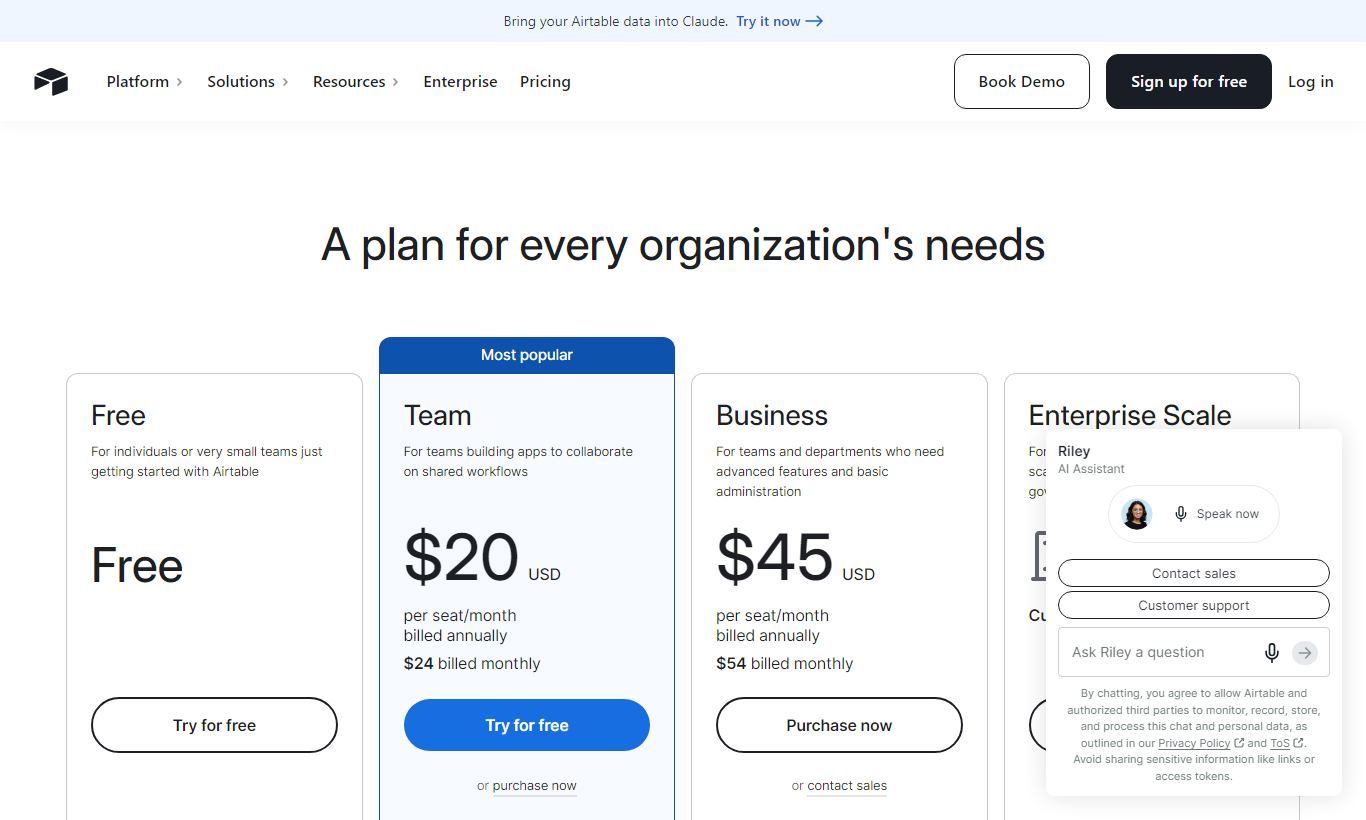
Airtable's pricing as of 2026 comes in four tiers, billed per user per month:
- Free: $0/month. Up to 5 editors, 1,000 records per base, 1 GB of attachments, Grid/Kanban/Calendar/Gallery views, 100 automation runs/month, 1 extension per base. Fine for personal use or a tiny team testing out a workflow.
- Team: $20/user/month (billed annually) or $24/user/month (billed monthly). 50,000 records per base, 20 GB attachments, Gantt and Timeline views, 25,000 automation runs/month, 10 extensions per base, field and table syncing, revision history (6 months). This is the tier most growing teams should pick.
- Business: $45/user/month (billed annually) or $54/user/month (billed monthly). 125,000 records per base, 100 GB attachments, 100,000 automation runs/month, advanced admin controls, SAML SSO, 2-year revision history, premium support. Built for organisations that need governance and compliance.
- Enterprise Scale: Custom pricing. Unlimited workspaces, enterprise-grade security, custom admin roles, dedicated CSM. You'll need to talk to sales directly.
Airtable's free plan has no time limit, and the paid plans include a 14-day free trial. Business is the exception, there's no trial, you have to request a demo. Paying annually saves roughly 17% across all tiers.
What We Love
- Relational data model beats flat task lists: Linked records and rollup fields let teams model complex workflows, like linking sprint tasks to OKRs, that flat tools like Asana can't replicate without workarounds.
- Six view types from one dataset: You can switch between Grid, Kanban, Gantt, Timeline, Calendar, and Gallery views without migrating any data, so every stakeholder sees what they need.
- Interface Designer enables stakeholder-facing portals: Building a polished, read-only client dashboard on top of a messy internal base is genuinely useful, and it requires no front-end development.
- Automation engine handles real business logic: Chained multi-step automations with JavaScript support handle everything from Slack alerts to auto-generating invoice records when a project status changes.
- API is developer-friendly and well-documented: Airtable's REST API is one of the most approachable in the no-code space. It makes extending the platform into custom internal tools easy.
Watch Out For
- Record limits can sneak up on you: At 1,000 records on the free plan and 50,000 on Team, teams with high-volume data, like e-commerce inventory or large CRM datasets, will hit ceilings faster than expected. That forces a plan upgrade or a data archiving strategy.
- The learning curve is real for non-technical users: Airtable's power comes from understanding relational fields, rollups, and view logic. Teams used to simple task apps like Todoist or Trello often struggle with the initial setup and the conceptual shift.
- No native time tracking or workload management: Unlike Monday.com or ClickUp, Airtable has no built-in time tracking, resource capacity views, or workload balancing. You'd need a third-party integration like Toggl or Harvest to fill that gap.
- Offline access is severely limited: Airtable is almost entirely cloud-dependent. There's no meaningful offline mode, and that's a genuine problem for field teams or users in low-connectivity environments.
Who Is It Best For?
Content and editorial teams at mid-sized companies: A 10-person editorial team managing 50+ articles per month across multiple publications will find Airtable's Calendar view, status rollups, and linked author/editor records make a real difference. You can track pitch, draft, edit, and publish status for every piece, assign team members, attach files, and auto-notify editors via Slack when an article moves to "Ready for Review", all in one base.
Product managers at early-to-mid-stage startups: A product manager who owns a roadmap linking Features to Epics, Epics to quarterly OKRs, and features to bug reports in GitHub will get more out of Airtable's relational model than almost any other tool offers. The Interface Designer lets the PM show executives a clean roadmap view while keeping the messy sprint-level data hidden in the same base.
Operations and agency teams managing multi-client workflows: A creative agency running projects for 20+ clients at once, where each project has deliverables, deadlines, assigned contractors, and client approval stages, is a textbook Airtable use case. Linked records across Clients, Projects, and Deliverables tables give an operations manager a single source of truth that a simple project tool or spreadsheet couldn't maintain.
How Does It Compare?
Airtable vs. Monday.com: Monday.com wins on out-of-the-box usability and native features like workload views and time tracking. Airtable wins on data flexibility and relational depth. If your team needs a tool that works on day one with minimal setup, Monday is easier. If your workflows involve linked data models and custom views, Airtable does more. See our full Airtable vs Monday.com breakdown.
Airtable vs. Notion: Notion suits documentation-heavy teams and wikis better. Airtable handles structured data and automations with more muscle. Notion's database features have come a long way, but Airtable's rollups, formula fields, and automation engine still outclass them for operations work. Read our Airtable vs Notion comparison for more detail.
Final Verdict
Airtable is one of the most genuinely versatile tools in the project management and work-management space. It earns that versatility through complexity, not simplicity. Teams willing to spend a few days on setup and training will get a platform that adapts to almost any structured workflow, from editorial calendars to product roadmaps to agency operations. The Team plan at $20/user/month is the real product. The free tier is a preview, not a long-term option for teams doing serious work.
Some teams should look elsewhere: those who want a plug-and-play task manager with time tracking, those who work offline regularly, or engineering teams that need deep Jira-style sprint and backlog management. For everyone else, especially content, marketing, operations, and product teams, Airtable is a tool that grows with you and earns its place in the tech stack.
Try Airtable Free →FAQ
Is Airtable free to use?
Yes. Airtable has a free plan with no time limit that supports up to 5 editors, 1,000 records per base, and 100 automation runs per month. It's genuinely useful for individuals and very small teams. Growing teams will typically need the Team plan ($20/user/month) for Gantt views, expanded record limits, and more automations.
How much does Airtable cost in 2026?
Airtable pricing in 2026: Free ($0), Team ($20/user/month billed annually, $24 monthly), Business ($45/user/month billed annually, $54 monthly), and Enterprise Scale (custom pricing). Annual billing saves roughly 17% compared to monthly billing.
Is Airtable better than Monday.com?
It depends on your use case. Airtable is better for teams that need relational data models, linked records, and flexible database-style views. Monday.com is better for teams that want an easier setup, native time tracking, and built-in workload management. Content and operations teams tend to prefer Airtable. Project-heavy teams that need resource management tend to prefer Monday.com.
Is Airtable good for project management?
Airtable works well for project management when your projects involve structured, relational data: content pipelines, product roadmaps, agency deliverables. It's less suited to pure task management or engineering sprint workflows, where dedicated tools like Jira or Linear offer more depth out of the box.
Does Airtable have a Gantt chart view?
Yes, but Gantt and Timeline views are only available on the Team plan ($20/user/month) and above. They're not included in the free plan. Once unlocked, Gantt views are linked to date fields in your table and update automatically as records change.
Can Airtable replace a CRM?
Airtable can function as a lightweight CRM for small teams, tracking contacts, deals, and communication history using linked records and form submissions. It lacks native email integration, two-way sync with email clients, and sales pipeline analytics that purpose-built CRMs like HubSpot or Pipedrive offer. For teams under 10 managing fewer than 500 contacts, it works well as a CRM substitute.
Is Airtable worth it for small businesses?
For small businesses with structured data needs, an agency, a media company, a product team, Airtable is worth it. The free plan covers early-stage use, and the Team plan at $20/user/month is competitive for what it delivers. Small businesses that just need basic task lists may find simpler tools like Trello or ClickUp's free plan a better fit.
Does Airtable work offline?
No, not meaningfully. Airtable is a cloud-first platform with very limited offline functionality. You can't create or edit records without an internet connection in any reliable way. This is a known limitation and a real concern for field teams or users in low-connectivity environments.
We may earn a commission when you click affiliate links. This never affects our editorial scores.
| Best for | Spreadsheet meets database |
| Category | Project Management |
Answer a few quick questions and we'll match you to the best tool for your needs.
→ Suggest a Tool