
Podia Review 2026: Is It Worth It?
Podia is an all-in-one platform for creators, coaches, and educators who want to sell online courses, digital downloads, memberships, and coaching without stitching together multiple tools. Starting at $39/month (Mover plan), it removes transaction fees on paid plans and bundles email marketing, a website builder, and community features under one roof. Podia works best for solo creators and small teams who care more about simplicity than deep customization. The interface is genuinely beginner-friendly, and setup takes hours, not weeks. It does lack native live-class scheduling, has thinner quiz and assessment depth than dedicated LMS tools like Teachable or Thinkific, and charges a 10% transaction fee on the free plan. If you want a clean, low-maintenance storefront to sell knowledge products, Podia delivers strong value. If you need advanced learner analytics or certification workflows, look elsewhere.
What we love
Watch out for
Podia at a glance

What to test in your Podia trial
14-day free trial with no credit card required
- Upload a course with drip-scheduled lessons and test video hosting with real content
- Create a digital product bundle pairing a course with a download and set pay-what-you-want pricing
- Build a welcome email sequence triggered by a purchase and send a test broadcast to your list
- Set up a multi-tier membership gating different courses and test the community discussion space
- Create a quiz with multiple-choice questions and check if scoring and certificates work for your needs
- Decide if Podia's community features meet your requirements before the trial ends or first payment
Podia earns its place as one of the most approachable all-in-one creator platforms on the market. If you're a course creator, coach, or digital entrepreneur who's spent too many hours juggling separate tools for course hosting, email marketing, and payments, Podia's unified workspace will feel like a genuine relief. The platform is fast to set up, free of transaction fees on paid plans, and clean enough that you'll spend your energy on content instead of configuration.
All-in-one platforms always come with trade-offs, though. Podia's quiz engine is basic, its community features lag behind dedicated platforms like Circle, and the free plan's 10% transaction fee makes it better suited as a trial than a long-term home. If your business centers on live cohort courses or needs detailed learner progress reporting, you'll hit Podia's ceilings fairly quickly. For the wide middle ground, independent educators with a growing audience, coaches selling digital products alongside 1:1 sessions, and creators who want one subscription doing the work of three, Podia is hard to beat at its price point.
Start Your Free Trial →What is Podia?
Podia was founded in 2014 by Spencer Fry and launched publicly in 2015 with one goal: make it dead simple for anyone to sell what they know online. Headquartered in New York, the company has bootstrapped its growth with a creator-first approach. There's no venture-capital pressure pushing it to bloat the feature set for enterprise clients. The platform targets independent creators, course authors, coaches, and small creator businesses that need a professional storefront without a developer on staff. It competes directly with Teachable, Thinkific, and Kajabi, and sits comfortably in the mid-market: more polished than a DIY WordPress build, and more affordable than Kajabi's $149/month entry point.
Today Podia supports online courses, digital downloads, coaching packages, memberships, webinars, and community spaces, all accessible through a single dashboard. Its email marketing tool, Podia Email, is included natively (with subscriber-based pricing for larger lists) and covers basic automation, broadcasts, and landing pages. The result is a platform that cuts down on tool sprawl for creators who previously needed ConvertKit plus Teachable plus Memberspace just to run their business.
Key Features
Feature Checklist
Online Course Builder
Podia's course builder keeps things simple: sections and lessons, nothing more. You create sections (modules), nest lessons inside them, and each lesson supports video, audio, text, PDFs, or embedded content. There's no branching logic or adaptive learning. Lessons unlock sequentially or all at once, your choice. A health coach launching a 6-week nutrition program can upload the entire curriculum, drip it on a weekly schedule, and have the sales page live within an afternoon. Video hosting is included with no storage caps disclosed on the pricing page, and Podia streams video directly, so you don't need a separate Wistia or Vimeo account. One honest gap: quizzes exist, but they're limited to simple multiple-choice, with no weighted scoring, rubrics, or certificate automation beyond a basic completion certificate on higher plans.
Digital Downloads & Products
Beyond courses, Podia lets you sell any digital file: eBooks, Notion templates, Lightroom presets, Figma kits, audio files, or bundled ZIP packages. Setting up a product takes under five minutes. Upload the file, write a description, set a price (including pay-what-you-want pricing), and publish. This makes Podia genuinely useful even for creators who don't run structured courses. A graphic designer could use Podia exclusively as a digital storefront, the same way they might use Gumroad, but with email marketing and a proper website included. Bundles let you package a course alongside a digital download for a single price, a solid upsell mechanism baked right in.
Coaching & Webinars
Podia's coaching product lets you sell 1:1 sessions by linking your Calendly (or other scheduling tool) to a coaching offer page. Podia isn't a scheduling system. It generates a product page and handles payment, then redirects the buyer to your external scheduler. It works, but if you're a coach who wants booking, payment, and session notes all in one place, you'll still need a dedicated tool like Calendly or Acuity. Webinars work the same way: Podia integrates with Zoom to sell access to live sessions, but it's a payment wrapper around your existing Zoom link, not a built-in live-streaming environment.
Memberships & Community
Memberships in Podia allow recurring subscriptions with tiered access. You can gate specific courses, downloads, or community sections behind different membership levels. The community feature provides a basic discussion space with posts, comments, and sections (like channels). It works fine for a tight-knit group but lacks the depth of Circle.so or Mighty Networks: no events, no live rooms, no member profiles with gamification, and no serious moderation tools. For a creator launching a paid newsletter community with 200 members, it's more than enough. For someone building a flagship community product, the limitations will surface quickly.
Email Marketing (Podia Email)
Podia Email is included on all paid plans and covers the essentials: broadcast campaigns, automated sequences (drip emails triggered by product purchase, sign-up, or tag), segmentation by product purchased or tag, and basic landing pages. The visual email editor is drag-and-drop and produces clean, mobile-responsive emails. Sequences can trigger when someone buys a specific course, which makes onboarding new students automatic. The free plan includes up to 100 subscribers before fees apply. Paid plans scale pricing based on list size, starting at $9/month for up to 500 additional subscribers on top of what's included. It won't replace a dedicated platform like ActiveCampaign for complex multi-branch automations, but for a creator whose email strategy is "welcome sequence + weekly broadcast," it covers the ground without an extra subscription.
Pricing
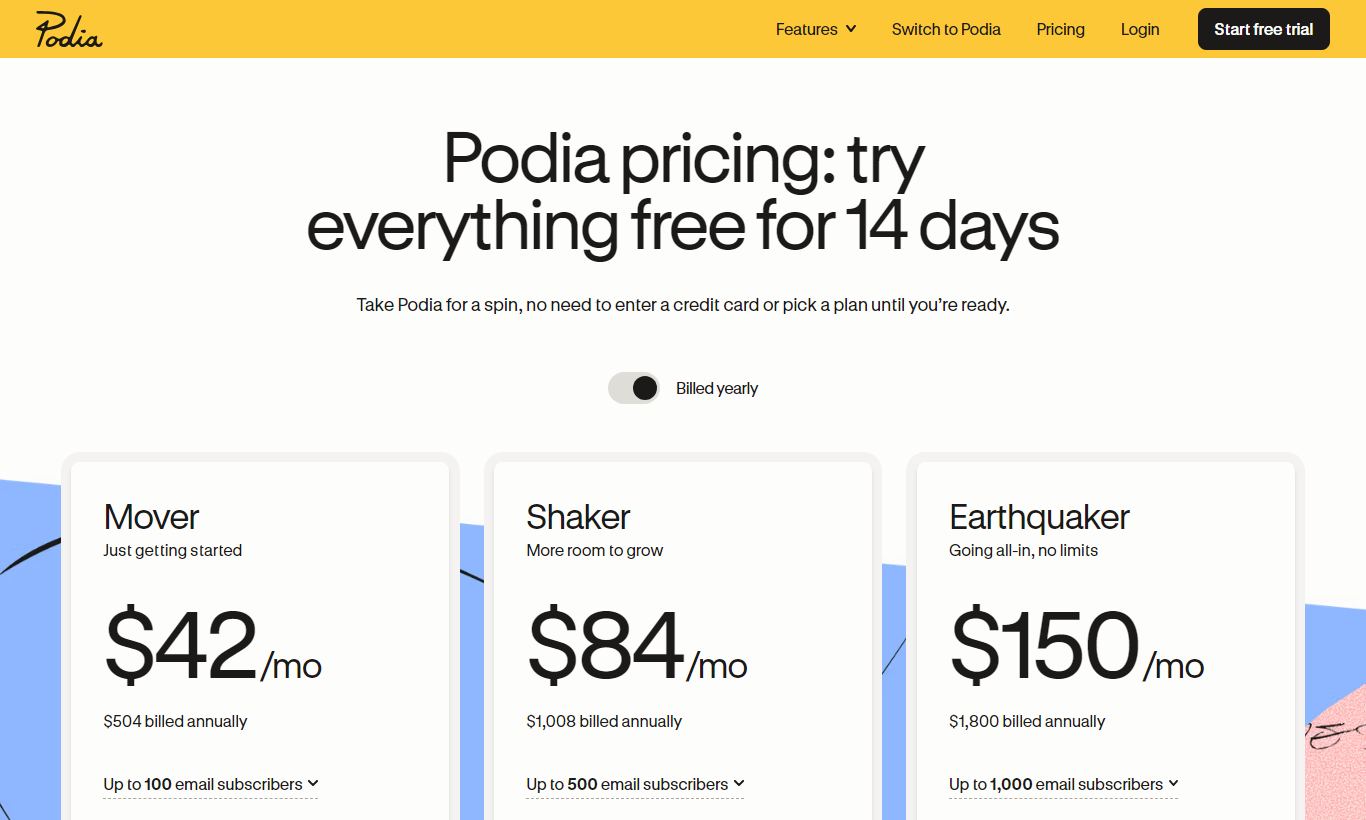
Podia offers four plans. The Free plan is genuinely free with no monthly fee, but Podia takes an 8% transaction fee on every sale. That means if you're generating real revenue, you'll pay more in fees than a paid plan would cost within months. The Mover plan costs $39/month (billed monthly) or $33/month billed annually, removes all transaction fees, and includes unlimited courses, downloads, email marketing for up to 100 subscribers, and a custom domain. The Shaker plan at $89/month ($75/month annually) adds affiliate marketing, memberships, and community features. It's the plan most serious creators end up choosing. The Earthquaker plan at $199/month ($166/month annually) adds priority support, onboarding calls, and removes the per-subscriber email fees up to a higher threshold. All paid plans come with a 14-day free trial, no credit card required.
What We Love
- Zero transaction fees on paid plans: Teachable's Starter plan takes a 5% cut, and Thinkific's free tier does too. Podia's Mover plan at $39/month charges 0% on sales. That's real money back in your pocket once monthly revenue clears a few hundred dollars.
- One platform, not five tools duct-taped together: Courses, digital downloads, email marketing, and a storefront website all live in one dashboard with one login. You won't need Zapier to connect the core functions.
- Unlimited products and hosting on all paid plans: There's no cap of 3 courses or 5 downloads per tier. Every paid plan supports unlimited products, which sidesteps a common annoyance with competing entry-level plans.
- Pay-what-you-want and free product options: Podia supports $0 price points and flexible pricing out of the box, so building a lead-magnet funnel (free mini-course leading to a paid flagship course) doesn't require workarounds.
- 14-day free trial with no credit card required: The trial gives you Shaker-level features, so you can actually test memberships and affiliate marketing before you commit to anything.
Watch Out For
- Basic quiz and assessment engine: Multiple-choice only, no weighted scoring, no branching, and certificates require manual setup. If you need real learner assessment, say for compliance training or professional development, you'll find this thin compared to Thinkific or LearnDash.
- Community features are thin for serious community builders: Podia's community lacks events, live audio rooms, member profiles with badges, and advanced moderation. This shows up again and again in user reviews. If community is your main product, Circle.so runs circles around it.
- No native live-class or cohort scheduling: Cohort-based courses need external tools like Zoom and Calendly. There's no built-in scheduling, attendance tracking, or live session replay hosting.
- Email marketing caps require additional spend at scale: Once your list grows past the included subscriber threshold, per-subscriber fees stack on top of your plan cost. A creator with a 10,000-subscriber list will pay a good deal more than the headline plan price.
Who Is It Best For?
The solo creator monetizing an existing audience. A YouTube educator or podcast host with 5,000 to 50,000 followers who wants to launch their first paid course or eBook bundle without a tech learning curve. Podia's fast setup, clean sales pages, and built-in email marketing mean they can go from idea to first sale in a weekend. The Mover plan's $39/month price tag pays for itself with a single course sale.
The coach selling a mix of digital products and 1:1 time. A business or life coach who sells a signature course, a workbook PDF, and a handful of coaching packages can manage all three revenue streams from a single Podia Shaker account. The affiliate marketing feature lets them recruit fellow coaches as referral partners without a third-party tool, giving them a cheap acquisition channel on the side.
The small creator business replacing a tool stack. A team of two or three managing a membership community, a course library, and a weekly email newsletter currently pays for Teachable, Mailchimp, and Memberful separately. Consolidating to Podia Shaker at $89/month saves real money and cuts out the integration upkeep that eats into time better spent making content.
How Does It Compare?
Podia vs. Teachable: Teachable offers more advanced quiz options and a longer history of enterprise integrations, but its Starter plan carries a 5% transaction fee and limits you to one admin user. Podia's equivalent tier is cheaper and charges no fee. See our full Podia vs Teachable breakdown for a side-by-side analysis.
Podia vs. Kajabi: Kajabi is the premium all-in-one option, with better funnel-building, pipeline automation, and podcast hosting. It starts at $149/month though, nearly four times Podia's Mover price. Kajabi makes sense for established creators generating $10K+/month who need deep marketing automation. Podia is the smarter starting point for anyone building toward that scale. Read our Podia vs Kajabi comparison for the full picture.
Final Verdict
Podia is a well-executed, creator-first platform that punches above its price point for the right user. Unlimited products, zero transaction fees, native email marketing, and an interface that doesn't intimidate non-technical users. That combination makes it one of the best entry-to-mid-tier course platforms available in 2026. It won't satisfy educators who need serious assessment tools, live cohort infrastructure, or a thriving community platform built into their LMS. But for the independent creator or small team who wants to consolidate their digital product business into one clean workspace, Podia delivers, and it keeps delivering as you scale up through its tiers.
Start with the 14-day free trial (no credit card needed) and build out your first product. If you can launch and make a sale within the trial window, and most creators can, you'll know immediately whether Podia's simplicity is an asset or a limitation for your specific needs.
Try Podia Free →FAQ
How much does Podia cost per month?
Podia offers four plans: Free ($0 but 8% transaction fee), Mover ($39/month or $33/month annually), Shaker ($89/month or $75/month annually), and Earthquaker ($199/month or $166/month annually). All paid plans have zero transaction fees and include unlimited products.
Does Podia have a free plan?
Yes. Podia's Free plan has no monthly fee but charges an 8% transaction fee on every sale. It supports unlimited products but lacks affiliate marketing, community features, and memberships. Treat it as a trial, not a permanent home for an active business.
Is Podia worth it for beginners?
Yes. Podia is one of the most beginner-friendly course platforms out there. The interface needs no technical knowledge, setup is fast, and the Mover plan at $39/month removes transaction fees right away. Most first-time course creators can publish their first product within a day.
How does Podia compare to Teachable?
Podia is usually cheaper at equivalent tiers and charges no transaction fees on paid plans (Teachable's Starter plan charges 5%). Teachable has a deeper quiz and assessment engine and more native integrations, so it suits formal educational content better. Podia wins on simplicity and overall value for digital product creators.
Does Podia take a percentage of sales?
Only on the Free plan (8% transaction fee). All paid plans, Mover, Shaker, and Earthquaker, charge 0% transaction fees. Podia processes payments through Stripe and PayPal, which charge their standard payment processing fees (typically 2.9% + $0.30 per transaction), but Podia itself takes nothing.
Can I sell memberships on Podia?
Yes, but only on the Shaker plan ($89/month) and above. Memberships support recurring monthly or annual billing, tiered access levels, and integration with Podia's community feature. The membership builder is straightforward but doesn't match the advanced community tools of dedicated platforms like Circle.so.
Does Podia have a free trial?
Yes. Podia offers a 14-day free trial on all paid plans with no credit card required. The trial includes Shaker-level features, so you can test memberships, community, and affiliate marketing before committing to a plan.
What are the best alternatives to Podia?
The top Podia alternatives are Teachable (stronger assessments, larger app marketplace), Thinkific (better LMS features, free plan with no transaction fees), and Kajabi (a premium all-in-one option with advanced marketing automation at a higher price). Community-first creators should also look at Mighty Networks alongside a separate course tool.
We may earn a commission when you click affiliate links. This never affects our editorial scores.
| Best for | Sell courses, memberships, and downloads |
| Category | Online Course Platforms |
Answer a few quick questions and we'll match you to the best tool for your needs.
→ Suggest a Tool