
Sprout Social Review 2026: Is It Worth It?
Sprout Social is a premium social media management and marketing automation platform built for teams that need deep analytics, structured publishing workflows, and enterprise-grade collaboration. Plans start at $249/month per seat (Standard), rising to $399/month (Professional) and $499/month (Advanced). That makes it one of the pricier tools in this category. A 30-day free trial is available on all tiers. Sprout earns its price tag with best-in-class social listening, a genuinely powerful Smart Inbox, and CRM-linked engagement features that smaller tools can't match. The per-seat pricing model does mean costs balloon quickly for larger teams, though. It's best suited to mid-market brands, agencies managing multiple clients, and enterprise social teams. Solo creators and early-stage startups watching their budget closely should look elsewhere.
What we love
Watch out for
Sprout Social at a glance
What to test in your Sprout Social trial
30-day free trial
- Set up Smart Inbox filters for your brand accounts and test CRM integration with your sales data
- Connect your top 3 social profiles and schedule 10 posts using Optimal Send Times recommendations
- Run a competitor benchmarking report for your top three competitors and compare engagement rates
- Import 5-10 team members with different role-based permissions and test approval workflows on draft posts
- Upload 20 assets to the content library and use them in a bulk CSV scheduling test across platforms
- Decide before day 30 if the per-seat cost and per-profile limits justify the purchase for your team size
Quick Verdict
Sprout Social sits at the premium end of social media management software, and it earns that spot with analytical depth, team workflow structure, and social listening capability that genuinely beats most competitors. If your social media operation involves more than one person, spans multiple platforms, and needs to report upward to stakeholders who care about ROI, Sprout Social is one of the most complete tools you can buy in 2026.
Complete doesn't mean cheap, though. At $249/month per seat for the entry-level Standard plan, Sprout is a significant investment, and one that needs honest justification before you sign. Teams that will push the platform hard across publishing, listening, analytics, and customer care will find it pays for itself. Teams that only need a basic scheduling tool won't. With a 30-day free trial available on every plan, there's no excuse not to test it properly before committing.
Start Your Free Trial →What is Sprout Social?
Founded in 2010 in Chicago, Sprout Social went public on Nasdaq in 2019 and today serves more than 30,000 customers globally, including brands like Hyatt, Grubhub, and Subaru. The platform was built for social media teams from day one, not bolted onto a broader marketing suite. That gives it a level of social-specific depth that general marketing automation platforms rarely match. It covers publishing and scheduling, social listening, engagement, analytics, and influencer marketing across networks including Instagram, Facebook, X (Twitter), LinkedIn, TikTok, Pinterest, and YouTube.
Sprout's primary market is mid-market and enterprise businesses with dedicated social teams, along with marketing agencies managing multiple brand accounts. The platform's architecture reflects this. Role-based permissions, approval workflows, audit trails, and multi-profile management are all built in as core features, not afterthoughts. A solo operator or a two-person startup will find the feature density and price point overkill. But a brand with five or more social profiles and a team of three or more people will find it makes a lot of sense.
Key Features
Feature Checklist
Smart Inbox
The Smart Inbox is Sprout's most distinctive feature. Rather than forcing community managers to tab between each platform's native app, it pulls every mention, comment, direct message, and review into a single prioritised stream. You can filter by network, profile, or message type, assign conversations to specific team members, mark items complete, and set automated rules to tag or route incoming messages. For a brand receiving hundreds of social interactions daily, this is the difference between a structured workflow and chaos. The inbox also integrates with Salesforce and HubSpot, meaning a customer service rep can pull up CRM contact history directly from a tweet or Instagram DM without leaving Sprout.
Publishing and Content Calendar
Sprout's publishing suite covers the full content lifecycle: drafting, media attachment, link shortening, approval routing, scheduling, and post-performance tracking. The visual content calendar offers a drag-and-drop interface for rescheduling content, and the Optimal Send Times feature uses historical engagement data to recommend the best posting windows for each specific profile, not a one-size-fits-all average. The Asset Library lets teams store approved brand images, videos, and copy snippets for reuse, which is a genuine time-saver for agencies or brands with strict brand guidelines. One notable limitation: bulk scheduling via CSV upload is available but requires some patience with formatting. It's functional rather than elegant.
Social Listening
Sprout's Listening feature (available on Advanced plan and above, or as a paid add-on) lets you track conversations about any topic, brand, competitor, or keyword across social networks and the broader web. Unlike basic mention monitoring, Listening surfaces sentiment trends, share-of-voice comparisons, and demographic breakdowns of who is driving a conversation. A retail brand, for example, could run a Listening query around a product launch to understand real-time sentiment versus a competitor's launch in the same category. The query builder is powerful but has a learning curve. Expect to spend a few hours dialling in Boolean logic before you get clean data.
Analytics and Reporting
Reporting is a genuine strength. Sprout offers 19+ pre-built report templates covering profile performance, post performance, team productivity, paid social, competitor benchmarking, and more. Reports are visually clean and export-ready in PDF or CSV, which matters when you're presenting to a CMO or a client. The Competitor Reports let you benchmark your engagement rate, follower growth, and posting frequency against up to five named competitors, pulling publicly available data automatically rather than requiring manual input. Custom report building is available on higher tiers, and the tagging system lets you slice performance data by campaign, content type, or any custom taxonomy you define.
Employee Advocacy (Bambu Integration)
Sprout's Employee Advocacy tool (previously a standalone product called Bambu, now integrated directly) lets social and marketing teams build a library of pre-approved content that employees can share to their personal networks with one click. For B2B brands in particular, where an engineer or sales rep sharing a company post can reach a highly relevant professional audience, this feature opens up reach that paid media can't replicate. Advocacy is available as an add-on and priced separately from the core plans, but for companies with 50+ employees even a 10% adoption rate can meaningfully amplify organic reach.
Pricing
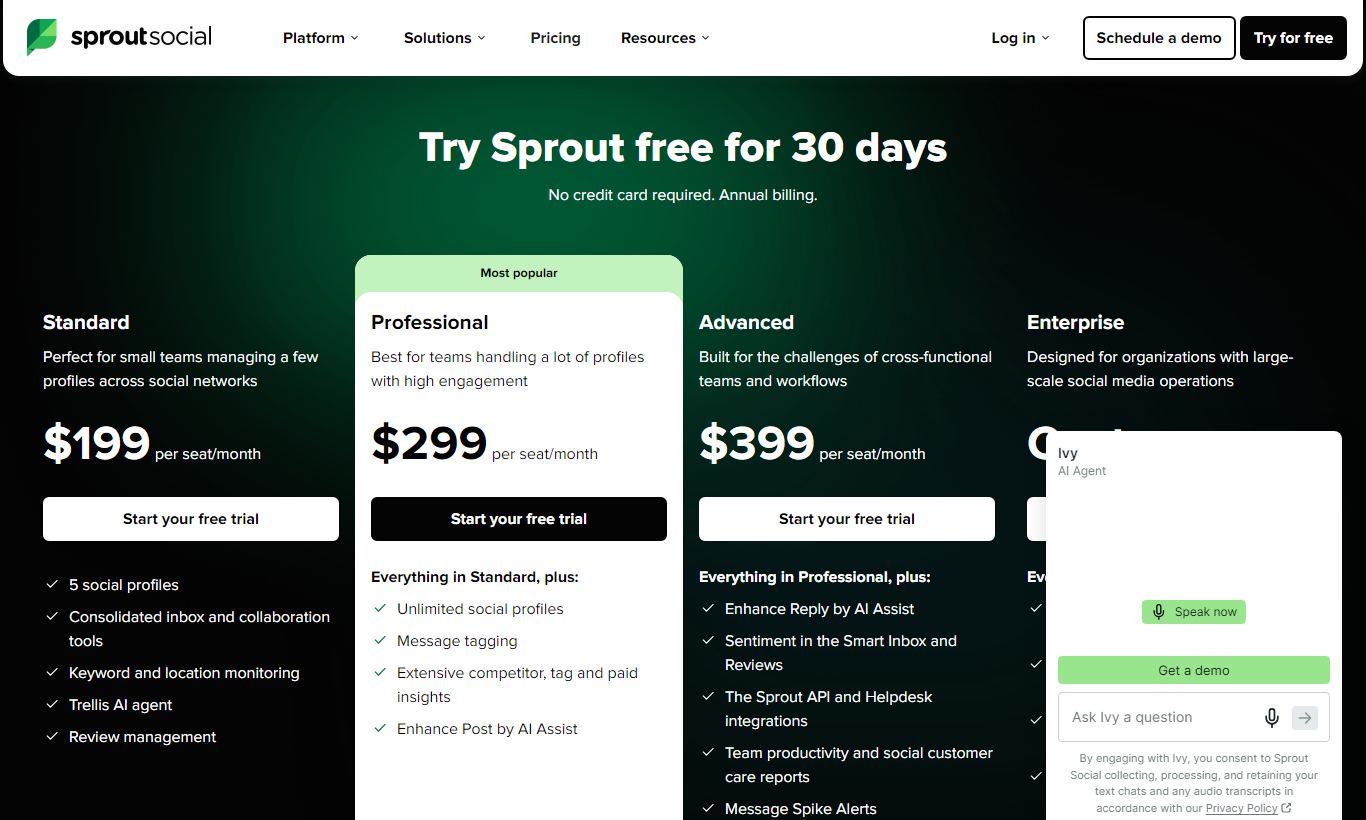
Sprout Social prices per seat, with annual billing as the default. Every plan includes a 30-day free trial, and you won't need a credit card to start. Here's how the tiers break down:
- Standard: $249/seat/month (billed annually). Up to 5 social profiles. Includes Smart Inbox, publishing calendar, basic analytics, and up to 5 users (extra seats cost more). Good for small teams just starting out.
- Professional: $399/seat/month (billed annually). Unlimited social profiles, competitor reports, message tagging, custom workflows, and URL tracking. This is the sweet spot for most growing marketing teams and agencies.
- Advanced: $499/seat/month (billed annually). Adds Chatbots with automation, Saved Replies, message spike alerts, a digital asset and content library, and access to the full Listening product. Built for large brands handling high volumes of engagement.
- Enterprise: Custom pricing. Adds premium analytics, an unlimited users option, API access, managed onboarding, and priority support SLAs. You'll need to talk to sales directly.
Monthly billing (non-annual) costs roughly 25% more on each tier. Add-ons cost extra too. Listening queries, additional profiles, Advocacy seats, and premium analytics are all priced separately, and they can add real money to your total bill. Get an itemised quote before you sign an annual contract.
What We Love
- Smart Inbox with CRM integration: Pulling Salesforce or HubSpot contact history into social conversations is genuinely rare at this level of polish. It closes the gap between social engagement and customer relationship management.
- Competitor benchmarking built into reporting: Automated competitor data in Professional-tier reports saves hours of manual tracking every month and surfaces insights that manual monitoring would almost certainly miss.
- Optimal Send Times powered by per-profile data: Unlike tools that apply generic best-practice windows, Sprout calculates optimal send times from each profile's own historical engagement. That's a real accuracy advantage.
- 30-day free trial with no credit card required: The trial is generous enough to run a real pilot across a live campaign. Teams get enough time to test the tool against actual workflows, not just a demo environment.
- Role-based approvals and audit trails: Granular permission controls, draft-to-published approval routing, and full audit logs make Sprout compliant-friendly and safe to deploy across large teams where brand voice control matters.
Watch Out For
- Per-seat pricing escalates fast: A team of five on the Professional plan already runs $1,995/month before any add-ons. That's a real budget concern for mid-size teams, and it catches buyers off guard if they don't map out headcount growth before signing an annual contract.
- Social Listening is a paid add-on on lower tiers: Many teams treat Listening as essential, but Sprout only includes it on the Advanced plan ($499/seat) or offers it as a separately priced add-on. Several competitors include basic listening at lower price points.
- Bulk scheduling via CSV is clunky: Power users managing high-volume content calendars say Sprout's CSV import for bulk scheduling works, but it's finicky compared to tools like Hootsuite. It demands careful formatting and sometimes forces a re-upload.
- TikTok and YouTube analytics lag behind native platforms: Sprout covers TikTok and YouTube for publishing and basic reporting, but several advanced analytics metrics available in TikTok For Business and YouTube Studio still haven't made it into Sprout's reporting layer. It's a known gap, and the product team has been closing it bit by bit.
Who Is It Best For?
Mid-market brand social teams (5 - 50 employees): A brand with 8 - 15 social profiles, a three- to five-person social team, and a need to report ROI to leadership will get enormous value from Sprout's reporting depth, approval workflows, and inbox management. The Professional plan fits this profile well.
Digital agencies managing multiple client accounts: Agencies running 10+ client social profiles benefit from Sprout's clean profile-switching, white-label-ready PDF reports, and the ability to give clients limited view-only access without exposing internal workflows. The per-seat model works in an agency's favour when headcount is lean relative to profile count.
Enterprise brands with high-volume social engagement: A consumer brand receiving 500+ social interactions per day, think a national retailer, an airline, or a major media property, needs the Smart Inbox's automation, spike alerts, and CRM integrations to keep response times under control. The Advanced or Enterprise plans are built specifically for this scale of operation.
How Does It Compare?
Hootsuite: Hootsuite's entry price is a lot lower and its bulk scheduling tools are more mature, so it's a better fit for content-heavy teams on tighter budgets. But Sprout consistently outperforms on analytics depth, Smart Inbox UX, and customer care workflows. See the full breakdown: Sprout Social vs Hootsuite.
Buffer: Buffer works well for solo creators and very small teams who need clean, simple scheduling at an accessible price point. Its analytics and collaboration features sit a tier below Sprout's, and it has no real social listening capability. It's not a fair matchup for teams of three or more. See the full breakdown: Sprout Social vs Buffer.
Final Verdict
Sprout Social is the right tool when social media is a genuine business priority, not just a checkbox. The platform's analytics, listening, and team collaboration features rank among the best available in 2026. The CRM integrations give social data a seat at the revenue table in a way most competitors haven't managed to match. The 30-day free trial is a real pilot opportunity, so use it to run an actual campaign, not just click around the interface.
If you're a solo operator, an early-stage startup, or a business whose social media activity is limited to occasional organic posts, Sprout Social will cost more than it returns. In that case, Buffer or the free tier of Later will serve you better. But if you're managing a team, multiple profiles, and stakeholders who demand reporting with substance, Sprout Social is one of the most defensible investments in your marketing stack.
Try Sprout Social Free →FAQ
How much does Sprout Social cost per month?
Sprout Social starts at $249 per seat per month on the Standard plan (billed annually). The Professional plan is $399/seat/month, Advanced is $499/seat/month, and Enterprise pricing is custom. Monthly billing costs roughly 25% more. Add-ons like Listening and Employee Advocacy are priced separately.
Does Sprout Social offer a free trial?
Yes. Sprout Social offers a 30-day free trial on all plans, no credit card required. That's a longer trial than most competitors give you, and it's enough time to run the tool through a real campaign cycle.
Is Sprout Social worth it for small businesses?
For most small businesses, especially those with only one or two people managing social media and fewer than five profiles, Sprout Social's per-seat pricing is hard to justify. Buffer, Later, and Metricool all offer solid scheduling and basic analytics for a fraction of the cost. Sprout's value grows as team size and profile count go up.
How does Sprout Social compare to Hootsuite?
Hootsuite has lower entry pricing and stronger bulk scheduling tools, which makes it a better fit for content-heavy teams on a budget. Sprout Social wins on analytics depth, Smart Inbox UX, CRM integrations, and social listening quality. Teams that care most about engagement management and reporting will usually get more out of Sprout.
What social networks does Sprout Social support?
Sprout Social supports Instagram, Facebook, X (Twitter), LinkedIn, TikTok, Pinterest, YouTube, and Google Business Profile. Publishing, inbox management, and analytics coverage varies by network. TikTok and YouTube analytics lag behind what the native platform tools offer.
Does Sprout Social have social listening?
Yes, but not every plan includes it by default. Full social listening comes with the Advanced plan ($499/seat/month) and is available as a paid add-on on Standard and Professional. The listening tool covers sentiment analysis, keyword and topic tracking, share of voice, and demographic breakdowns.
Can Sprout Social integrate with Salesforce or HubSpot?
Yes. Sprout Social has native integrations with both Salesforce and HubSpot CRM. These let teams pull up CRM contact records and history directly inside the Smart Inbox while responding to social messages, which matters a lot for brands that use social as a customer service or sales channel.
Is there a cheaper alternative to Sprout Social that does the same thing?
No single tool fully matches Sprout Social's combination of Smart Inbox, analytics, and listening at a lower price. Hootsuite comes closest on overall feature breadth for less money. Agorapulse is a solid mid-market alternative with similar inbox and reporting features at a slightly lower price. Which one makes sense depends on which features your team actually uses day to day.
We may earn a commission when you click affiliate links. This never affects our editorial scores.
| Best for | Social media management platform |
| Category | Marketing Automation |
Answer a few quick questions and we'll match you to the best tool for your needs.
→ Suggest a Tool