
Thrive Themes Review 2026: Is It Worth It?
Thrive Themes is a WordPress-native conversion optimization suite that bundles a drag-and-drop page builder (Thrive Architect), A/B testing (Thrive Optimize), opt-in forms (Thrive Leads), a quiz builder (Thrive Quiz Builder), and more under one subscription. At $299/year for the full Thrive Suite, it delivers exceptional value for WordPress-based businesses that prioritize conversion rate optimization over flashy design. It's not a standalone funnel platform like ClickFunnels. You need an existing WordPress site to use it. But for bloggers, course creators, coaches, and small marketing teams who live inside WordPress, Thrive Themes packs more conversion-focused tools per dollar than almost any competing suite. The learning curve is moderate, and some tools feel less polished than dedicated point solutions, but the overall package is hard to beat at this price.
What we love
Watch out for
Thrive Themes at a glance
What to test in your Thrive Themes trial
30-day money-back guarantee
- Set up an opt-in form with Thrive Leads using category-based targeting to show different offers on different blog posts
- Run an A/B test on your landing page with Thrive Optimize to compare two headlines or call-to-action buttons
- Create a simple quiz with Thrive Quiz Builder that segments your audience into 2-3 groups with different lead magnets
- Connect one Thrive tool to your email platform to confirm integrations work with your stack
- Decide before 30 days if the learning curve and WordPress-only setup work for your business, or claim your money back
Quick Verdict
Thrive Themes earns a strong recommendation for WordPress-based businesses that want a serious conversion optimization toolkit without paying enterprise-level prices. The full Thrive Suite includes Thrive Architect, Thrive Leads, Thrive Quiz Builder, Thrive Ultimatum, Thrive Apprentice, and several other tools, all for $299/year. That's a fraction of what you'd pay for equivalent standalone tools cobbled together from different vendors. If your business runs on WordPress and your goal is to grow an email list, sell courses, or build high-converting landing pages, this suite deserves serious consideration.
Here's the honest caveat: Thrive Themes isn't a hosted funnel builder. You need a self-hosted WordPress installation to use it. That's a dealbreaker for some, but a feature for others. You own your data, your pages, and your infrastructure. There's no platform lock-in and no monthly seat fees that balloon as your team grows. For the right buyer, that trade-off is worth it.
Start Your Free Trial →What is Thrive Themes?
Thrive Themes was founded in 2013 and is headquartered in Lausanne, Switzerland. The company was built on a single premise: every tool in the suite should exist to increase conversions, not just make websites look nice. Unlike general-purpose page builders such as Elementor or Divi, Thrive Themes designs every product decision around measurable business outcomes: click-through rates, opt-in rates, course completions, and revenue. The company serves mostly solopreneurs, bloggers, online course creators, coaches, and small digital marketing teams who run WordPress sites.
The product line has matured a lot since its early days as a theme shop. Today, Thrive Suite is the flagship offering, a bundled subscription giving access to all current and future Thrive plugins. The company also sells individual plugins if you only need one piece of the stack, though the Suite is almost always better value. Thrive Themes has carved out a loyal niche among WordPress power users who want conversion-first design without the recurring costs of hosted platforms like Leadpages or ClickFunnels.
Key Features
Feature Checklist
Thrive Architect - Visual Page Builder
Thrive Architect anchors the whole suite. It's a front-end drag-and-drop editor that lets you build landing pages, sales pages, opt-in pages, and full website layouts visually. What sets it apart from Elementor or the native WordPress block editor is the depth of conversion-focused elements: countdown timers, click-to-call buttons, lead generation forms, testimonial blocks, guarantee boxes, and pricing tables all come built in. You won't need to hunt for third-party widgets. Take a coach launching a group program. She can drop in a scarcity timer, a testimonial carousel, a two-column feature list, and an embedded Calendly widget, all within a single drag-and-drop session. The 350+ pre-built landing page templates are organized by conversion goal (opt-in, webinar, sales, thank you), which saves a huge amount of time compared to starting from scratch.
Thrive Leads - Advanced Opt-In Form Builder
Thrive Leads is one of the most capable list-building plugins available for WordPress. It supports every major form type: lightbox popups, sticky ribbons, slide-ins, in-content forms, screen fillers, scroll mats, and widget-area forms. More importantly, it has granular targeting. You can display different opt-in forms based on post category, tag, specific URL, traffic source, or device type. The built-in A/B testing engine lets you test different form designs, headlines, and offers against each other with statistical confidence scoring. Here's a real-world scenario: a food blogger might show a "5 Weeknight Dinner Recipes" opt-in to visitors reading recipe content, while showing a "Meal Planning Guide" to visitors on nutrition articles. Two completely different lead magnets, served automatically based on content category.
Thrive Optimize - A/B Testing for Landing Pages
Thrive Optimize is an add-on that works alongside Thrive Architect to run split tests on full landing pages. You duplicate a page, make changes to the variant, set a traffic split, and let it run. The dashboard shows visits, conversions, conversion rate, and a visual indicator of which variant is winning. It uses a Bayesian statistical model to declare winners with confidence, rather than requiring a fixed sample size upfront. For a small business owner spending $500/month on paid traffic, even a 10% improvement in landing page conversion rate from one test cycle can pay back the entire annual Thrive Suite subscription.
Thrive Quiz Builder
Quiz-based lead generation is one of the highest-converting opt-in mechanisms around, and Thrive Quiz Builder makes it surprisingly approachable. You can build scored quizzes, personality quizzes, or right/wrong knowledge tests. Each quiz can display a custom results page based on the user's answers, and you can gate the results behind an opt-in form. That "results reveal" mechanic converts at exceptionally high rates. A business coach, for example, might create a "What's Your Leadership Style?" quiz that segments respondents into four categories and delivers a tailored lead magnet to each one, automatically tagging them in their email marketing platform.
Thrive Ultimatum - Scarcity and Countdown Campaigns
Thrive Ultimatum handles deadline-driven marketing campaigns. It supports fixed-date countdowns (a Black Friday sale ending November 30, for instance), evergreen campaigns (a unique 7-day timer that starts when each user first visits), and recurring campaigns. The evergreen feature stands out, and it's built with ethics in mind: cookie-based tracking stops users from simply refreshing the page to reset the timer. Marketers running evergreen webinar funnels can attach a genuine, personalized deadline to every new lead without managing a single manual campaign.
Thrive Apprentice - Course and Membership Delivery
Thrive Apprentice is a course delivery plugin that integrates tightly with WooCommerce or SendOwl for payment processing. It supports drip content schedules, lesson completion tracking, and custom course templates styled to match your brand. It won't match a dedicated LMS like LearnDash or Teachable for sheer feature depth, but for a creator who wants to keep everything within the WordPress ecosystem and skip a separate monthly SaaS fee, it does the job well. Courses can be gated by membership level or purchase, and the student dashboard experience is clean and professional.
Pricing
Thrive Themes restructured its pricing around the Thrive Suite model. Here's the current breakdown:
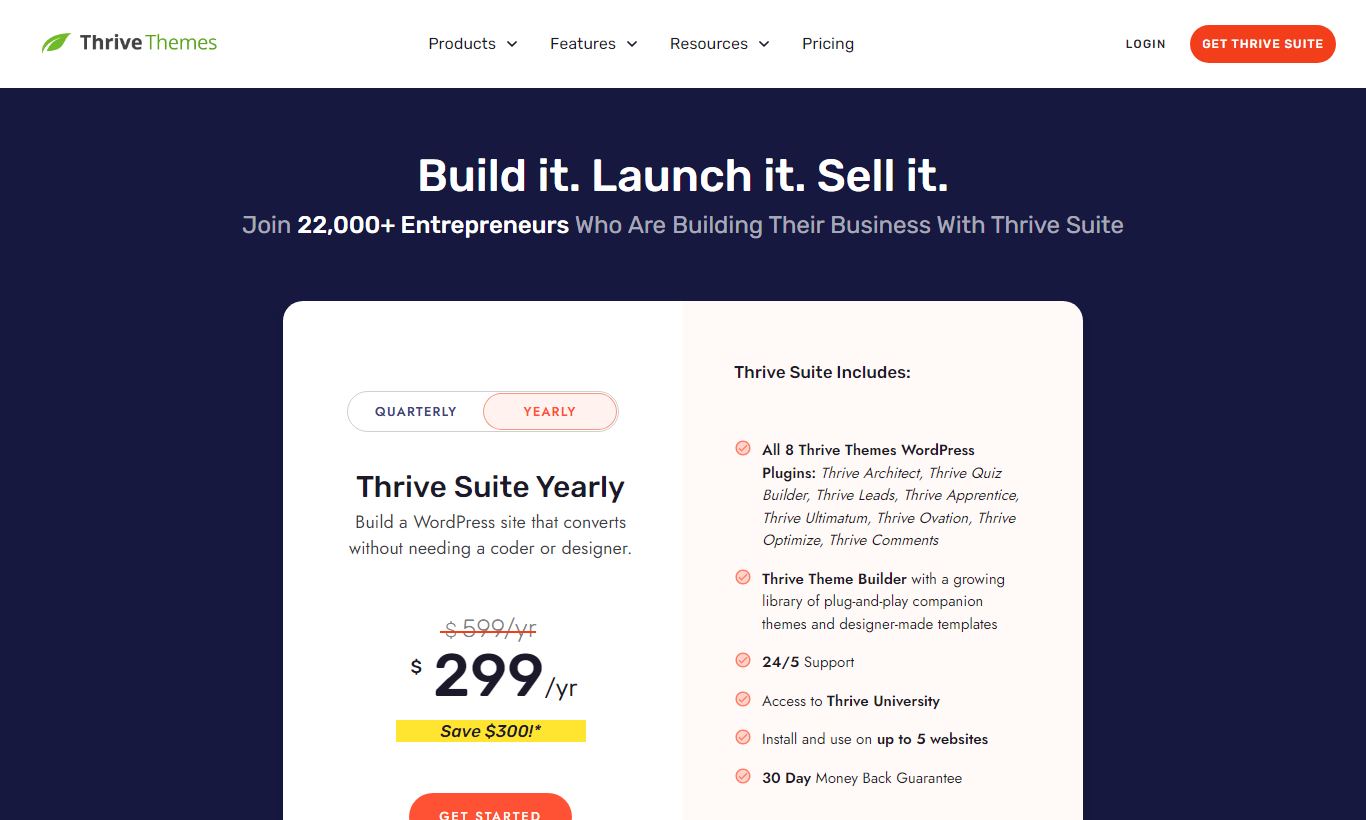
- Thrive Suite - $299/year (approx. $24.92/month): Full access to all Thrive plugins including Thrive Architect, Thrive Leads, Thrive Quiz Builder, Thrive Ultimatum, Thrive Apprentice, Thrive Automator, Thrive Comments, and Thrive Ovation. Covers up to 5 websites. New plugins and updates included. This is the plan most buyers should pick.
- Thrive Suite Quarterly - $149/quarter (approx. $49.67/month): Same features as the annual plan but billed every three months. Built for users who want to try the suite before committing to a full year. It costs a lot more over a 12-month stretch, though.
- Individual Plugins (Legacy): Some individual plugins like Thrive Architect are still sold separately at around $99/year per plugin. But the full suite costs $299/year, so buying three or more individual plugins makes the suite the obvious value choice.
There is no permanently free plan. Thrive Themes doesn't offer a free trial in the traditional sense, but they back the purchase with a 30-day money-back guarantee, which does much the same job. All plans include access to the Thrive University training library and their support system.
What We Love
- Conversion-first design philosophy: Every element in Thrive Architect, from the button block to the countdown timer, exists to get visitors to take action. The template library is organized by conversion objective, not aesthetic style.
- Built-in A/B testing without third-party tools: Thrive Optimize plugs directly into Thrive Architect, so you can split-test entire landing pages in a few clicks. Bayesian confidence scoring stops you from declaring a winner too early.
- Evergreen countdown timers with anti-cheat logic: Thrive Ultimatum's cookie-based evergreen timers create real, personalized scarcity. No fake countdowns that reset on refresh.
- Quiz-based lead segmentation out of the box: Thrive Quiz Builder lets you build multi-path quizzes that sort subscribers into custom groups at opt-in. Tagged, qualified leads feed straight into your email automation.
- Outstanding value for multi-tool WordPress stacks: Thrive Suite costs $299/year for five sites. That replaces tools that would otherwise run you $600 - $1,200/year if bought separately.
Watch Out For
- WordPress-only, no hosted option: If you're not on self-hosted WordPress, none of this works. Shopify, Squarespace, and Wix users are locked out entirely. Even WordPress.com users may run into restrictions.
- Steeper learning curve than Leadpages or Unbounce: New users often say Thrive Architect takes longer to master than competing hosted builders. The interface is powerful but dense, and some elements behave strangely until you understand the underlying CSS box model.
- Thrive Apprentice lacks advanced LMS features: The course builder doesn't support certificates, advanced quizzing, SCORM files, or cohort-based learning. Teams building complex corporate training programs will need a dedicated LMS.
- No built-in email marketing or payment processing: Unlike all-in-one platforms such as Kajabi or Kartra, Thrive Themes requires you to bring your own email service provider and payment processor. That gives you flexibility, but it also means more setup work.
Who Is It Best For?
The WordPress-based content creator or blogger: Someone running a blog with 10,000 - 100,000 monthly visitors who wants to convert readers into email subscribers using targeted opt-in forms, A/B-tested pop-ups, and quiz-based lead magnets. Thrive Leads on its own, with category-level targeting and built-in split testing, can beat generic pop-up plugins like OptinMonster for a fraction of the standalone price.
The online course creator or coach selling mid-ticket programs: A business coach or online educator who wants to build high-converting sales pages, host a course, and run a deadline-driven launch sequence, all inside WordPress, without paying Kajabi's $149/month minimum. Thrive Architect handles the sales page, Thrive Apprentice delivers the course, and Thrive Ultimatum manages the launch deadline. The pieces fit together surprisingly well.
The small marketing team running paid traffic to landing pages: A two or three-person marketing team managing Google Ads or Meta campaigns who needs to build, test, and iterate on landing pages quickly. Thrive Optimize's split testing, combined with Architect's deep customization, makes it a serious tool for teams that treat conversion rate optimization as a core skill, not an afterthought.
How Does It Compare?
Thrive Themes vs. Leadpages: Leadpages is a hosted landing page builder starting at $49/month. It's easier to set up and works without WordPress, but it lacks Thrive's A/B testing depth (Leadpages requires a higher tier for A/B), quiz functionality, course delivery, and scarcity marketing tools. If you're on WordPress and want real conversion depth, Thrive Suite wins on features and value. See our full Thrive Themes vs Leadpages breakdown.
Thrive Themes vs. ClickFunnels: ClickFunnels 2.0 starts at $97/month and is a fully hosted funnel platform with built-in email marketing, CRM, and payment processing. It costs a lot more, but it's genuinely all-in-one, which makes it the right call for businesses that want a single vendor and no tech stack to manage. If you're already running your own email list and payment setup on WordPress, though, ClickFunnels' extra cost doesn't pay off. Thrive Suite handles the conversion-critical parts better and cheaper, right inside WordPress. Compare them directly: Thrive Themes vs ClickFunnels.
Final Verdict
Thrive Themes is the best conversion optimization suite available for self-hosted WordPress. At $299/year, it's one of the most compelling deals in the entire landing pages and funnels software category. The lineup of tools, Architect, Leads, Optimize, Quiz Builder, Ultimatum, Apprentice, is genuinely impressive, and the conversion-first thinking behind all of them produces real, measurable business results when you use them correctly.
It's not the right tool if you're on a non-WordPress platform, if you want a fully hosted all-in-one solution, or if you're a complete beginner who needs hand-holding through every step. For those buyers, Leadpages or Kajabi may be better starting points. But if you're a WordPress-committed business owner, creator, or marketer who takes conversion rate optimization seriously, Thrive Suite deserves a place at the center of your stack.
Try Thrive Themes Free →FAQ
How much does Thrive Themes cost?
Thrive Suite costs $299/year (about $24.92/month) when billed annually, or $149/quarter when billed every three months. The annual plan covers up to 5 WordPress websites and includes all Thrive plugins.
Does Thrive Themes offer a free trial?
There's no traditional free trial. Every purchase comes with a 30-day money-back guarantee, though, which gives you a risk-free month to test the full suite.
Is Thrive Themes worth it in 2026?
Yes, if you're on WordPress. At $299/year for the full suite across five sites, Thrive Themes delivers strong value compared to buying equivalent tools separately. The core tools (Architect, Leads, Optimize) alone would cost a lot more from competing vendors.
Does Thrive Themes work with any WordPress theme?
Yes. Thrive Architect and most Thrive plugins work with any well-coded WordPress theme. Thrive also offers its own "Thrive Theme Builder" for users who want a fully integrated design system from header to footer.
How does Thrive Themes compare to ClickFunnels?
ClickFunnels is a fully hosted funnel platform starting at $97/month that includes email marketing and payment processing built in. Thrive Themes is WordPress-only and needs third-party integrations for those functions, but it costs far less and gives you more control over your data and infrastructure.
Can I use Thrive Themes to sell online courses?
Yes. Thrive Apprentice (included in Thrive Suite) lets you build and deliver online courses directly in WordPress. It supports drip content, lesson tracking, and payment integration via WooCommerce. It won't match LearnDash or Teachable for features, but it's a solid option for straightforward course delivery.
What email marketing platforms does Thrive Themes integrate with?
Thrive Themes integrates with all major email service providers including ActiveCampaign, ConvertKit, Mailchimp, AWeber, Drip, GetResponse, HubSpot, and many more via Thrive Automator or native API connections.
Is Thrive Architect better than Elementor?
Depends on your goal. Elementor is a more general-purpose page builder with a larger template library and broader design flexibility. Thrive Architect is narrower but goes deeper on conversion-focused elements like A/B testing, lead generation forms, and scarcity timers. Marketers tend to prefer Thrive Architect. Designers often lean toward Elementor.
We may earn a commission when you click affiliate links. This never affects our editorial scores.
| Best for | Conversion-focused WordPress themes |
| Category | Landing Pages & Funnels |
Answer a few quick questions and we'll match you to the best tool for your needs.
→ Suggest a Tool