
OptimizePress Review 2026: Is It Worth It?
OptimizePress is a WordPress-native landing page and funnel builder built for coaches, course creators, and online marketers. Starting at $99/year for the Essential plan, it gives you a drag-and-drop page editor, pre-built funnel templates, membership site tools, and checkout capabilities, all without the recurring monthly fees charged by SaaS competitors like ClickFunnels. For WordPress users already invested in that ecosystem, OptimizePress delivers real value. You own your data, pay once a year, and get a genuinely capable funnel-building toolkit. It's not the slickest tool on the market, and non-WordPress users will face a real learning curve. Still, for budget-conscious creators who want full site control, OptimizePress is a strong, well-rounded choice worth serious consideration.
What we love
Watch out for
OptimizePress at a glance
What to test in your OptimizePress trial
30-day money-back guarantee
- Build a landing page using one of the 300+ templates and check editor speed on your current hosting plan
- Create a multi-step funnel with OptimizeFunnels and connect your ConvertKit or email tool to test integration
- Set up a checkout page with an order bump using Stripe or PayPal to verify payment processing works
- Configure membership tiers and drip-release content to confirm it replaces your existing membership plugin
- Test A/B split testing on a page variant and verify conversion tracking connects to Google Analytics
- Before day 30 ends, decide if you'll keep it or request a refund from the support team
Quick Verdict
OptimizePress earns its place as one of the best value-for-money funnel builders available for WordPress users. For $99 to $399 per year, a fraction of what ClickFunnels charges monthly, you get a drag-and-drop page builder, sales funnel templates, membership site functionality, and a checkout system that actually converts. If you're a coach, course creator, or affiliate marketer already running WordPress, this is a serious toolkit that can replace three or four separate paid tools.
The caveats are real. OptimizePress lives entirely inside WordPress, so it's not an option if you're not on that platform. Setup takes longer than a hosted SaaS solution, and some advanced automation features require pairing with third-party email tools. For those who meet the profile, though, the trade-off between control and convenience lands firmly in OptimizePress's favor.
Start Your Free Trial →What is OptimizePress?
OptimizePress was founded in 2010 by James Dyson (not the vacuum cleaner billionaire, a UK-based developer), and it's been a fixture in the WordPress marketing world for over a decade. It started as a WordPress theme for building landing pages and grew into a full suite: a plugin-based page builder (OptimizeBuilder), a checkout and order-bump system (OptimizeCheckouts), a membership platform (OptimizeMember), and a funnel management layer (OptimizeFunnels). The company is headquartered in the UK, and its audience skews heavily toward solo entrepreneurs, digital product sellers, and marketing agencies running client sites.
Unlike SaaS funnel builders that host everything on their own servers, OptimizePress installs directly onto your WordPress site. That means you're in charge of hosting, speed optimisation, and backups. But you also own every pixel of your data, you're not subject to platform shutdowns, and you pay annual flat fees rather than mounting monthly subscriptions. For established WordPress operators, that's a real architectural advantage.
Key Features
Feature Checklist
Drag-and-Drop Page Builder (OptimizeBuilder)
The core of OptimizePress is its visual editor. Built as a WordPress block-style editor overlay, OptimizeBuilder lets you construct landing pages, sales pages, opt-in pages, and thank-you pages using a library of over 40 purpose-built elements: countdown timers, video players, testimonial blocks, pricing tables, progress bars, and opt-in forms. Editing happens in a live visual preview. You click, adjust, and see changes in real time without toggling between a preview and a code view. For a solo marketer building a webinar registration page, this means a polished, conversion-optimised design in under an hour using one of the 300+ pre-built templates.
Sales Funnel Templates and Management (OptimizeFunnels)
OptimizeFunnels connects individual pages into a customer journey that actually makes sense. You can build multi-step funnels, opt-in to tripwire to upsell to thank you, using a visual funnel map that shows each step and the conversion path between them. Pre-built funnel templates cover the most common use cases: lead magnet funnels, webinar registration sequences, product launch funnels, and free-plus-shipping offers. Each template ships with all the pages in the sequence pre-designed, so you're editing copy and images rather than building from scratch. For a course creator launching a new programme, this cuts the time from concept to live funnel from days to hours.
Checkout and Order Bumps (OptimizeCheckouts)
OptimizeCheckouts brings native payment processing into the WordPress stack. It integrates directly with Stripe and PayPal, supports one-click order bumps (the "add this to your order" checkbox that meaningfully increases average order value), and handles one-time payments, subscriptions, and free trial periods. Checkout pages are fully customisable within the builder, so you can match them to your brand rather than redirecting customers to a generic payment gateway page. For a membership site selling a $97/month coaching programme, showing an order bump for a $27 workbook at checkout is a simple revenue boost that pays for the tool multiple times over.
Membership Site Builder (OptimizeMember)
OptimizeMember handles content protection and member access management directly inside WordPress. You can create free and paid membership tiers, drip-release content on a schedule (release Module 3 on day 14 after purchase, for example), and build a branded member dashboard where students access their course material. It integrates with the checkout system, so a completed purchase automatically unlocks the right membership tier. This replaces the need for a separate plugin like MemberPress or Restrict Content Pro for most mid-complexity use cases.
A/B Split Testing and Conversion Tracking
Available on higher-tier plans, OptimizePress includes built-in split testing for landing pages. You can serve two versions of a page to different visitor segments and let the system identify the winning variant based on conversion rate. Conversion tracking connects to Google Analytics and integrates with Facebook Pixel via the settings panel. For a marketer running paid traffic to a lead magnet page, testing headline variants without a separate tool like Google Optimize (now retired) is a genuine workflow improvement.
Pricing
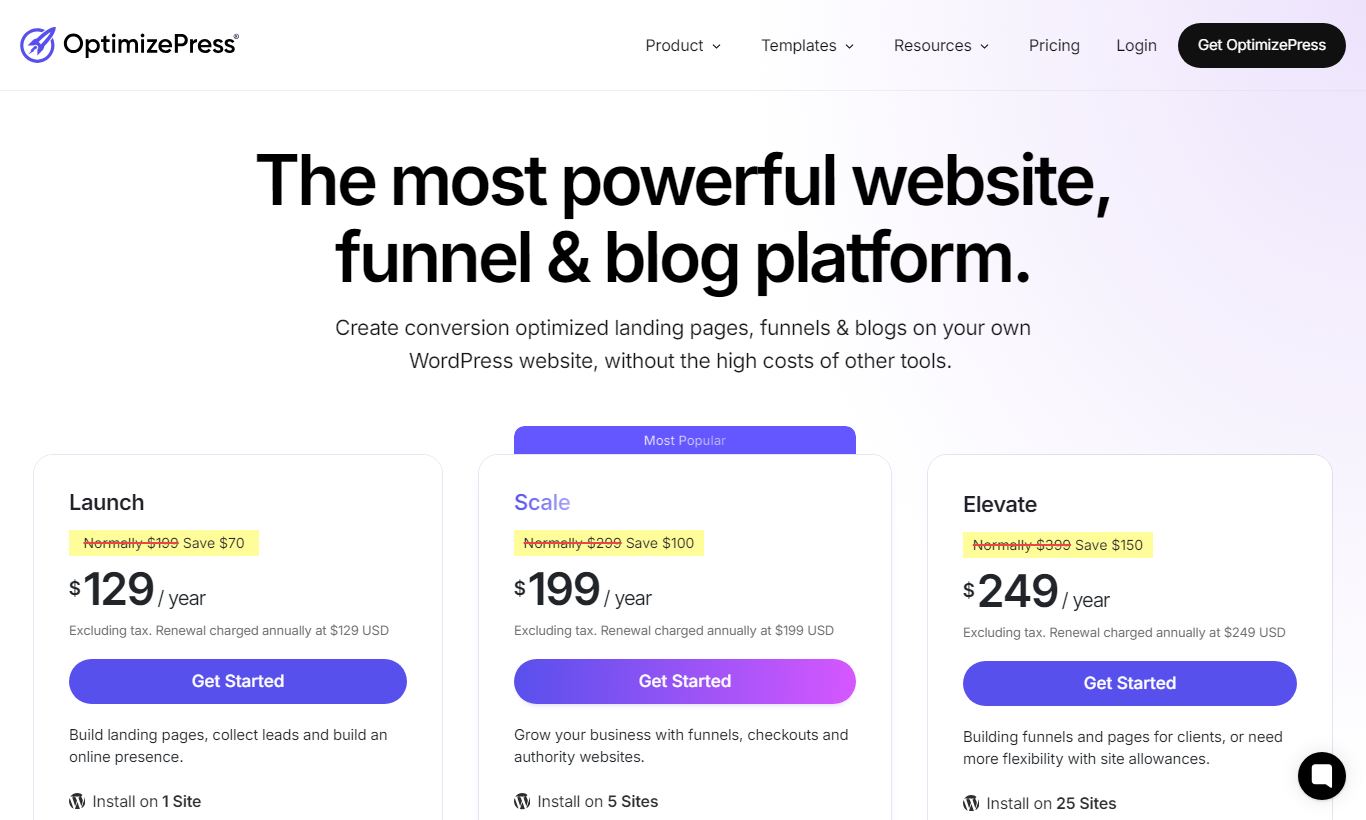
OptimizePress bills annually only. There's no monthly option. Every plan comes with a 30-day money-back guarantee, which is about as close as you'll get to a free trial.
- Essential ($99/year): 1 personal site. Includes OptimizeBuilder, the full template library, and core page elements. Doesn't include OptimizeFunnels, OptimizeCheckouts, or OptimizeMember. Good fit if you're building individual landing pages rather than full funnels.
- Suite ($199/year): Up to 1 personal site. Gives you the full product suite: OptimizeFunnels, OptimizeCheckouts, OptimizeMember, and A/B testing. This is the tier to pick if you're serious about selling digital products or running memberships.
- Agency ($399/year): Up to 20 client sites. Everything in Suite, plus agency-specific features: client site management, the ability to install on client WordPress installs, and priority support. If you run a marketing agency managing multiple client funnels, this beats licensing individual tools per client.
There's no free plan. The 30-day refund policy is your only risk-free way in. For context, ClickFunnels starts at $97/month. That puts OptimizePress Suite at $199/year below the cost of two months on the cheapest ClickFunnels plan.
What We Love
- Annual flat-fee pricing with no per-funnel or per-visitor limits: Unlike ClickFunnels or Kartra, you won't be watching funnel or contact counts. Build as many pages and funnels as your hosting can handle for one fixed annual cost.
- Native checkout with order bumps included in Suite: One-click order bumps, upsell pages, and Stripe/PayPal integration are baked in. You don't need a separate WooCommerce setup or a third-party checkout plugin.
- 300+ templates covering the most common funnel types: The templates are genuinely well-designed and include complete multi-page funnel sets, not just individual page layouts.
- WordPress ownership model means full data portability: Your pages, contacts, and orders live on your own hosting infrastructure. You're never locked into a platform that could change its pricing or shut down.
- Membership drip content without a separate plugin: OptimizeMember handles tiered access and content scheduling natively, replacing tools that cost $99 to $299 a year on their own.
Watch Out For
- WordPress-only, a hard stop for non-WordPress users: If your site runs on Squarespace, Wix, Webflow, or any other platform, OptimizePress simply isn't an option. There's no hosted version and no subdomain workaround.
- No built-in email marketing or CRM automation: OptimizePress integrates with ActiveCampaign, ConvertKit, Drip, and others, but it doesn't replace them. You still need a separate email tool for sequences, broadcasts, and lead nurturing. That's a real extra cost and one more integration to manage.
- Page builder performance can lag on older or under-resourced hosting: Multiple user reviews on Trustpilot and G2 mention editor slowness on shared hosting plans. The builder demands more resources than native Gutenberg or Elementor, so a decent VPS or managed WordPress host is a smart move.
- Full funnel features locked behind Suite ($199/year): The $99 Essential plan is genuinely limited. No funnels, no checkout, no membership tools. Buyers who purchase Essential expecting a complete funnel builder often feel misled once they find those features require an upgrade.
Who Is It Best For?
The independent course creator or coach on WordPress: Someone selling a $497 online course or a $197/month group coaching membership, already hosted on WordPress, who wants to build a professional launch funnel with an opt-in page, sales page, checkout, and member portal, without paying $1,164/year for ClickFunnels. The Suite plan at $199/year covers every piece of that workflow natively.
The affiliate marketer or blogger monetising an existing WordPress site: A content creator with an established WordPress blog who wants to add lead magnet funnels, email list opt-ins with A/B tested landing pages, and the occasional product launch. OptimizePress fits into their existing WordPress setup without a platform migration or a second SaaS subscription running alongside it.
The small marketing agency (under 10 clients): An agency managing client sites on WordPress that needs to build and maintain landing pages and lead funnels for multiple clients. The Agency plan at $399/year covers 20 sites. That works out to $20 per site annually for a full funnel toolkit, which is extraordinarily cost-effective when billing clients for the deliverables.
How Does It Compare?
OptimizePress vs ClickFunnels: ClickFunnels is a hosted SaaS starting at $97/month ($1,164/year), with a slicker onboarding process and built-in email automation. OptimizePress wins on price and data ownership, no contest. ClickFunnels wins on out-of-the-box simplicity for people who aren't on WordPress, plus its built-in follow-up funnel email sequences.
OptimizePress vs Leadpages: Leadpages ($37 to $74/month) is a hosted landing page builder with stronger A/B testing analytics and a cleaner interface, but it has no native checkout, membership, or full funnel management. If you just want to build landing pages, Leadpages has a gentler learning curve. If you want a complete funnel-and-membership stack on WordPress, OptimizePress gives you far more capability per dollar.
Final Verdict
OptimizePress is a mature, well-featured funnel and landing page toolkit that delivers real value inside the WordPress ecosystem. The Suite plan at $199/year is the honest entry point for anyone serious about building sales funnels, and at that price, it's hard to argue with. The absence of built-in email automation and the WordPress-only constraint are real limits, but for users who already live in WordPress and have an email provider, those are manageable gaps, not dealbreakers.
If you're a course creator, coach, membership site operator, or marketing agency running WordPress, OptimizePress should sit near the top of your shortlist. If you're not on WordPress, or you need an all-in-one platform with email marketing built in, look at ClickFunnels or Kartra instead. But for WordPress users who want to own their infrastructure and stop paying SaaS premiums, this is one of the more defensible purchases in digital marketing tooling.
Try OptimizePress Free →FAQ
How much does OptimizePress cost?
OptimizePress offers three annual plans: Essential at $99/year (1 site, page builder only), Suite at $199/year (1 site, full funnel and checkout tools), and Agency at $399/year (up to 20 sites). There's no monthly billing option and no free plan, but every plan comes with a 30-day money-back guarantee.
Is OptimizePress worth it in 2026?
Yes, if you're on WordPress. At $199/year, the Suite plan gets you a full funnel builder, checkout system, and membership platform for less than two months of ClickFunnels' entry price. If you're not on WordPress, it's a non-starter, since the whole product is built for that platform.
Does OptimizePress work with Stripe and PayPal?
Yes. OptimizeCheckouts, included in the Suite and Agency plans, integrates natively with both Stripe and PayPal. It handles one-time payments, subscriptions, and free trial periods, and lets you add order bumps right on the checkout page.
Can OptimizePress replace ClickFunnels?
For WordPress users, it can replace most of what ClickFunnels does: landing pages, sales funnels, checkout, and membership sites, all at a much lower annual cost. The gap is email marketing. ClickFunnels includes follow-up email sequences. OptimizePress doesn't, so you'll need a separate tool like ConvertKit or ActiveCampaign.
Does OptimizePress have a free plan or free trial?
No free plan and no traditional free trial. What you get instead is a 30-day money-back guarantee on every plan, which gives you a full month to test the software risk-free before committing.
Is OptimizePress good for beginners?
Depends on how comfortable you already are with WordPress. If you know your way around WordPress administration, the learning curve is manageable and the templates help a lot. If you've never touched WordPress, the setup work, hosting, installation, plugin configuration, might push you toward a hosted option like Leadpages instead.
What email marketing tools does OptimizePress integrate with?
It connects with ActiveCampaign, ConvertKit, Drip, Mailchimp, AWeber, GetResponse, Infusionsoft (Keap), and several others through native connectors and Zapier. There's no built-in email marketing or CRM automation, so you'll need a separate platform for follow-up sequences.
Can I use OptimizePress for a membership site?
Yes. The Suite and Agency plans include OptimizeMember, which handles content protection, tiered membership levels, drip-scheduled content release, and a branded member dashboard. It plugs directly into OptimizeCheckouts, so a purchase automatically triggers the right membership access.
We may earn a commission when you click affiliate links. This never affects our editorial scores.
| Best for | WordPress landing pages and funnels |
| Category | Landing Pages & Funnels |
Answer a few quick questions and we'll match you to the best tool for your needs.
→ Suggest a Tool