
Landingi Review 2026: Is It Worth It?
Landingi is a landing page and funnel builder built for marketers, agencies, and SMBs who need to launch high-converting pages without writing code. The company started in 2012 and is headquartered in Poland. It offers a drag-and-drop editor, over 400 templates, A/B testing, pop-ups, and a lightweight funnel builder. Pricing starts at $24/month, billed annually, and every paid plan comes with a 14-day free trial. Landingi's template library runs deep, and its multi-client workspace features make it a solid pick for agencies. It falls short of ClickFunnels on deep funnel automation, and it lags behind Unbounce on AI-driven copy optimization. Teams that need to ship a lot of polished landing pages fast, especially agencies juggling multiple brands, get strong value here. If you need complex sales funnels or enterprise-grade personalization, look elsewhere.
What we love
Watch out for
Landingi at a glance
What to test in your Landingi trial
14-day free trial
- Build 2-3 landing pages from your own templates using the drag-and-drop editor to test freeform placement
- Import your brand colors, logos, and messaging into a Smart Section and verify it syncs across multiple test pages
- Set up an A/B test on one page variant and check if conversion tracking matches your existing analytics
- Create an exit-intent and scroll-triggered pop-up and test both on a live page with real traffic
- Build a simple 3-step funnel (opt-in, thank-you, upsell) and confirm conversion tracking flows correctly between steps
- Before day 14 ends, upgrade to Professional or cancel if the 500 conversion cap on Lite doesn't fit your traffic volume
Quick Verdict
Landingi earns its place as one of the most practical landing page builders on the market for volume-driven marketing teams. If your workflow involves launching 5 to 20 landing pages a month across different campaigns or clients, Landingi's fast drag-and-drop editor, 400+ professionally designed templates, and solid A/B testing infrastructure will save you hours per week. It hits a sweet spot: it's significantly cheaper than Unbounce or Instapage, yet offers a more purpose-built landing page experience than all-in-one tools like HubSpot or Mailchimp.
Landingi isn't the right fit for every buyer, though. Its funnel builder is lightweight compared to ClickFunnels, its native CRM is minimal, and the AI copywriting assistant, while useful, isn't as polished as what you'd find in Unbounce's Smart Builder. Still, for the price, the range of features is hard to beat. The 14-day free trial requires no credit card on most plans, so there's genuinely low risk in taking it for a spin.
Start Your Free Trial →What is Landingi?
Landingi was founded in 2012 by Błażej Abel and is headquartered in Katowice, Poland, with a growing international customer base across the US, UK, and Europe. The platform is built for creating, publishing, and optimizing landing pages and conversion funnels. It's not a full website builder, email marketing suite, or CRM. That focus is a deliberate product decision, and it shows: nearly every feature in Landingi exists to help you get more conversions from your paid and organic traffic. The company serves over 4,000 customers globally, ranging from solo digital marketers to mid-sized agencies managing dozens of client accounts.
Landingi sits squarely in the mid-market segment. It's more powerful and flexible than free tools like Carrd, more affordable than enterprise options like Instapage, and more focused on landing pages than broad marketing platforms like ActiveCampaign or HubSpot. It competes most directly with Unbounce, Leadpages, and GetResponse's landing page module. Its agency plan tier, multi-workspace architecture, and white-labeling options make it a strong choice for digital agencies and freelancers managing campaigns for multiple clients.
Key Features
Feature Checklist
Drag-and-Drop Page Editor
Landingi's core editor is a pixel-precise drag-and-drop builder that lets you place any element (text blocks, images, buttons, forms, countdown timers, video embeds) anywhere on the canvas without grid constraints. Some builders lock you into section-based layouts. Landingi gives you true freeform placement, which works well for designers who want pixel-level control. The editor also supports responsive editing, so you can adjust the mobile layout separately without breaking the desktop version. In practice, a marketer could duplicate a high-performing hero section from one page, drop it into a new campaign page, and be live in under 30 minutes.
Template Library (400+ Designs)
With over 400 templates organized by industry (real estate, SaaS, e-commerce, events, finance) and campaign type (lead generation, product launch, webinar registration, app download), Landingi's library is one of the largest among dedicated landing page tools. The templates look good, but they're also built around conversion best practices, with logical above-the-fold layouts, social proof sections, and clear CTAs already in place. A B2B SaaS team running a PPC campaign could select the "Software Free Trial" template, swap in their brand assets, connect a Zapier integration to their CRM, and publish to a custom domain in under an hour.
A/B Testing and Smart Sections
A/B testing in Landingi is available on the Create plan and above. You can split-test entire page variants or individual sections, set traffic split percentages, and declare a winner based on conversion rate thresholds. The "Smart Sections" feature is one of Landingi's most underrated capabilities. It lets you create a shared section (like a testimonial block or pricing table) that stays synced across multiple pages. Update it once, and every page using that smart section reflects the change instantly. That's a real time-saver for agencies maintaining brand consistency across dozens of client pages.
Pop-ups and Lightboxes
Landingi includes a fully-featured pop-up builder that shares the same drag-and-drop editor as the main page builder. You can create exit-intent pop-ups, timed pop-ups, scroll-triggered overlays, and click-triggered lightboxes. Targeting rules let you show pop-ups based on URL, device type, referral source, or visitor behavior. This comes in handy for e-commerce teams running traffic to product pages who want to capture email addresses from visitors about to bounce, without needing a separate pop-up tool like OptinMonster.
Funnel Builder
Landingi's funnel builder lets you chain landing pages into multi-step sequences, for example: ad click → opt-in page → thank-you page with upsell → confirmation email. You can map out the funnel visually, set conversion goals at each step, and track drop-off rates between pages. It's a solid tool for simple lead generation or webinar registration funnels. It lacks the conditional logic, advanced branching, and integrated checkout flows that ClickFunnels or Kartra provide, though. Treat it as a sequence organizer, not a full marketing automation engine.
Analytics and Integrations
Built-in analytics cover page views, unique visitors, conversion rate, and form submission tracking. You can add Google Analytics 4, Google Tag Manager, Facebook Pixel, and custom scripts via a global script manager, so any third-party tracking setup you already have will slot in cleanly. Native integrations include HubSpot, Salesforce, Mailchimp, ActiveCampaign, GetResponse, Zapier, and Make (formerly Integromat). For agencies, the Zapier and Make connections stand out, letting you build custom multi-step automations between Landingi form submissions and any CRM or email tool in the client's stack.
Pricing
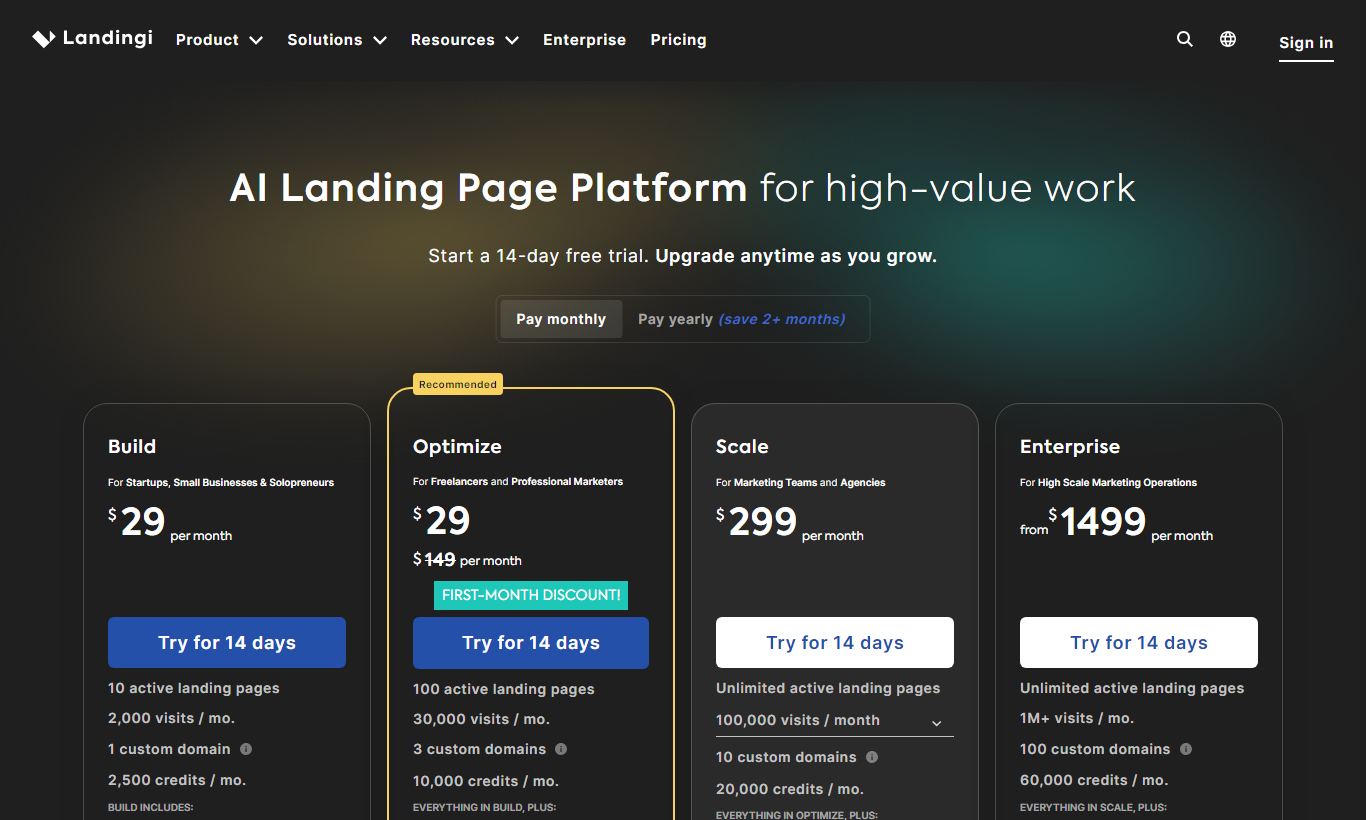
Landingi offers four main paid plans, all with a 14-day free trial. Annual billing runs about 20-25% cheaper than monthly pricing. There's no permanently free plan, but the trial isn't gated. You can build and preview full pages before paying anything.
- Lite, $24/month (annual) / $29/month (monthly): 1 custom domain, unlimited landing pages, 500 conversions/month, core editor, 400+ templates, basic analytics. No A/B testing, no pop-ups.
- Professional, $57/month (annual) / $69/month (monthly): 5 custom domains, unlimited conversions, A/B testing, pop-ups, Smart Sections, AI assistant, priority support. Best for growing marketing teams.
- Agency, $119/month (annual) / $149/month (monthly): 20 custom domains, multi-client sub-accounts, white-label options, team collaboration, audit logs. Built for agencies.
- Agency+, $149/month (annual) / $179/month (monthly): Unlimited domains, unlimited sub-accounts, dedicated account manager, custom contract options. For large agencies or high-volume operations.
One thing to watch: conversions are capped on the Lite plan at 500/month, and that limit can become a bottleneck fast once a campaign gets any real traffic. Moving to Professional removes the conversion cap entirely, and it's the plan most individual marketers actually end up needing. All plans include Landingi's CDN hosting and SSL certificates.
What We Love
- Pixel-precise freeform editor: True drag-and-drop without grid lock gives designers full layout control. That's rare at this price point.
- Smart Sections for cross-page consistency: Update a testimonial block or CTA once and it syncs across every page using that section. For agencies, this saves real time.
- 400+ conversion-optimized templates: Organized by industry and campaign type, with a logical CRO structure already built in. These aren't just pretty layouts.
- Built-in pop-up builder with behavioral targeting: Exit-intent, scroll-triggered, and timed pop-ups are built in natively, so you don't need a separate tool or subscription.
- Multi-client sub-accounts with white-labeling on Agency tiers: Agencies can manage separate client workspaces, custom domains, and branding from a single Landingi account.
Watch Out For
- Funnel builder lacks conditional logic: Multi-step funnels handle linear sequences fine, but they can't do if/then branching, behavioral triggers, or integrated checkout. That's a real gap if you're running complex sales funnels.
- 500 conversion cap on the Lite plan is restrictive: A single mid-traffic PPC campaign can hit this ceiling within days, forcing an upgrade sooner than buyers might expect.
- AI copywriting assistant is still maturing: The built-in AI writer generates usable drafts, but it often produces generic copy that needs heavy editing. It doesn't yet match what Unbounce's Smart Builder puts out.
- No native e-commerce or checkout functionality: Landingi has no built-in payment processing or product catalog. Selling directly from a landing page means bolting on a third-party integration (Stripe via Zapier, ThriveCart, etc.), which adds friction and cost.
Who Is It Best For?
Digital marketing agencies managing 5 - 30 client campaigns simultaneously get the most out of Landingi's Agency plans. Separate client sub-accounts, white-labeling, Smart Sections for reusable brand assets, and multi-domain management solve real operational headaches in agency work. A 10-person agency running Google Ads and Meta campaigns for 15 clients could standardize its entire landing page production workflow within Landingi's ecosystem.
In-house PPC and performance marketing managers at SMBs running steady paid traffic on Google Ads, LinkedIn, or Meta will benefit from the fast build cycle, A/B testing, and deep analytics integration on the Professional plan. Take a B2B SaaS company with a two-person marketing team launching monthly product feature campaigns. They can turn out landing page variants quickly without pulling in a developer for every change.
Freelance marketers and consultants building lead generation assets for clients will like the price-to-capability ratio on the Professional plan at $57/month. The template library alone cuts down on time spent on initial page design, and the Zapier integration lets new form submissions flow straight into whatever CRM the client already uses, no custom development required.
How Does It Compare?
Unbounce is the closest direct competitor. It offers more sophisticated AI-powered optimization tools and a slightly more polished editor, but its Build plan starts at $99/month, nearly double Landingi's Professional tier. For teams that don't need Unbounce's Smart Traffic AI (which auto-routes visitors to the best-performing variant), Landingi's lower price is hard to argue with. See our full Landingi vs Unbounce breakdown for a side-by-side feature comparison.
Leadpages is priced similarly to Landingi (Standard plan at $37/month) and includes basic checkout functionality, so it's a better fit for course creators or coaches who need to sell directly from their landing pages. Its template library is smaller, though, its multi-client management is weaker, and its A/B testing is limited to higher-tier plans. For agencies or teams that need volume and collaboration, Landingi has the edge. Check our Landingi vs Leadpages comparison for the full picture.
Final Verdict
Landingi is a well-executed, focused tool that does what it promises: help marketing teams build, publish, and optimize landing pages at scale. Its strengths are real and practically valuable, a flexible editor, a massive template library, Smart Sections, A/B testing, and agency-grade multi-client management. The pricing is fair, especially on the Professional and Agency plans, and the 14-day free trial gives you enough runway to validate whether it fits your workflow.
Where it falls short, no native checkout, a lightweight funnel builder, and a maturing AI assistant, matters depending on your use case. If you're building complex automated sales funnels with conditional logic and integrated payments, ClickFunnels or Kartra will serve you better. But for the majority of performance marketers, PPC managers, and digital agencies whose core need is shipping great-looking, high-converting landing pages quickly and consistently, Landingi is a strong, honest choice that won't break your budget.
Try Landingi Free →FAQ
How much does Landingi cost per month?
Landingi pricing starts at $24/month (billed annually) for the Lite plan. The Professional plan, which most active marketers will need, is $57/month annually or $69/month on a monthly basis. Agency plans start at $119/month (annual).
Does Landingi offer a free plan or free trial?
Landingi doesn't have a permanently free plan, but it offers a 14-day free trial on all paid plans with no credit card required. The trial gives full access to the editor, templates, and publishing features.
Is Landingi good for agencies?
Yes. Landingi's Agency and Agency+ plans include dedicated client sub-accounts, white-labeling, multi-domain management, and team collaboration tools. It's one of the stronger agency-focused landing page platforms in its price range.
How does Landingi compare to Unbounce?
Unbounce offers more advanced AI optimization (Smart Traffic) and a slightly more polished editor, but starts at $99/month, nearly double Landingi's comparable plan. Landingi wins on price and agency features. Unbounce wins on AI-driven testing and conversion intelligence.
Can I sell products directly from a Landingi landing page?
Not natively. Landingi has no built-in payment processing or product catalog. To sell directly, you need to integrate a third-party tool like Stripe (via Zapier), ThriveCart, or PayPal using embed code. For teams that need native checkout, Leadpages or ClickFunnels are better alternatives.
Does Landingi support A/B testing?
Yes, A/B testing is available on the Professional plan and above ($57/month annual). You can test full page variants or individual sections, set custom traffic splits, and track winners by conversion rate. It's not available on the Lite plan.
Is Landingi worth it for a solo marketer or freelancer?
For a freelancer or solo marketer who regularly builds landing pages for clients or campaigns, the Professional plan at $57/month offers strong value. Unlimited conversions, A/B testing, pop-ups, and Zapier integrations are all included. If you only need one or two pages and have light traffic, the Lite plan at $24/month covers the basics.
What integrations does Landingi support?
Landingi natively integrates with HubSpot, Salesforce, Mailchimp, ActiveCampaign, GetResponse, Google Analytics 4, Facebook Pixel, and Google Tag Manager. It also connects to Zapier and Make, which opens up thousands of additional app connections for CRM syncing, email automation, and notification workflows.
We may earn a commission when you click affiliate links. This never affects our editorial scores.
| Best for | Landing page builder for marketers |
| Category | Landing Pages & Funnels |
Answer a few quick questions and we'll match you to the best tool for your needs.
→ Suggest a Tool