
Mailchimp Review 2026: Is It Worth It?
Mailchimp is one of the most recognised email marketing platforms out there, and it backs that reputation up with a generous free plan, an easy drag-and-drop editor, and a growing set of automation and CRM tools. It works best for small and mid-sized businesses that want one marketing hub without a steep learning curve. The free tier covers up to 500 contacts and 1,000 sends a month, which is genuinely useful for a business just getting off the ground. Paid plans start at $13/month (Essentials) and climb to $350+/month for larger lists. Mailchimp's strengths are ease of use, template variety, and audience segmentation. It struggles on value for money once your contact count grows, and its automation doesn't go as deep as dedicated platforms like ActiveCampaign. It earns a 4.1 out of 5 and is a solid default pick for businesses sending under 50,000 emails a month.
What we love
Watch out for
Mailchimp at a glance
What to test in your Mailchimp trial
Free plan (up to 500 contacts, 1,000 sends per month)
- Build and send a welcome email using the drag-and-drop editor to test template quality
- Import your customer contacts and create segments based on purchase history or engagement
- Set up a single-step automation trigger (welcome email on signup) to confirm it works
- Connect your Shopify or WooCommerce store and verify order tracking is displaying revenue correctly
- Test the A/B testing feature by creating a variant campaign with different subject lines
- Decide whether Standard plan's branching automation and journey builder are worth upgrading before free limit hits
Quick Verdict
Mailchimp is the default starting point for email marketing, and there's a good reason for that. It's approachable, well-documented, and its free plan is genuinely functional rather than a stripped-down teaser. For a solo founder, a boutique retailer, or a small marketing team sending weekly newsletters, it gives you everything you need to build an audience and drive engagement without touching a line of code. The drag-and-drop editor is polished, the template library is extensive, and the Shopify and WooCommerce integrations work exactly as advertised.
Mailchimp isn't the right fit for everyone, though. Businesses with large lists above 50,000 contacts will find pricing climbs sharply, and marketing teams that rely heavily on conditional automation logic may hit a ceiling at the Standard tier. If you're evaluating Mailchimp seriously, the sweet spot is a growing e-commerce brand or content business with 1,000 to 20,000 subscribers and a moderate sending frequency. Within that profile, it earns a confident recommendation and a rating of 4.1 out of 5.
Start Your Free Trial →What is Mailchimp?
Mailchimp was founded in 2001 by Ben Chestnut and Dan Kurzius in Atlanta, Georgia, originally as a side project of a web design agency. Over two decades it has grown into one of the world's most widely used email marketing platforms, with more than 13 million active users. Intuit acquired Mailchimp in 2021 for a reported $12 billion, and since then the product has expanded beyond email into a broader "marketing platform" that includes landing pages, social ad management, a basic CRM, and a website builder. For most users, though, the email engine remains its core value proposition. Mailchimp targets small to mid-sized businesses, particularly in e-commerce, content publishing, and nonprofits, and it positions itself as an all-in-one marketing hub built for non-technical users.
The platform supports over 300 app integrations and is available in multiple languages, so it works fine for globally distributed teams. It's cloud-based with no desktop installation required. The mobile app lets you monitor campaign performance and make basic edits on the go.
Key Features
Feature Checklist
Email Editor and Template Library
Mailchimp's drag-and-drop email editor is one of the most user-friendly in the category. You build emails by dragging content blocks (text, image, button, divider, product grid, social links) into a canvas that previews in real time. There are over 100 pre-designed templates sorted by industry and campaign type (announcements, promotions, newsletters), and all render cleanly on mobile without any manual adjustment. For teams with design resources, there's also a code editor for fully custom HTML. One underrated feature is the built-in image editing tool. You can crop, filter, and resize images without leaving the editor, which saves real time on weekly newsletters. The only frustration here is that some of the most visually polished templates are locked to paid tiers.
Audience Segmentation
Mailchimp's segmentation tools are a genuine strength. Beyond basic list splits, you can build segments using combinations of contact data, campaign engagement behaviour (opened, clicked, didn't open), purchase history (for connected stores), geographic location, and predicted lifetime value. The "Predicted Demographics" feature, available on Standard and Premium, uses machine learning to estimate age range and gender based on name and engagement data. That can be surprisingly useful for targeting without requiring subscribers to self-identify. Tags allow for manual labelling, while groups let subscribers self-select interests at the point of signup. For a DTC brand running seasonal promotions, this level of targeting is more than enough to run personalised campaigns that outperform batch-and-blast sends.
Customer Journey Builder and Automation
The Customer Journey Builder, introduced on the Standard plan, is Mailchimp's most powerful automation tool. It lets you map multi-step workflows visually, with branching paths based on conditions like "if contact clicked link → wait 2 days → send follow-up" or "if contact made a purchase → tag as customer → enter loyalty sequence." Pre-built journey maps for welcome series, cart abandonment, post-purchase follow-up, and win-back campaigns can be activated in minutes with only minor customisation needed. On the Essentials plan, automation is limited to single-step triggers. A welcome email fires when someone subscribes, but you can't build a five-email nurture sequence with conditional logic. That's a real gap for anyone running more sophisticated drip campaigns, and it's worth weighing when you pick a plan.
Reporting and Analytics
Every Mailchimp plan includes open rate, click-through rate, bounce rate, unsubscribe rate, and geographic distribution reports, the essentials for monitoring list health and campaign performance. E-commerce-connected accounts get revenue-per-campaign tracking, which ties actual orders to specific email sends. The click map overlay is a particularly useful visual tool. It shows a heatmap of which links in your email received the most engagement, helping you optimise layout and CTA placement over time. Comparative reporting, which allows side-by-side analysis of multiple campaigns, is reserved for Premium subscribers. That's a frustrating limitation for Standard plan users who want to benchmark performance across sends without manually exporting data to a spreadsheet.
Landing Pages, Signup Forms, and Integrations
Mailchimp includes a functional landing page builder that supports custom domains on paid plans. These pages connect directly to your audience so new subscribers are added automatically, and they can host lead magnets, event registrations, or product announcement pages. Embedded and pop-up signup forms are straightforward to generate and style to match your brand. On the integrations front, Mailchimp connects natively to Shopify, WooCommerce, BigCommerce, Magento, Squarespace Commerce, and dozens of other platforms. Its REST API is well-documented and actively maintained, and the Zapier integration opens up connections to 300+ additional tools. The one notable gap is transactional email. Mailchimp's Mandrill service handles this use case but is billed as a separate paid add-on starting at $20/month for 25,000 transactional emails.
Pricing
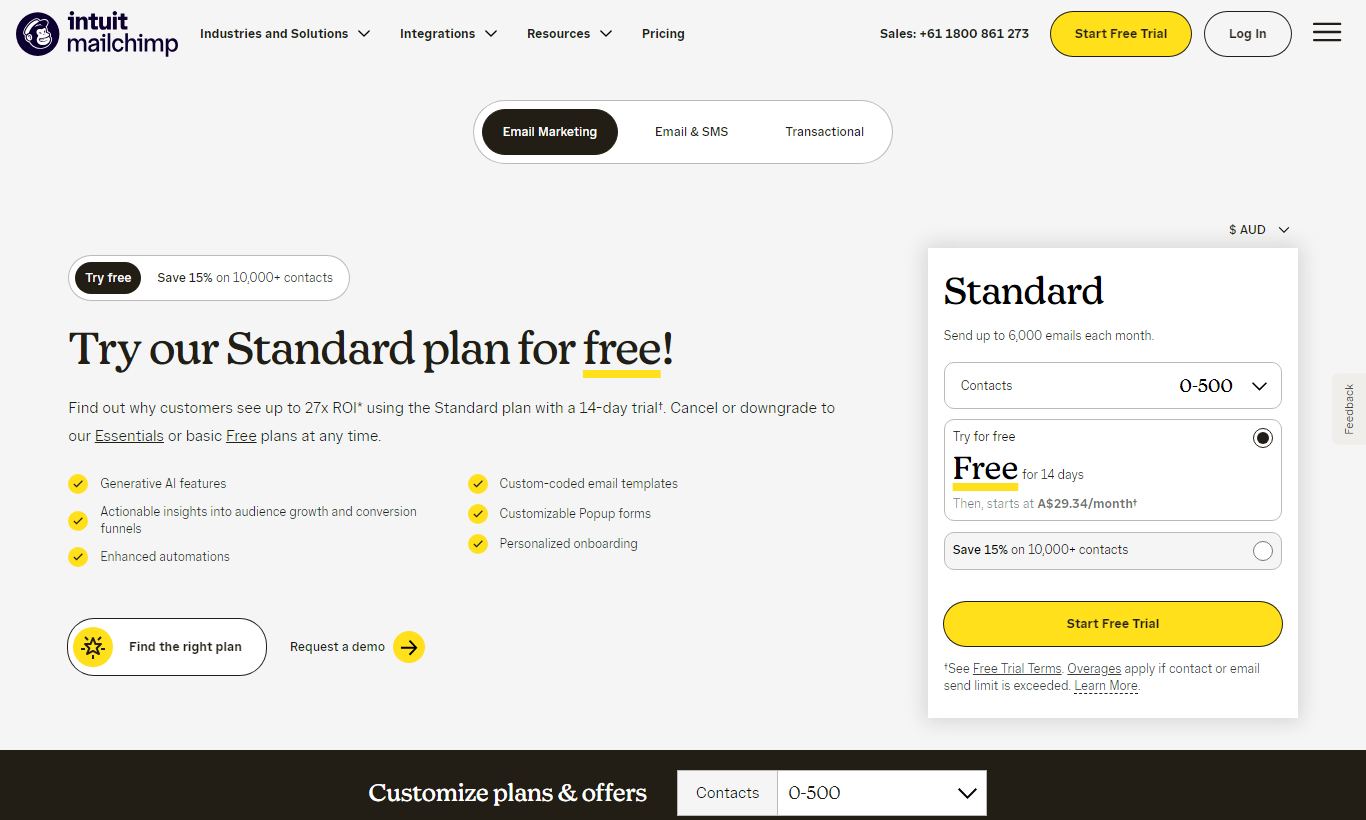
Free - $0/month: Supports up to 500 contacts and 1,000 sends per month. Includes basic templates, single-step automations, a landing page, and signup forms. Emails carry Mailchimp branding. Email support only lasts the first 30 days. After that, free plan users get self-service documentation and nothing more.
Essentials - from $13/month: The entry-level paid tier starts at $13/month for 500 contacts (billed monthly), with a send limit of 10x your contact count. It unlocks all email templates, A/B testing, removal of Mailchimp branding, and 24/7 chat and email support. Costs climb to roughly $80/month at 10,000 contacts.
Standard - from $20/month: This is the tier most people recommend, starting at $20/month for 500 contacts. It adds the Customer Journey Builder, send-time optimisation, dynamic content blocks, predictive segmentation, and retargeting ad creation. At 10,000 contacts, expect around $100/month. Pay annually and you'll save roughly 15%.
Premium - from $350/month: Built for high-volume senders and larger teams, this tier starts at $350/month for 10,000 contacts. It includes unlimited audiences, advanced segmentation, multivariate testing, comparative reporting, role-based user permissions, and priority phone support. Most small and mid-sized businesses will never need it.
Paid plans don't offer a free trial beyond the free tier itself. Annual billing discounts apply automatically the moment you choose yearly payment at checkout.
What We Love
- Genuinely usable free plan: 500 contacts and 1,000 sends per month with no credit card required. That's one of the most accessible entry points in email marketing, and it's a solid way to test the platform before you commit any budget.
- Polished drag-and-drop editor with in-browser image editing: Even first-time users can build a professional-looking email in under 30 minutes. The built-in image editor means you won't need to switch between tools.
- E-commerce revenue attribution: Native integrations with Shopify and WooCommerce connect email sends directly to order data. You can see exactly how much revenue each campaign generated, which matters a lot for DTC brands.
- Behavioural and predictive segmentation on Standard tier: You can filter by purchase history, predicted lifetime value, and engagement level. That lets you run targeted campaigns that outperform generic broadcast sends by a real margin.
- Self-service knowledge base and Mailchimp Academy: The documentation is thorough and clearly written. It's especially useful for first-time email marketers who need guidance on deliverability, list hygiene, and automation strategy.
Watch Out For
- Pricing becomes uncompetitive at scale: The Standard plan for a 50,000-contact list runs over $270/month. At that volume, Brevo (formerly Sendinblue) and Klaviyo pack more features into every dollar, so model your costs carefully before committing to Mailchimp long-term.
- Branching automation is paywalled at Standard: Multi-step conditional workflows, the kind you'd need for a proper lead nurture or onboarding sequence, aren't available on the Essentials plan. That $13/month entry tier is genuinely limited for automation-driven businesses.
- Support quality drops significantly below Premium: Free and Essentials users get no phone support. Free plan users lose email support after 30 days entirely. Real users on review platforms consistently flag slow response times and templated replies on the chat channel as a source of frustration.
- Transactional email is a separate paid add-on: Mandrill, Mailchimp's transactional email service, isn't bundled into any plan. SaaS companies and e-commerce stores that need to send order confirmations, password resets, and receipts will pay $20+ per month on top of the effective cost. It's a genuine architectural headache.
Who Is It Best For?
The content creator or newsletter publisher with under 10,000 subscribers: A podcaster, blogger, or independent journalist running a weekly newsletter will find Mailchimp's free and Essentials tiers cover everything they need. Templates, basic segmentation, open rate tracking, and signup form embeds all come at minimal cost. The editor is fast enough to turn a newsletter around in an hour, and the analytics give enough signal to improve over time.
The small e-commerce brand doing $500K - $5M in annual revenue: A Shopify-based DTC brand in this revenue range is exactly the user profile Mailchimp is built for. The native store integration syncs product catalogues and customer purchase history automatically. Cart abandonment automations take under an hour to configure, and revenue-per-campaign reporting draws a direct line between email activity and bottom-line results. The Standard plan at this scale typically runs $60 - $130/month, a cost the attribution data backs up.
The nonprofit or community organisation managing event communications: Nonprofits managing donor communications, volunteer updates, and event announcements lean on Mailchimp's free plan and low-cost paid tiers often. The landing page builder works well for event registration, the form builder captures new supporter data, and the interface is simple enough that volunteer staff can run campaigns without much training.
How Does It Compare?
Mailchimp vs ActiveCampaign: ActiveCampaign wins for automation-heavy use cases. Its conditional logic, lead scoring, and built-in CRM go a lot deeper than Mailchimp's Standard tier. But ActiveCampaign has no free plan, starts at $15/month, and takes longer to learn. Mailchimp vs ActiveCampaign comes down to a trade-off: simplicity versus automation power.
Mailchimp vs Brevo (formerly Sendinblue): Brevo prices by email volume instead of contact count, which makes it far cheaper for businesses with large lists but moderate send frequency. At 50,000 contacts, Brevo's Business plan beats Mailchimp Standard by a wide margin. Its editor and template library aren't as polished, though. See the full Mailchimp vs Brevo breakdown for a detailed, feature-by-feature analysis.
Final Verdict
Mailchimp earns its position as the most widely recommended starting point in email marketing because it delivers on its core promise. You can go from zero to a professional, well-targeted email campaign in an afternoon, without a developer, a designer, or a training course. The free plan is among the most useful in the category, the e-commerce integrations are best-in-class for the price range, and the overall polish of the product reflects two decades of iteration based on real user feedback.
Where it falls short is at scale and for teams with advanced automation needs. If your contact list exceeds 30,000-50,000 subscribers, take a serious look at Brevo or Klaviyo before defaulting to Mailchimp's higher pricing tiers. If your marketing strategy hinges on sophisticated multi-branch automation sequences, lead scoring, or deep CRM integration, ActiveCampaign will serve you better despite its higher learning curve. For everyone else, particularly small businesses, e-commerce brands in their growth phase, and content publishers, Mailchimp remains one of the most sensible, well-rounded choices available in 2026.
Try Mailchimp Free →FAQ
Is Mailchimp free to use?
Yes. Mailchimp offers a permanently free plan that supports up to 500 contacts and 1,000 email sends per month. No credit card is required to sign up. The free plan includes basic templates, single-step automations, and a landing page builder. It shows Mailchimp branding on outgoing emails and limits you to one audience list.
How much does Mailchimp cost per month?
Mailchimp's paid plans start at $13/month (Essentials, up to 500 contacts), $20/month (Standard, up to 500 contacts), and $350/month (Premium, starting at 10,000 contacts). Pricing scales with your contact count. The Standard plan for 10,000 contacts costs around $100/month. Annual billing cuts costs by roughly 15%.
Is Mailchimp good for small businesses?
Yes, Mailchimp is one of the best email marketing tools for small businesses. The free plan is genuinely usable for early-stage businesses with small lists, and the Essentials and Standard tiers offer professional features at accessible price points. It's easy enough that you can launch a campaign in under 30 minutes without any technical skills.
How does Mailchimp compare to ActiveCampaign?
Mailchimp is easier to use and cheaper at low contact counts. ActiveCampaign offers deeper marketing automation, with conditional branching, lead scoring, and CRM tools built into every paid plan. If automation sophistication matters more than simplicity, go with ActiveCampaign. If you want a quick setup and a free tier, Mailchimp wins.
Does Mailchimp have marketing automation?
Yes, but the depth depends on your plan. The free and Essentials plans include single-step automations (a welcome email triggered on signup, for example). The Standard plan unlocks the Customer Journey Builder, which supports multi-step workflows with branching logic based on user behaviour, purchases, and engagement. You need the Standard tier or above for full automation power.
Is Mailchimp worth it in 2026?
Mailchimp is worth it for businesses that value ease of use, a reliable free entry point, and solid e-commerce integrations. It gets less cost-effective once your contact list grows past 20,000 to 50,000 subscribers, where platforms like Brevo or Klaviyo offer better pricing for high-volume senders. It scores 4.1 out of 5 and remains a top pick for small to mid-sized marketing teams.
Does Mailchimp integrate with Shopify?
Yes. Mailchimp has a native Shopify integration that syncs customer data, purchase history, and product catalogues directly into your email campaigns. You can trigger automated emails based on purchases or abandoned carts, embed product blocks into newsletters, and track revenue generated per campaign from within the Mailchimp dashboard.
What are the main limitations of Mailchimp?
The most common complaints about Mailchimp include steep pricing at higher contact tiers, limited automation logic on the Essentials plan, email-only support on the free tier that expires after 30 days, and the fact that transactional emails via Mandrill cost extra on top of any standard plan. It also lacks a built-in CRM with deal pipelines for sales-focused teams.
We may earn a commission when you click affiliate links. This never affects our editorial scores.
| Best for | Email marketing and automations |
| Category | Email Marketing |
Answer a few quick questions and we'll match you to the best tool for your needs.
→ Suggest a Tool