
ConvertKit Review 2026: Is It Worth It?
ConvertKit (now rebranded as Kit) is an email marketing platform built for creators: bloggers, podcasters, course sellers, and independent newsletter writers. It's earned a strong reputation for simplicity. Tagging-based subscriber management replaces clunky list silos, the visual automation builder is genuinely easy to use, and the free plan supports up to 10,000 subscribers with unlimited emails. Paid plans start at $25/month for 1,000 subscribers. ConvertKit stands out for helping creators make money from their audience. Built-in tip jars, paid newsletters, and a creator network for cross-promotion set it apart from generic ESP competitors. It's not a great fit for e-commerce brands that need deep segmentation, or for teams that want A/B testing on automation sequences. For the solo creator or small digital-product business trying to grow and monetize an audience without a steep learning curve, ConvertKit is one of the strongest choices available in 2026.
What we love
Watch out for
Convertkit at a glance
What to test in your Convertkit trial
Free plan
- Build a welcome automation sequence with conditional branches based on subscriber tags
- Set up mutual creator recommendations in the Creator Network and track opt-ins from partner newsletters
- Create a paid newsletter tier or add a tip jar to test direct monetization without leaving the platform
- Import your current subscriber list and test tagging workflow against your current list-based segmentation
- Run an A/B test on a landing page headline to compare form conversion rates
Quick Verdict
ConvertKit is about as close as the creator economy gets to a purpose-built email platform. It strips away the dashboard bloat you'll find in tools like Mailchimp or ActiveCampaign and replaces it with a focused workflow: grow your list, segment it with tags, automate sequences, and get paid, all from one interface. For bloggers, podcasters, and newsletter writers who've outgrown Mailchimp's free tier but don't need the enterprise overhead of a HubSpot, ConvertKit hits a genuine sweet spot.
The catch is that ConvertKit's strength is also its limit. The platform is opinionated. It works great if you run a creator-style business, less so if you're a B2B SaaS company needing complex multi-step lead scoring, or an e-commerce brand wanting abandoned cart triggers powered by deep product catalog data. If you fit the target profile, the value is hard to argue with, especially on the free plan, which is genuinely generous at 10,000 subscribers.
Start Your Free Trial →What is ConvertKit?
Nathan Barry founded ConvertKit in 2013 out of frustration with email tools built for marketers, not creators. The company has since rebranded its product identity to "Kit" while keeping the ConvertKit domain, and it now serves over 600,000 creators worldwide. Its target user is specific: an independent content creator, course builder, author, or newsletter operator who earns income directly from their audience. The platform has deliberately avoided turning into a general-purpose marketing suite. That's both its greatest strength and its clearest market constraint.
ConvertKit sits in a growing niche between basic email tools (Mailchimp, MailerLite) and full marketing automation platforms (ActiveCampaign, HubSpot). It competes most directly with Beehiiv and Ghost on newsletter monetization, and with MailerLite on price-to-feature ratio. Its Creator Network, a cross-promotion tool that lets creators recommend each other's newsletters, is a genuinely different feature you won't find on most competing platforms.
Key Features
Feature Checklist
Subscriber Tagging and Segmentation
ConvertKit ditches the old "multiple lists" model in favor of a single unified subscriber database built on tags and segments. Instead of duplicating a subscriber across three lists, you tag them ("podcast-listener," "bought-course-2024," "webinar-attendee") and target broadcasts to any combination of those tags. This matters in practice. You're billed by unique subscribers, not by the sum of multiple list memberships, so it saves real money as your audience grows. Segments update automatically as subscriber tags and custom fields change. A segment called "engaged-last-30-days" stays accurate without you touching it.
Visual Automation Builder
The automation builder uses a drag-and-drop canvas to map sequences triggered by events: a form submission, a tag being applied, a link clicked inside an email, or a purchase through an integrated product. Each node on the canvas can be an email, a delay, a conditional branch ("if subscriber has tag X, send email A, otherwise send email B"), or an action like adding a tag or subscribing someone to another sequence. Compared to ActiveCampaign's automation builder, ConvertKit's is noticeably simpler. It won't handle deeply nested logic trees. But for most creator use cases, welcome sequences, course delivery, re-engagement campaigns, it covers the bases cleanly without requiring a flowchart degree.
Email Broadcasts and Templates
Broadcasts are one-off sends to your list or a segment of it. The editor offers two paths: a plain-text style editor that renders well on mobile and desktop (the go-to for personal newsletters), and a visual block editor with image, button, and column blocks for more designed campaigns. Templates are clean and minimal. ConvertKit's design philosophy deliberately discourages heavy HTML template use, on the reasoning that plain-text emails feel more personal and generate higher reply rates. It's an opinionated stance, but the data generally backs it up for creator audiences.
Creator Monetization Tools
This is where ConvertKit genuinely stands apart. The platform includes built-in tools to sell digital products and paid newsletters without needing a third-party integration. You can set up a paid newsletter tier (powered by Stripe) where subscribers pay monthly or annually for premium content, delivered directly through ConvertKit. The tip jar feature lets readers support your work with one-time payments. For digital products like eBooks or templates, ConvertKit Commerce handles the transaction, file delivery, and subscriber tagging automatically, marking a buyer as such in your database so you can suppress future sales pitches. ConvertKit takes a 3.5% + $0.30 transaction fee on the free plan and no platform fee (just Stripe's standard rate) on paid plans.
Creator Network and Recommendations
The Creator Network is a unique feature. When a new subscriber opts into your list, you can show them an "also recommended" screen featuring other ConvertKit creators whose audience overlaps with yours. You set up mutual recommendations with creators you trust, and both parties grow their lists organically through each other's confirmation flows. Early adopters have reported meaningful list growth, in some cases hundreds of new subscribers per month, at zero additional cost. It's an underrated advantage that neither Mailchimp nor MailerLite can match.
Landing Pages and Forms
ConvertKit includes a landing page builder with around 50+ templates, covering opt-in pages, link-in-bio pages, and webinar registration flows. Forms come in four formats, inline, modal, slide-in, and sticky bar, and can be embedded on any site or hosted on a ConvertKit subdomain. A/B testing is available on form headlines (on paid plans), so you can test opt-in copy to improve conversion rates. The landing page builder is capable but not as flexible as a dedicated tool like Unbounce. For simple lead capture pages, though, it removes the need for an extra subscription.
Pricing
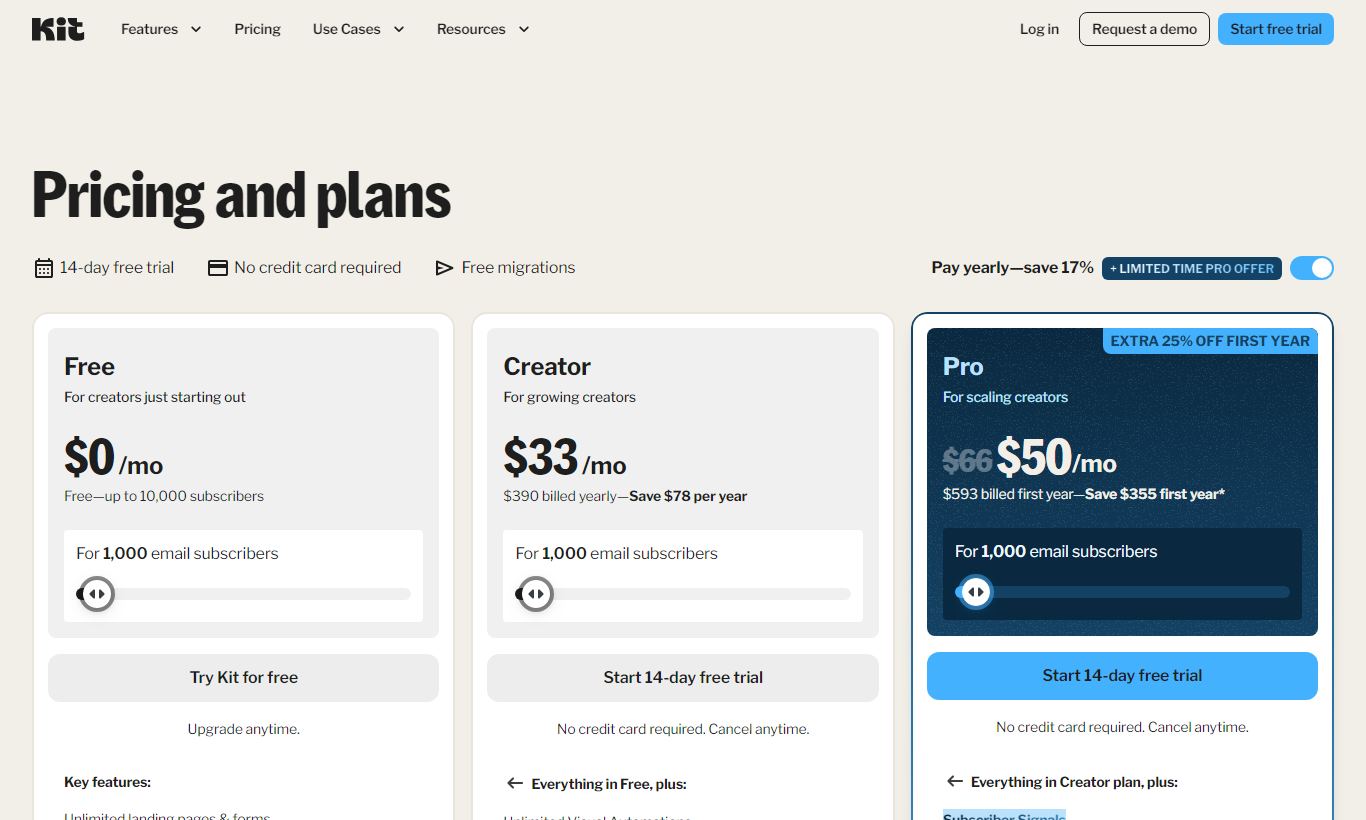
ConvertKit prices by subscriber count, and it scales predictably. Every tier bills per 1,000-subscriber increment, and paying annually knocks roughly 17% off the monthly rate.
- Free Plan, $0/month: Up to 10,000 subscribers, unlimited email sends, unlimited landing pages and forms, basic email sequences (limited to one automation). No paid newsletter features. ConvertKit branding shows on emails. This is one of the most generous free plans in the industry by subscriber count.
- Creator, $25/month (billed monthly, 1,000 subscribers): Removes ConvertKit branding, unlocks the full visual automation builder, free migration from another ESP, third-party integrations (Shopify, Teachable, and Zapier among them), and the Creator Network. Price climbs to $50/month at 5,000 subscribers and $100/month at 25,000 subscribers.
- Creator Pro, $50/month (billed monthly, 1,000 subscribers): Adds advanced reporting with subscriber scoring, a newsletter referral system, priority support, Facebook custom audiences integration, and team members. At 5,000 subscribers, this tier costs $92/month. Pay annually and Creator Pro for 1,000 subscribers drops to $42/month.
There's no free trial on paid plans, not really. The free plan works as an indefinite trial instead. You upgrade when you need the paid features, not when a clock runs out. For high-volume senders with 100,000+ subscribers, pricing gets negotiated directly and can compete with enterprise ESPs.
What We Love
- Free plan covers up to 10,000 subscribers with unlimited sends. That kind of generosity is rare, and it lets creators build a real audience before paying a cent.
- Tag-and-segment model eliminates duplicate billing. One subscriber with five tags counts as one contact, not five, unlike traditional list-based tools.
- Built-in paid newsletter and digital product commerce. Creators can monetize without stitching together Stripe, Gumroad, and a separate ESP.
- Creator Network enables organic list growth through mutual newsletter recommendations at the point of opt-in, a growth lever most competing platforms simply don't offer.
- The visual automation builder is genuinely approachable for non-technical users. It has conditional logic, event-based triggers, and a clear visual flow map.
Watch Out For
- No A/B testing on automations. You can split-test form headlines, but subject lines and content inside automation sequences aren't testable. That gap frustrates growth-focused creators.
- Email design stays deliberately basic. The platform pushes you toward plain-text formats, and the visual block editor doesn't match the layout control you get in Klaviyo or Campaign Monitor. Brands that need rich HTML templates will feel boxed in.
- Reporting is thin on the lower tiers. Free and Creator plans show basic open and click rates, but subscriber scoring, detailed engagement history, and deliverability analytics sit behind Creator Pro.
- It's not built for e-commerce or B2B SaaS workflows. There's no native abandoned cart automation, no CRM-style deal tracking, and no lead scoring based on website behavior unless you build heavy Zapier workarounds.
Who Is It Best For?
The independent newsletter writer with 1,000 - 50,000 subscribers gets the most out of ConvertKit. Someone running a weekly paid newsletter on, say, climate technology or personal finance will find the platform handles subscriber management, payment collection, and content delivery in one place. That replaces a combination of Substack (which takes a 10% revenue cut) and a separate ESP.
The course creator or digital product seller who already has a blog or social audience and wants to build an email list to fuel product launches will see real ROI from ConvertKit's automation sequences and commerce features. A health coach selling a $97 online program, for example, can build a welcome sequence, tag purchasers automatically, and suppress them from future promotional broadcasts, all without hiring a developer.
The content creator still building their list, a podcaster or YouTuber just starting to grow an email list who isn't ready to pay for email marketing yet, gets a lot out of the free plan's 10,000-subscriber limit. They can embed forms, run automations, and deliver lead magnets without a credit card, then upgrade to paid features once the business generates enough revenue to justify it.
How Does It Compare?
ConvertKit vs. Mailchimp: Mailchimp packs in more features for design-heavy campaigns and e-commerce integrations. But its list-based billing means you pay for the same subscriber more than once if they sit on multiple lists. For creators, ConvertKit's tagging model is cleaner and cheaper. Check our full ConvertKit vs Mailchimp breakdown.
ConvertKit vs. Beehiiv: Beehiiv has won over a lot of newsletter creators with a more polished, publication-style web experience and solid monetization through its ad network. ConvertKit still wins on automation depth, and its Creator Network gives it an edge for creators who sell products beyond newsletter subscriptions. Beehiiv remains a strong alternative for anyone running a pure newsletter. See our ConvertKit vs Beehiiv comparison for the full head-to-head.
Final Verdict
ConvertKit does what it says on the tin. It's a focused, creator-native email platform that lets you grow, segment, and monetize an audience without needing a marketing operations background. The free plan is among the best in the industry. The automation builder strikes the right balance between power and approachability. And the built-in commerce tools cut the friction between an audience and revenue.
It's not the right tool if you need deep e-commerce automation, complex behavioral lead scoring, or rich HTML template design. The lack of A/B testing inside automation sequences is a real gap for data-driven operators. But if you're a creator, consultant, or small digital-product business who wants an email platform that grows with you and doesn't charge you twice for the same subscriber, ConvertKit is still one of the smartest picks out there in 2026.
Try ConvertKit Free →FAQ
Is ConvertKit free?
Yes. ConvertKit offers a permanently free plan that supports up to 10,000 subscribers with unlimited email sends, landing pages, and one automation. No credit card required. By subscriber count, it's one of the most generous free tiers in email marketing.
How much does ConvertKit cost per month?
ConvertKit's Creator plan starts at $25/month for up to 1,000 subscribers (billed monthly), scaling to $50/month for 5,000 subscribers and $100/month for 25,000. The Creator Pro plan starts at $50/month for 1,000 subscribers. Annual billing cuts costs by roughly 17%.
Is ConvertKit good for beginners?
Yes, especially for creator-type beginners. The interface is deliberately simple, the free plan removes financial risk, and the automation builder uses a visual canvas that doesn't require technical knowledge. Beginners coming from a general marketing background may find the lack of multi-list management unfamiliar at first.
ConvertKit vs. Mailchimp, which is better?
Depends on your use case. ConvertKit's tag-based subscriber model is more efficient and cheaper for creators with complex segmentation needs. Mailchimp offers more design flexibility and stronger e-commerce integrations. Newsletter creators and digital product sellers tend to do better with ConvertKit. Retail and e-commerce brands should look at Mailchimp or Klaviyo instead.
Does ConvertKit have a landing page builder?
Yes. ConvertKit includes a landing page builder with 50+ templates, available on all plans including the free tier. Pages can be hosted on a ConvertKit subdomain or embedded on your own site. It handles basic lead capture well but lacks the advanced customization of dedicated landing page tools like Unbounce.
Can you sell products directly through ConvertKit?
Yes. ConvertKit Commerce lets you sell digital products (eBooks, templates, courses) and paid newsletter subscriptions directly through the platform, powered by Stripe. The free plan charges a 3.5% + $0.30 platform fee. Paid plans only incur Stripe's standard processing fee, with no extra cut for ConvertKit.
Is ConvertKit worth it for small lists under 1,000 subscribers?
Yes. The free plan covers lists up to 10,000 subscribers, so anyone with fewer than 1,000 subscribers pays nothing. Start on the free plan and only upgrade to Creator or Creator Pro once you need the visual automation builder, integrations, or the advanced reporting those tiers unlock.
We may earn a commission when you click affiliate links. This never affects our editorial scores.
| Best for | — |
| Category | Email Marketing |
Answer a few quick questions and we'll match you to the best tool for your needs.
→ Suggest a Tool