
LiveAgent Review 2026: Is It Worth It?
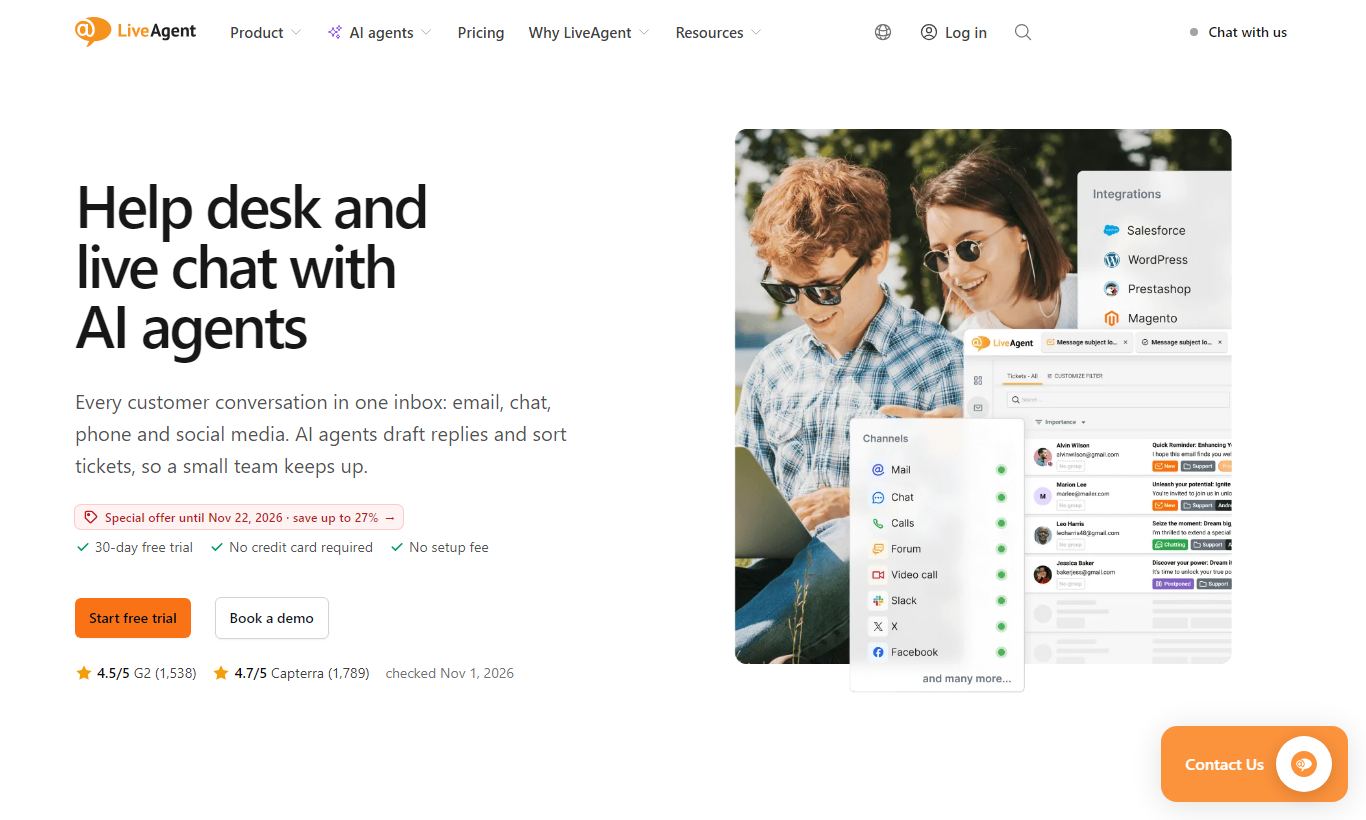
LiveAgent is a feature-dense help desk and customer support platform built around a universal inbox that pulls tickets from email, live chat, voice, social media, and more into a single agent workspace. Founded in 2011 by Quality Unit, it serves over 150 million end users across 40,000+ businesses. Plans start at $15/agent/month, with a generous free tier and a 30-day free trial on paid plans. LiveAgent stands out for its breadth. Few platforms at this price point bundle a full call centre, live chat with the fastest widget speeds in the market, and strong automation tools. It's an especially good fit for SMBs and mid-market companies that want an all-in-one support stack without paying enterprise prices. Larger organisations with complex CRM needs may find integrations thinner than dedicated rivals like Salesforce Service Cloud.
What we love
Watch out for
Liveagent at a glance
What to test in your Liveagent trial
30-day free trial
- Connect your email, live chat, and phone into one inbox and handle a full day of tickets without switching apps
- Set up an automation rule that tags and routes a ticket type to the right team without manual sorting
- Test the live chat widget on your website and measure load time against your current solution
- Build a knowledge base article and check if it reduces repeat questions from customers
- Pull a custom report comparing first response time and resolution time across your team members
- Decide whether to upgrade before the trial ends or your first bill arrives
Quick Verdict
LiveAgent earns its reputation as one of the best-value help desk platforms on the market. At $29 per agent per month (the Medium Business plan), you get a unified inbox spanning email, live chat, voice, Facebook, Instagram, and Twitter, plus a full built-in call centre with IVR and unlimited call recordings. That combination would cost substantially more on Zendesk or Freshdesk once you stack comparable add-ons. The platform isn't perfect. Its reporting UI feels like it hasn't fully caught up with the underlying data power, and the mobile apps need work. Still, for any SMB or mid-market team currently juggling separate email clients, a third-party chat widget, and a phone system, LiveAgent is likely the consolidation play they've been looking for.
The 30-day free trial (no credit card required) means there's no financial risk in running a real pilot with your team. That's the right way to evaluate a tool this broad.
Start Your Free Trial →What is LiveAgent?
LiveAgent is a cloud-based customer support platform developed by Quality Unit, a software company founded in Bratislava that launched the product in 2011. Today it serves over 40,000 businesses and handles interactions for more than 150 million end users worldwide. The platform is built for customer-facing support teams, from solo operators handling a few dozen tickets a day to mid-market operations running multi-department, multilingual support queues. Many tools started as single-channel products and had extra channels bolted on later. LiveAgent didn't. It was built around a universal inbox concept from early in its development, and that shows in how naturally the different channel types sit together in the agent workspace.
LiveAgent positions itself against Zendesk, Freshdesk, and Intercom. In practice, it competes most directly with Freshdesk on price and Zendesk on feature breadth. It sits in a practical middle ground. It's more full-featured than budget tools like Groove or HelpScout, and considerably cheaper than enterprise platforms like Salesforce Service Cloud or ServiceNow.
Key Features
Feature Checklist
Universal Inbox & Ticketing
Every interaction, no matter the channel, becomes a ticket in LiveAgent. An email from a frustrated customer, a live chat that escalated, an Instagram DM, a missed call, a contact form submission. They all land in the same queue, sortable by priority, SLA status, department, or agent. Tickets can be merged (when a customer follows up across two channels), split (when one conversation contains multiple separate issues), and tagged for routing or reporting. The full audit trail on every ticket, who viewed it, who replied, when, from which channel, is invaluable for team oversight and dispute resolution. You don't notice this feature until you've worked in a system that lacks it. After that, you can't imagine going back.
Live Chat Widget
LiveAgent's live chat widget is independently benchmarked as one of the fastest loading in the industry, typically under 2.5 seconds. That matters for teams worried about page-speed scores (a factor in Google's Core Web Vitals ranking signals). The widget is fully customisable: brand colours, position, pre-chat survey fields, and offline fallback forms. Proactive chat triggers let you automatically invite visitors to chat based on rules like "spent more than 45 seconds on the pricing page" or "visited the returns page twice in a session." For e-commerce support teams, this kind of behaviour-triggered outreach can meaningfully cut abandoned cart rates. Chat can also be routed to specific departments or agents based on the page the visitor is on.
Built-in Call Centre
From the $29 Medium Business plan upward, LiveAgent includes a fully operational call centre. No Twilio setup, no third-party telephony integration required. You get IVR (interactive voice response) with a drag-and-drop flow designer, automatic call distribution (ACD) with skills-based routing, call queuing with hold music, unlimited call recordings stored in the cloud, and a callback request feature so customers don't have to wait on hold. Video calling is also available on the Large Business plan. For a small support team currently paying separately for a VoIP provider, this alone can justify the upgrade from Small to Medium Business tier.
Automation Rules Engine
LiveAgent's automation rules are genuinely powerful and cover two trigger types: action-based (something happens, so you do something) and time-based (if a ticket is open for X hours with no response, it escalates). Here's a practical example: a rule that automatically assigns any ticket tagged "billing" to the finance department, sets it to high priority, and sends the customer an acknowledgement email, all within seconds of ticket creation, with no agent involvement. SLA policies can be layered on top, so if that billing ticket isn't responded to within two hours, it auto-escalates to a supervisor. Building these rules requires no coding. The interface uses dropdown condition builders that most support managers can configure in under an hour.
Knowledge Base & Customer Portal
Every paid plan includes a self-service customer portal with a built-in knowledge base. Articles are written using a WYSIWYG editor that supports images, videos, attachments, and internal links. You can create multiple knowledge bases for different brands or product lines from a single LiveAgent account, a genuinely useful capability for agencies or companies with multiple sub-brands. The portal also includes a community forum where customers can post questions and upvote answers, turning your most engaged customers into first-line support contributors. Deflection rates from a well-maintained LiveAgent knowledge base are typically significant. Teams report 20 to 35% reductions in ticket volume within the first three months of deploying self-service content.
Reporting & Analytics
LiveAgent's reporting suite covers the metrics that matter most to support managers: ticket volume by channel and time period, first response time, resolution time, agent performance comparisons, SLA compliance rates, customer satisfaction (CSAT) scores, and chat engagement metrics. The real-time dashboard gives team leads a live view of open tickets, available agents, and active chat sessions, which is useful for managing queues during peak hours. Where the platform falls short is customisation. The data depth is good, but building custom report views requires more navigation than it should, and the visual design of the analytics module hasn't kept pace with more modern tools like Intercom or Zendesk Explore.
Pricing
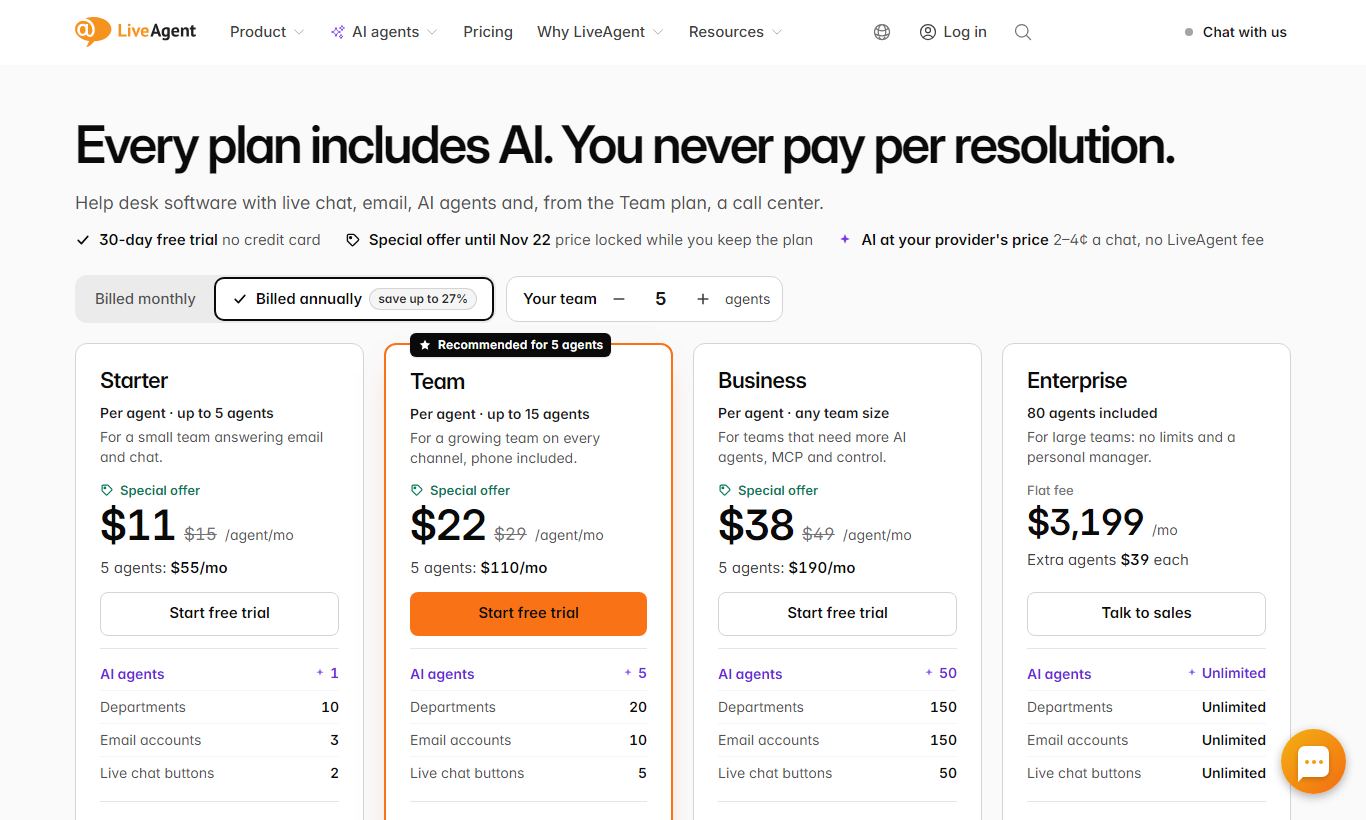
LiveAgent's pricing is refreshingly transparent. There are five tiers, all billed per agent per month:
- Free - $0/forever: Includes 1 email address, 1 live chat button, 1 phone number, and 7 days of ticket history. It's genuinely usable for solo support operators, but the ticket history cap will frustrate anyone who needs to reference older conversations.
- Small Business - $15/agent/month (annual billing): Unlimited email and chat, full ticket history, a knowledge base and customer portal, basic automation, and API access. A strong entry point for growing teams.
- Medium Business - $29/agent/month (annual billing): Adds the built-in call centre, social media channels (Facebook, Instagram, Twitter/X), SLA management, time tracking, and advanced reporting. This is the recommended tier for most teams.
- Large Business - $49/agent/month (annual billing): Unlocks WhatsApp integration, video call support, IP allowlisting, custom roles and permissions, and an assisted onboarding package.
- Enterprise - $69/agent/month (annual billing): Adds a dedicated account manager, custom SLAs, uptime SLA guarantees, data migration support, and priority support routing.
Monthly billing is available on all tiers at a slight premium over the annual rates above. A 30-day free trial is available on all paid plans with no credit card required. It's a genuine, full-featured trial rather than a feature-limited demo.
What We Love
- All-in-one channel coverage at a fair price: The Medium Business plan at $29/agent/month bundles email, live chat, a fully functional call centre, and social media channels. Replicating that combination on Zendesk or Freshdesk costs a lot more.
- Chat widget page-speed performance: The sub-2.5-second widget load time is independently verified, so deploying LiveAgent chat won't hurt your Core Web Vitals scores. Most vendors don't even address this.
- No-code automation that actually scales: Time-triggered and action-triggered rules with SLA escalation paths let lean support teams automate the repetitive routing and acknowledgement work that otherwise eats up agent time.
- Unlimited call recordings on every call-centre-enabled plan: Most telephony integrations charge extra for recording storage. LiveAgent includes it, which saves real money for compliance-conscious teams.
- Multi-brand knowledge base support: You can create separate, independently branded self-service portals from a single LiveAgent account. Competing platforms rarely offer this below their enterprise tier.
Watch Out For
- Reporting UI is functionally powerful but visually dated: The data is all there, but getting to custom date ranges, drilling into a specific agent's performance, or exporting a usable dashboard takes more clicks than it should. Teams with heavy reporting needs may find this grating day-to-day.
- Thin native CRM: Contact records in LiveAgent capture ticket history and basic notes. There's no deal pipeline, no segmentation by lifecycle stage, and no sales activity logging. If your support team also handles upsells or renewal conversations, you'll need a separate CRM tool alongside LiveAgent.
- Key social channels gated behind higher tiers: WhatsApp, now the primary support channel in many markets, is only available from the $49 Large Business plan. Teams picking LiveAgent specifically for WhatsApp support need to budget for that tier.
- Mobile app reliability issues: Both the iOS and Android apps get consistent user complaints about delayed or missed push notifications, plus a chat interface that feels cramped. For distributed teams whose agents regularly work from mobile devices, this is a real operational risk.
Who Is It Best For?
E-commerce support teams (5 - 50 agents): A Shopify or WooCommerce merchant fielding pre-sale questions via chat, order issues via email, and post-purchase calls is the textbook LiveAgent customer. The behaviour-triggered chat invitations, native Shopify integration, and built-in call centre mean one $29/agent platform replaces three separate tools. At 10 agents, that's $290/month versus potentially $600 - $800 on a piecemeal stack.
SaaS customer success teams offering tiered support: A B2B SaaS company with free, pro, and enterprise customers can use LiveAgent's department routing, SLA tiers, and custom roles to give enterprise customers priority queue access while routing self-service customers to the knowledge base first. The multi-knowledge-base feature supports separate help centres for different product lines, so you don't need multiple accounts.
Service businesses with inbound phone as a primary channel: A legal firm, healthcare practice, or financial services office where the phone is still the dominant contact channel will find LiveAgent's built-in call centre (with IVR, skills-based routing, and call recording) cheaper and better integrated than running a separate VoIP system alongside a help desk. At $29/agent, the call centre comes included. It's not an add-on.
How Does It Compare?
Zendesk: Zendesk offers more sophisticated analytics, a larger app marketplace (1,400+ integrations vs LiveAgent's 200+), and deeper CRM-style customer data. To match LiveAgent's Medium Business plan features, though, you'd typically be looking at Zendesk Suite starting at $55/agent/month or higher with add-ons. For cost-conscious teams that don't need Zendesk's enterprise depth, LiveAgent wins on value. See our full LiveAgent vs Zendesk breakdown for a detailed feature-by-feature comparison.
Freshdesk: Freshdesk's free and Growth plans are comparable entry points, but Freshdesk's call centre (Freshcaller) and social channels are separate products requiring separate subscriptions. LiveAgent's all-in-one architecture at the Medium Business tier is genuinely more integrated. For most teams, it's cheaper once you cost out equivalent Freshdesk add-ons. See our LiveAgent vs Freshdesk guide for a side-by-side pricing and feature breakdown.
Final Verdict
LiveAgent is one of the most complete customer support platforms you'll find under the $50/agent/month mark. The Medium Business plan at $29/agent/month hits the sweet spot. It includes what most support teams actually need: a unified inbox, live chat with proactive triggers, a full call centre, social media channels, SLA automation, and a self-service knowledge base. The platform has flaws. The reporting interface needs a redesign, the mobile apps could use real investment, and teams with deep CRM needs will hit a ceiling on contact management. But if your current support stack is a patchwork of separate tools, or you're outgrowing a single-channel help desk, LiveAgent is a credible, affordable upgrade. It'll consolidate your operations without wrecking your budget.
Some teams should look elsewhere: enterprise operations that need Salesforce-grade CRM integration, teams whose primary channel is WhatsApp but can't justify the $49 Large Business tier, and mobile-first support teams who need a polished app experience.
Try LiveAgent Free →FAQ
How much does LiveAgent cost?
LiveAgent plans range from a free tier to $15, $29, $49, and $69 per agent per month when billed annually. Monthly billing costs a bit more. Every paid plan comes with a 30-day free trial, and you don't need a credit card to start one.
Does LiveAgent have a free plan?
Yes. The free plan sticks around indefinitely and includes 1 email address, 1 live chat button, 1 phone number, and 7 days of ticket history. It works fine for solo operators or very small teams sizing up the platform before they commit to a paid tier.
Is LiveAgent good for small businesses?
LiveAgent is one of the strongest options out there for SMBs. The Small Business plan, at $15/agent/month, covers unlimited email and chat, a knowledge base, and API access. That's more than most rivals offer at the same price. The free plan also lets very small teams get started at zero upfront cost.
How does LiveAgent compare to Zendesk?
Zendesk offers deeper CRM-style customer data, a bigger app marketplace, and more polished analytics. LiveAgent wins on price. Its $29 Medium plan includes a built-in call centre and social channels that Zendesk would charge a lot more to replicate. If you're a budget-conscious SMB that doesn't need Zendesk's enterprise ecosystem, LiveAgent is the stronger value play.
Does LiveAgent include a call centre?
Yes. From the Medium Business plan ($29/agent/month) upward, LiveAgent includes a full built-in call centre with IVR, automatic call distribution, call queuing, unlimited call recordings, and callback request functionality. You won't need a separate telephony platform.
Is LiveAgent worth it in 2026?
For SMBs and mid-market teams that want one platform covering email, live chat, voice, and social without enterprise pricing, LiveAgent delivers real value. Teams that need deep CRM integration or advanced AI-driven analytics will outgrow it eventually. But at $29 to $49 per agent per month, the range of features here is hard to match.
What integrations does LiveAgent support?
LiveAgent offers 200+ native integrations, including Shopify, Magento, WooCommerce, Pipedrive, HubSpot, Slack, WordPress, and Zapier. A REST API is available on all paid plans for custom integrations and data syncing with external systems.
How long is the LiveAgent free trial?
LiveAgent gives you a 30-day free trial on all paid plans, no credit card required. During the trial you get full access to every feature in your chosen plan tier, so it's a genuine pilot, not a limited demo.
We may earn a commission when you click affiliate links. This never affects our editorial scores.
| Best for | — |
| Category | Customer Support |
Answer a few quick questions and we'll match you to the best tool for your needs.
→ Suggest a Tool