
Help Scout Review 2026: Is It Worth It?
Help Scout is a customer support platform built around a shared inbox model that keeps email-first teams organised without burying agents in ticket numbers and queue jargon. It offers a clean, human-feeling interface that both support staff and end-customers actually like using. Core features include the Mailbox shared inbox, Docs knowledge base, live chat via Beacon, and a growing set of AI-powered tools. Pricing starts at $50/month (up to 100 contacts/month on the free trial, then paid tiers from $50). Help Scout works best for small and mid-sized businesses, especially SaaS companies and e-commerce brands, that want a professional support operation without the complexity of enterprise platforms like Zendesk. It's not the right fit for large call-centre environments or teams that need advanced telephony. For its target audience, though, it delivers strong value and earns a rating of 4.4 out of 5.
What we love
Watch out for
Help Scout at a glance
What to test in your Help Scout trial
15-day free trial
- Set up collision detection by having two agents reply to the same test message
- Create an automated workflow that routes 'refund' emails and tags them urgent
- Build a Docs knowledge base article and watch Beacon surface it as you type a support question
- Test AI Summarize on a long multi-message thread to see how well it condenses the details
- Try AI Answers on common questions like password resets using your Docs content
- Decide before day 15 if Plus plan's unlimited mailboxes and AI features justify upgrading from Standard
Quick Verdict
Help Scout earns its reputation as one of the cleanest, most human-centred customer support platforms available for small and mid-sized businesses. If your team lives in email and you want to serve customers without making them feel like a ticket number, Help Scout's shared inbox model genuinely delivers. The interface is light enough that new agents are productive within hours, yet deep enough to handle complex workflows, automation rules, and a self-service knowledge base, all under one roof.
Help Scout isn't a universal fit, though. Teams that need native telephony, complex SLA reporting dashboards, or a heavily customisable ticketing taxonomy will hit walls. The AI features introduced between 2024 and 2025 show promise, but they're still maturing compared to Intercom's AI suite. For the right buyer, a 5 to 50 person SaaS or e-commerce support team, Help Scout is a near-perfect tool. For enterprise call-centre environments, keep looking.
Start Your Free Trial →What is Help Scout?
Help Scout was founded in 2011 by Nick Francis, Denny Swindle, and Jared McDaniel on a simple idea: customer support software should feel like email, not a corporate ticketing system. Based in Boston and operating as a remote-first company, Help Scout has grown to serve more than 12,000 businesses worldwide, many of them in the SaaS, e-commerce, and non-profit sectors. The company has stayed independent and bootstrapped for much of its history, and that's kept its product roadmap focused on the needs of small-to-mid-market support teams rather than chasing enterprise feature bloat.
The platform centres on three main products: Mailbox (a collaborative inbox for email and chat), Docs (an embeddable knowledge base), and Beacon (a widget that surfaces Docs articles, live chat, and contact forms directly on your site or app). Together, these form a support stack that can replace a patchwork of separate tools. Help Scout also offers a full API, Zapier connectivity, and 50+ native integrations with CRMs, e-commerce platforms, and developer tools.
Key Features
Feature Checklist
Shared Inbox & Conversation Management
The Mailbox is the heart of Help Scout. Traditional ticketing systems assign a number to every customer interaction. Help Scout skips that and presents conversations as conversations. Agents get assigned threads individually or through automated workflows. Collision detection stops two agents from replying to the same message at once, a small feature that saves you from the embarrassing double-reply problem. Each conversation panel shows the full history with that customer on the right sidebar, including previous conversations, order data (via Shopify or WooCommerce integrations), and any custom attributes your team has defined. Tagging, starring, and custom folders let teams triage large volumes without losing context.
Automation & Workflows
Help Scout's Workflows engine supports both automatic (trigger-based) and manual workflows. Automatic workflows fire the moment conditions are met. Route any email containing "refund" to your billing team's mailbox, tag it "urgent," and notify the team lead via Slack, for instance. Manual workflows are one-click macros agents trigger themselves. They're ideal for multi-step processes like processing a cancellation: send confirmation email, tag conversation, close and log. Workflows use an if/then logic builder that non-technical users can navigate comfortably, though it lacks the branching complexity of tools like Freshdesk's scenario automations.
Docs Knowledge Base
Docs is Help Scout's built-in self-service knowledge base. You can create multiple Docs sites, useful if you support several product lines or brands, each with its own domain, branding, and article structure. The editor is a clean block-based interface similar to Notion, and it supports images, videos, code blocks, and callout boxes. Docs integrates directly with Beacon, so when a customer starts typing a support message, the widget surfaces relevant articles in real time and deflects tickets before they're created. Help Scout reports that customers using Beacon with Docs see up to 30% fewer inbound conversations. Article-level analytics show views, upvotes, and searches that returned no results, which makes spotting knowledge gaps easy.
Beacon Live Chat & Proactive Messaging
Beacon is the embeddable widget that ties Mailbox, Docs, and chat together. You can configure it to show a live chat option during business hours and switch automatically to an email form outside those hours, so customers always have a way to reach you. Proactive messages trigger on URL, time-on-page, or custom JavaScript events, letting you reach out to customers at high-intent moments, like a user who's spent 90 seconds on the pricing page. Beacon lets you customize colour, greeting text, and which features (chat, Docs, contact form) show up for end users.
AI Features (Help Scout AI)
Help Scout began rolling out AI-powered tools in 2023 and expanded them significantly through 2024 to 2025. The current AI toolkit includes AI Summarize (condenses long email threads into a one-paragraph brief), AI Assist (rewrites or adjusts the tone of draft replies, for example making a reply friendlier or translating it to Spanish), and AI Answers (automatically responds to common questions by pulling from your Docs content before the conversation reaches an agent). AI Answers matters most here. Early adopters report meaningful deflection rates for routine questions like password resets and shipping timelines. These features come with the Plus and Pro plans and mark a real competitive step forward, though the AI doesn't yet handle complex multi-step resolutions the way Intercom's Fin AI agent does.
Reporting & Analytics
Help Scout's reporting suite covers the essentials: conversation volume, first response time, resolution time, customer happiness ratings (CSAT), and agent productivity breakdowns. The Company report gives managers a bird's-eye view, while the Team report drills down to individual agent performance. You can filter reports by mailbox, tag, date range, and custom fields. One notable gap: there are no SLA breach alerts or SLA tracking dashboards built in, which rules Help Scout out for teams contractually obligated to hit response-time guarantees. Exporting reports to CSV is straightforward for further analysis in Excel or Looker.
Pricing
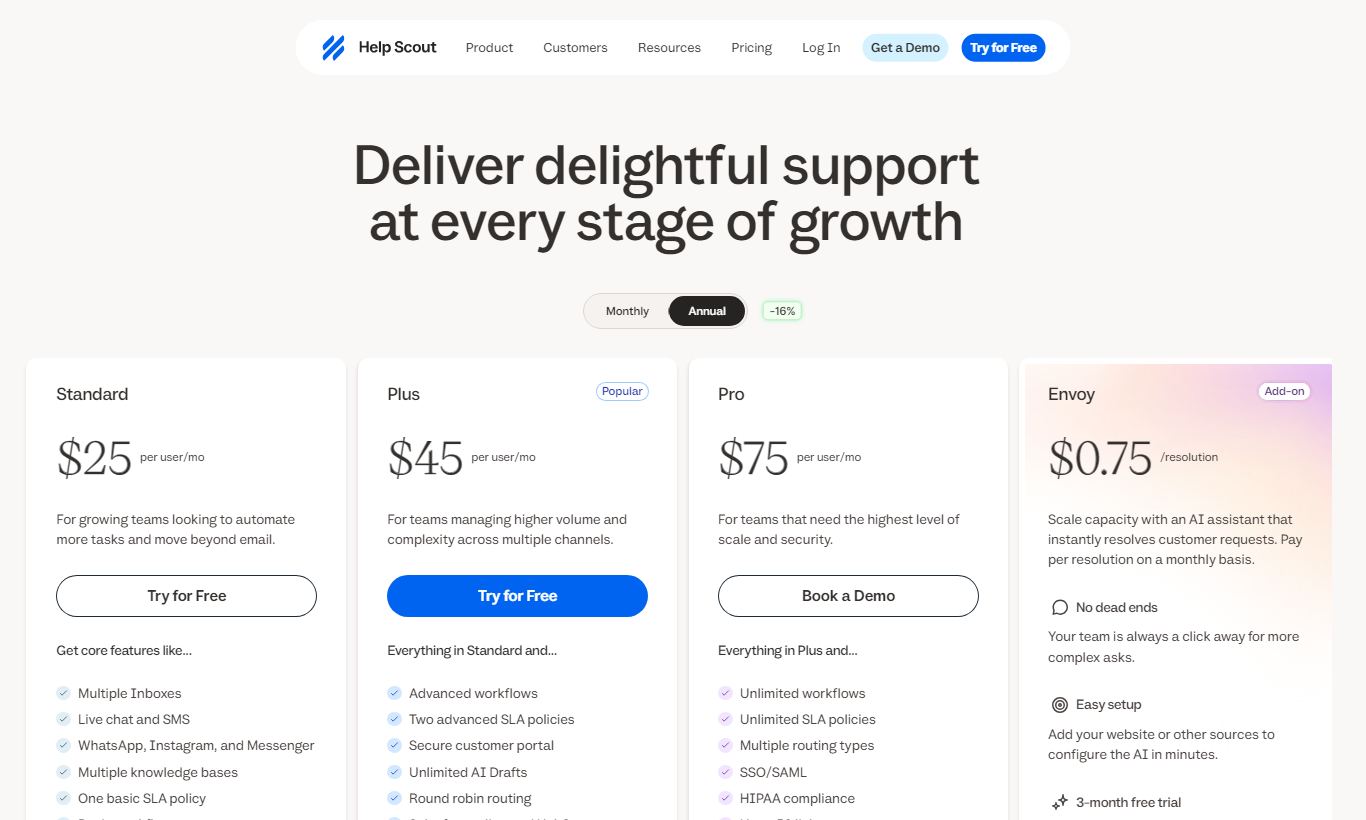
Help Scout offers three paid tiers and a 15-day free trial (no credit card required). All prices below are per month, billed annually. Monthly billing costs roughly 20% more.
- Standard, $50/month (up to 3 mailboxes, 1 Docs site, Beacon, basic workflows, core reporting). Good fit for small teams just getting started.
- Plus, $75/month (unlimited mailboxes, 2 Docs sites, advanced workflows, custom fields, Salesforce and HubSpot integrations, AI Assist and AI Summarize, team reporting). This is the most popular tier, and it's the one most growing teams should pick by default.
- Pro, $125/month (everything in Plus, plus enterprise security features, concierge onboarding, HIPAA compliance, higher API rate limits, and dedicated account management). Built for larger teams with compliance needs.
All plans are priced per account, not per seat, up to a user limit. Standard supports up to 25 users, Plus supports up to 25 users (with extra users available for purchase), and Pro offers custom user limits. This per-account pricing is unusual in the market and it's a real advantage for teams of 10 or more agents compared to competitors that charge per seat. The 15-day free trial includes full Plus-tier features.
What We Love
- Per-account pricing that scales without punishment: At $75/month for the Plus plan, a 20-person team pays the same as a 5-person team. That's rare in support software and a genuine budget win for growing teams.
- Collision detection prevents embarrassing double-replies: Real-time "agent is viewing" indicators cut out the coordination headaches that plague shared Gmail or Outlook inboxes.
- Beacon's in-widget Docs deflection measurably reduces ticket volume: Article suggestions pop up as customers type their message, stopping low-complexity questions before they ever reach the queue.
- AI Summarize genuinely saves time on complex threads: It condenses a 15-message back-and-forth into a readable brief, so agents can pick up conversations mid-flight without reading everything that came before.
- 15-day free trial with no credit card required: You get full Plus-tier access during the trial, so you can test advanced workflows and integrations before committing. It's not a stripped-down demo.
Watch Out For
- No native telephony or voice support: Teams that handle phone calls alongside email will need a separate tool (e.g. Aircall or Dialpad) and a manual workflow to log calls in Help Scout. There's no built-in voice channel.
- SLA tracking is absent: There are no configurable SLA policies, breach alerts, or SLA performance dashboards. This rules out Help Scout for teams with formal service-level agreements or enterprise compliance mandates.
- AI features lag behind Intercom's Fin: Help Scout's AI Answers handles straightforward FAQ deflection well, but it can't execute multi-step resolutions (e.g. issue a refund, update an account setting) that Intercom's Fin AI agent now supports natively.
- Standard plan's 3-mailbox cap can be restrictive: Businesses managing multiple brands or regional inboxes will hit this ceiling quickly and face a $25/month jump to Plus. It's a common complaint in user reviews on G2 and Capterra.
Who Is It Best For?
A SaaS company with a 10 - 40 person support team: Help Scout's flat per-account pricing is a lot cheaper than Zendesk or Intercom at this size. The AI Answers + Docs combo fits SaaS support well. There's usually a pile of repetitive "how do I…" questions that Beacon can handle on its own, which frees up agents for the harder technical escalations.
An e-commerce brand managing post-purchase support: Native Shopify and WooCommerce integrations pull order data straight into the conversation sidebar, so agents can check order status, tracking numbers, and purchase history without switching tabs. Workflow automation for routing order questions, refunds, and shipping delays lines up neatly with how e-commerce support actually gets organized.
A bootstrapped startup graduating from a shared Gmail inbox: Help Scout's interface looks and feels like email on purpose, so the learning curve is small. A five-person team can move over from Gmail, set up Docs, and get Beacon live on their site in under a day. The Standard plan at $50/month is a solid entry point for early-stage companies that don't need enterprise features but still want proper collaboration tools.
How Does It Compare?
Zendesk: Zendesk offers deeper SLA management, a native voice channel, and enterprise-grade reporting. But its per-agent pricing means a 20-person team pays dramatically more, and the interface carries years of accumulated complexity that new agents find steep. Help Scout vs Zendesk comes down to simplicity and cost versus raw feature depth.
Intercom: Intercom has invested heavily in AI-driven conversational support and proactive messaging. That makes it the stronger choice for product-led growth companies that want sophisticated in-app engagement. Intercom's pricing is significantly higher and more opaque, though, and its ticketing layer has historically felt bolted on. Help Scout vs Intercom is a trade-off between email-first simplicity and chat-first AI ambition.
Final Verdict
Help Scout is one of the best-designed customer support platforms in its price range. Its per-account pricing, human-centred inbox interface, and tight Mailbox + Docs + Beacon integration make it an excellent default choice for small and mid-sized teams, particularly in SaaS and e-commerce, that want a professional support operation without enterprise-level complexity. The growing AI toolkit sets it apart, and it's only going to get better.
Teams that need telephony, SLA tracking, or enterprise-scale customisation should look at Zendesk or Freshdesk instead. For the vast majority of growing businesses that support customers mainly through email and chat, Help Scout earns a confident recommendation. It's one of the rare pieces of software that both support agents and customers actually enjoy using.
Try Help Scout Free →FAQ
How much does Help Scout cost per month?
Help Scout's paid plans start at $50/month (Standard), $75/month (Plus), and $125/month (Pro), all billed annually. Monthly billing costs about 20% more. Pricing is per account, not per seat, which works out unusually cheap for teams of 10 or more agents.
Does Help Scout have a free plan?
No, Help Scout doesn't offer a permanent free plan. It gives you a 15-day free trial with full access to Plus-tier features and no credit card required. Once the trial ends, you'll need to pick a paid plan to keep using it.
Is Help Scout worth it for small businesses?
Yes, for most small businesses that handle customer support mainly through email and chat. The per-account pricing means even a 10-person team pays just $75/month on the Plus plan, far less than per-seat alternatives charge. The clean interface, Docs knowledge base, and Beacon widget together give you a full support stack without needing a dedicated admin to run it.
How does Help Scout compare to Zendesk?
Help Scout is simpler, cheaper for growing teams, and better suited to email-first support workflows. Zendesk offers more advanced SLA management, native telephony, and enterprise reporting. Pick Help Scout if ease of use and cost matter most to you. Pick Zendesk if you need compliance-grade SLAs or a voice channel.
Does Help Scout have AI features?
Yes. Help Scout offers AI Summarize (thread summarisation), AI Assist (reply tone and language adjustment), and AI Answers (automatic FAQ deflection from Docs content). These features come with Plus and Pro plans. They cut down agent effort on routine tasks, but they're less capable than Intercom's Fin when it comes to complex, multi-step resolutions.
What integrations does Help Scout support?
Help Scout offers 50+ native integrations including Shopify, WooCommerce, Salesforce, HubSpot, Slack, Jira, GitHub, Stripe, and Zapier (which opens up 5,000+ additional app connections). The Salesforce and HubSpot integrations require the Plus plan or higher.
Does Help Scout support live chat?
Yes, through its Beacon widget. Beacon runs real-time live chat during whatever business hours you set, then switches automatically to an email contact form outside those hours. It also surfaces Docs knowledge base articles in the widget as customers type, which helps deflect common questions before they turn into full support conversations.
Is Help Scout HIPAA compliant?
HIPAA compliance comes with the Pro plan ($125/month billed annually). Pro includes a Business Associate Agreement (BAA) and the extra security controls needed to handle protected health information (PHI), making it a solid fit for healthcare and wellness businesses.
We may earn a commission when you click affiliate links. This never affects our editorial scores.
| Best for | — |
| Category | Customer Support |
Answer a few quick questions and we'll match you to the best tool for your needs.
→ Suggest a Tool