
Freshdesk Review 2026: Is It Worth It?
Freshdesk is a cloud-based customer support platform from Freshworks. It lets teams manage tickets across email, phone, chat, social media, and self-service portals from a single inbox. The free plan is genuinely usable for up to 10 agents, and paid tiers start at $15/agent/month. Freshdesk's strengths are multi-channel ticket management, automation rules, and a surprisingly capable self-service portal. That makes it a strong fit for growing SMBs and mid-market support teams. Its AI features (Freddy AI) are maturing but still lag behind enterprise-grade competitors like Zendesk. Teams that need solid help-desk fundamentals without the cost or complexity of enterprise tools will get strong value here. It earns a 4.3 out of 5.
What we love
Watch out for
Freshdesk at a glance
What to test in your Freshdesk trial
21-day free trial
- Connect all your support channels (email, social, chat) and merge duplicate tickets from the same customer
- Set up time-triggered and event-triggered automation rules to auto-assign tickets and escalate SLA breaches
- Build a knowledge base with 20+ articles and test Freddy AI's self-service suggestions in your support widget
- Add a colleague as an agent and verify collision detection works when you both open the same ticket
- Run your standard weekly reports and confirm the pre-built dashboards show the metrics you need
- Decide if Freshdesk fits your team before the 21 days end or your first bill is due
Quick Verdict
Freshdesk is one of the most compelling help-desk platforms available in the sub-$50/agent/month bracket. Its free plan is genuinely functional, not a stripped-down teaser, and its Growth and Pro tiers offer automation, SLA management, and multi-channel support that would have cost enterprise prices five years ago. For a support team of 5 to 150 agents that wants to get up and running in days rather than months, Freshdesk is a near-ideal fit.
Where it stumbles is at the edges. Advanced AI capabilities still feel like a work in progress, reporting customisation requires the top-tier Enterprise plan, and the sheer number of add-ons can push monthly costs higher than the sticker price suggests. Even so, for most small and mid-sized businesses, the value-to-capability ratio is hard to beat.
Start Your Free Trial →What is Freshdesk?
Freshdesk was launched in 2010 by Freshworks (then Freshdesk Inc.) as a direct challenger to Zendesk's growing dominance. The founding premise was simple: enterprise-calibre help-desk software shouldn't require an enterprise-sized IT budget or implementation team. Today it serves over 60,000 businesses globally, from independent e-commerce stores to publicly listed companies. It sits within the broader Freshworks ecosystem alongside Freshchat (live chat), Freshsales (CRM), and Freshservice (IT service management), so it integrates naturally if your organisation already uses other Freshworks products.
The platform is primarily cloud-hosted (SaaS), with no on-premise option. It's built for customer-facing support teams, not IT helpdesks (that's Freshservice's territory), and its UX is deliberately approachable. A new agent can field their first ticket within minutes of being provisioned. That matters when you're onboarding part-time or seasonal support staff.
Key Features
Feature Checklist
Unified Ticketing Inbox
Freshdesk's core feature is a shared team inbox that pulls in support requests from email, web widget, phone, live chat, Twitter/X, Facebook, and WhatsApp, and drops them into a single queue. Each channel creates a ticket with full conversation threading, so an agent replying by email and a customer responding on Twitter stay in the same ticket thread. For a small support team juggling multiple channels, this alone kills the chaos of managing separate inboxes.
Tickets can be tagged, prioritised (Urgent/High/Medium/Low), assigned to agents or groups, and linked to parent tickets when a major incident spawns multiple customer reports. The merge and split ticket functions are genuinely useful. Merging duplicate contacts who raised the same issue takes one click.
Automation Rules and Workflows
Freshdesk's automation engine is one of its strongest selling points. Admins can build rules that trigger on ticket creation or update: auto-assigning tickets based on keywords, routing VIP customer emails to a dedicated group, escalating tickets that breach SLA thresholds, or firing off canned responses when specific conditions are met. The Growth plan includes basic automation. The Pro plan adds round-robin and skill-based assignment, and that makes a real difference for teams with 10+ agents.
There's also a time-triggered automation layer. Rules can fire X hours after a ticket is created, last updated, or due, which is handy for nudging dormant tickets back into the queue before they breach SLA. Building these rules requires no coding. The condition/action builder is clean and logical. Complex multi-step workflows (for example, escalate → reassign → notify manager → log activity) work fine without bringing in a third-party automation tool.
SLA Management and Business Hours
SLA policies let managers set response and resolution time targets by ticket priority, and Freshdesk tracks compliance in real time. When a ticket risks breaching its SLA, the platform escalates automatically, firing off an email to the assigned agent, their team lead, or any configured escalation chain. Multiple SLA policies can run side by side, which matters if you support different customer tiers (enterprise customers on a 1-hour SLA, standard users on a 24-hour SLA, for example). Business hours and holiday calendars come baked in at the Growth plan, so SLA clocks correctly pause outside working hours.
Self-Service Portal and Knowledge Base
Freshdesk's help centre builder lets you create a branded, SEO-friendly customer portal with structured knowledge base articles, solution categories, and a community forum. The editor is WYSIWYG with support for images, videos, and code blocks. That's adequate for most documentation needs, though it lacks the content management depth of a dedicated tool like Notion or Confluence. The portal can be multilingual (up to 42 languages on higher tiers), which matters for teams supporting customers around the world.
Freddy AI's self-service component suggests relevant articles to customers as they type their support query into the widget, cutting ticket volume before an agent even gets involved. In practice, this works best once your knowledge base has 50+ well-written articles. A sparse knowledge base produces poor suggestions.
Reporting and Analytics
The built-in reports cover ticket volume, resolution time, first response time, SLA compliance, agent performance, and CSAT scores. On the Growth and Pro plans, these are pre-built dashboards. The Enterprise plan adds a custom report builder where you can define metrics, date ranges, and visualisation types. One notable gap: scheduled report delivery (emailing a PDF to your leadership team every Monday) requires the Pro plan or above. For most SMBs the default dashboards do the job, but analytics-heavy operations will feel boxed in until they reach the Enterprise tier.
Freddy AI (AI Features)
Freshdesk's AI layer, branded Freddy AI, offers article suggestions, predictive ticket fields (auto-suggesting category and priority based on ticket content), and an AI-assisted reply drafting feature called Freddy Copilot. Freddy Copilot is a paid add-on ($29/agent/month) and can summarise long ticket threads, draft responses in the brand's tone, and suggest next-best actions. In practice, the summarisation is the most immediately useful feature. Collapsing a 30-email chain into a 5-bullet briefing saves real time. The response drafting is competent but needs human review before sending. It doesn't yet match the contextual precision of Intercom's Fin AI agent.
Pricing
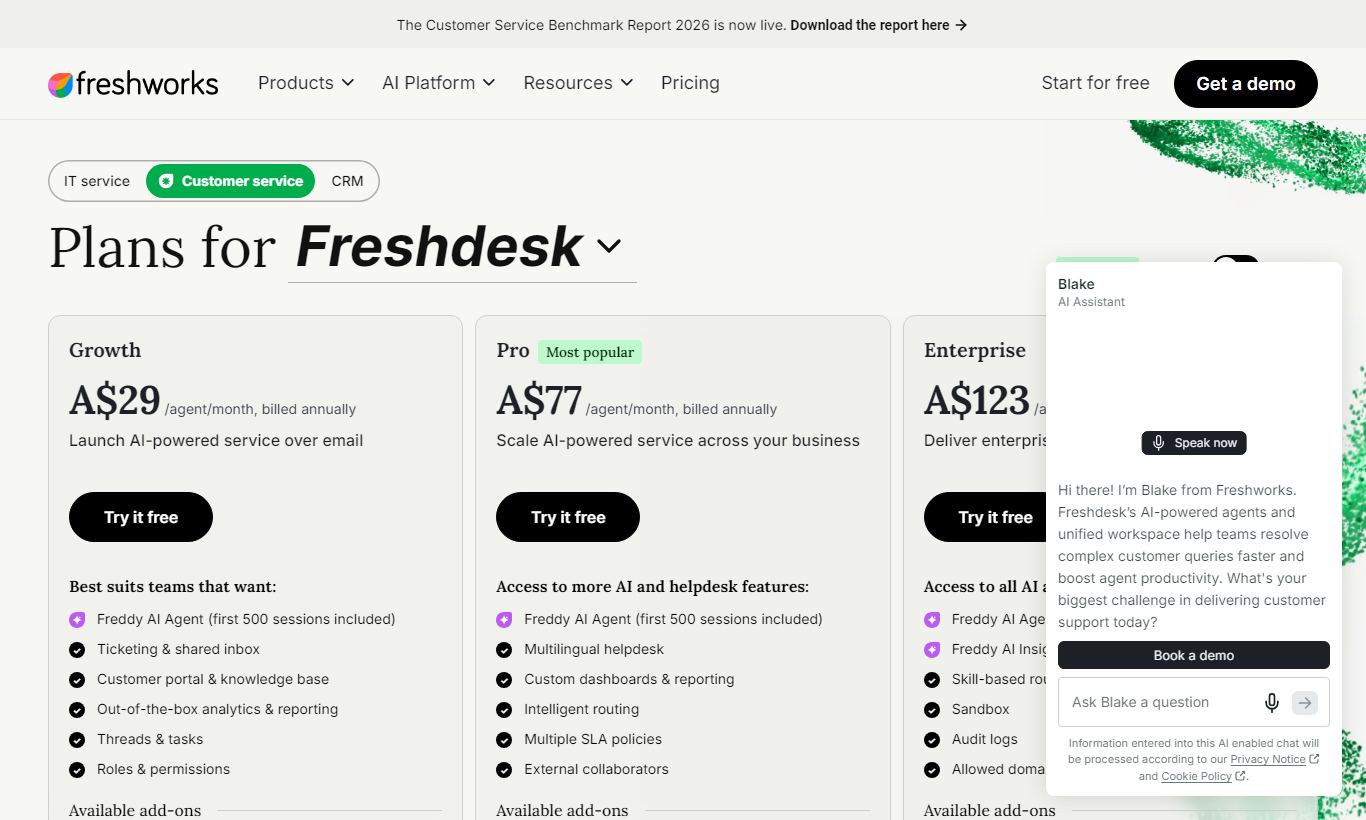
Freshdesk pricing runs per agent per month, billed annually (monthly billing costs about 20% more). There are four tiers:
- Free: $0 for up to 10 agents. Covers email and social ticketing, knowledge base, and basic reporting. No automation rules, no SLA management. A genuine starting point for very small teams.
- Growth: $15/agent/month (billed annually) or $18/month (billed monthly). Adds automation, SLA management, business hours, collision detection, time tracking, and 1,000 Freshbots sessions/month. Most growing teams start here.
- Pro: $49/agent/month (annual) or $59/month (monthly). Adds round-robin routing, custom roles, custom reports, multilingual knowledge base, community forums, CSAT surveys, and up to 5,000 Freshbots sessions. This is the sweet spot for teams with 20+ agents or complex routing needs.
- Enterprise: $79/agent/month (annual) or $95/month (monthly). Adds audit logs, agent shifts, skill-based routing, sandbox environment, IP whitelisting, and unlimited Freshbots sessions. Needed for enterprise-grade compliance and advanced customisation.
A 21-day free trial is available on all paid plans. No credit card required. Freddy Copilot AI is an optional add-on at $29/agent/month across all paid plans. Freshdesk Omni (which bundles Freshchat and deeper messaging channels) starts at $29/agent/month and is a separate product line.
What We Love
- Free plan that actually works: Up to 10 agents can handle email and social tickets, access the knowledge base, and view basic reports without paying a cent. That's rare in the help-desk market.
- Automation depth at low price points: Time-triggered and event-triggered rules are available from the $15/month Growth plan, covering use cases that competitors reserve for premium tiers.
- Collision detection prevents duplicate responses: Agents see a real-time indicator when a colleague is already viewing or replying to a ticket. It's a small feature that wipes out an embarrassingly common problem.
- Multilingual self-service portal: Supports customers in 42 languages from a single knowledge base instance, with no separate portals or custom development work needed.
- Freshworks ecosystem integration: Native, configuration-free sync with Freshsales CRM, Freshchat, and Freshservice gives companies already in the Freshworks stack a unified customer data layer without custom APIs.
Watch Out For
- Add-on costs inflate the real price: Freddy Copilot ($29/agent/month), extra Freshbots sessions, and WhatsApp/SMS channels all cost more on top. A 20-agent Pro team with Copilot ends up paying $78/agent, which lands closer to enterprise competitor pricing than the headline number lets on.
- Custom reporting is locked to Enterprise: The pre-built dashboards work fine, but they don't bend much. Teams that need to slice ticket data by custom fields, products, or customer segments will hit real walls with the Growth and Pro dashboards.
- Freddy AI lags behind the best tools out there: Users migrating from Intercom or Zendesk AI often say Freshdesk's AI replies need more fine-tuning and come out more generic, especially on complex, multi-step customer issues.
- Phone and telephony setup is a hassle: Freshdesk does include built-in telephony through Freshcaller, but setting up IVR menus, call recording, and agent availability rules takes real effort. It's a steep climb compared to the rest of the beginner-friendly interface.
Who Is It Best For?
E-commerce businesses with seasonal volume spikes: A 10-person DTC brand handling 200 tickets/day during peak season can set up Freshdesk's automation rules to auto-tag order queries, route returns to a specialist group, and send status-update canned replies. No dedicated ops person needed. The Growth plan's pricing means adding 5 temporary agents during peak periods won't break the budget.
SaaS companies scaling from startup to Series B: A software company with a growing customer success team benefits from Freshdesk's SLA management, collision detection, and integration with tools like Jira (for escalating bugs) and Slack (for agent notifications). The Pro plan's custom roles let companies separate tier-1 support agents from senior engineers without granting unnecessary admin access.
Regional businesses with multilingual customer bases: A European company supporting customers in German, French, Spanish, and English can build a single knowledge base with language-specific article versions, auto-detect customer language from ticket metadata, and route tickets to language-matched agents using skill-based routing on the Pro plan. No custom development required.
How Does It Compare?
Zendesk: Zendesk is still the market leader when it comes to enterprise complexity and ecosystem breadth. But its entry-level plan ($55/agent/month) costs more than three times Freshdesk's Growth tier. If your team doesn't need Zendesk's macro-level customisation or its 1,500-app marketplace, Freshdesk gets you 80% of the value for a fraction of the cost. Check our full Freshdesk vs Zendesk breakdown for a feature-by-feature comparison.
Intercom: Intercom wins on conversational support and AI-native workflows. Its Fin AI agent is genuinely ahead of Freddy AI for automated resolution rates. That said, Intercom's pricing is consumption-based and can scale unpredictably for high-volume teams. Freshdesk's per-seat model is easier to budget for. Teams that are chat-first and AI-forward will prefer Intercom. Teams that lean email-first will find Freshdesk's fundamentals a better fit. Read our Freshdesk vs Intercom comparison for a deeper analysis.
Final Verdict
Freshdesk earns its 4.3 rating by being genuinely good at the things most support teams actually need: clean ticket management, sensible automation, reliable SLA tracking, and a self-service portal that needs no developer help. It isn't the flashiest platform on the market, and its AI features still trail Intercom and Zendesk's top tiers. For any team that wants cost-effectiveness, fast onboarding, and a feature set that scales from 3 agents to 100+, Freshdesk is a low-risk choice.
If you're currently managing support through a shared Gmail inbox, a spreadsheet of open issues, or a legacy system with no automation, Freshdesk will feel like a big leap forward. Start with the 21-day free trial on the Growth plan. You'll have a working ticketing system with automation rules and SLA tracking live within a single afternoon.
Try Freshdesk Free →FAQ
Is Freshdesk really free?
Yes. Freshdesk's Free plan supports up to 10 agents with no time limit, covering email and social ticketing, a basic knowledge base, and limited reporting. It excludes automation rules and SLA management, which require the Growth plan at $15/agent/month.
How much does Freshdesk cost per month?
Freshdesk pricing starts at $0 (Free, up to 10 agents), then $15/agent/month (Growth), $49/agent/month (Pro), and $79/agent/month (Enterprise), all billed annually. Monthly billing costs roughly 20% more per agent. Add-ons like Freddy Copilot AI cost an extra $29/agent/month.
Is Freshdesk better than Zendesk?
For most small and mid-sized businesses, Freshdesk offers comparable core features at a much lower cost. Zendesk's entry plan starts at $55/agent/month, compared to Freshdesk's $15. Zendesk has a bigger app marketplace and more mature enterprise customisation, but for teams under 200 agents that don't need complex integrations, Freshdesk is often the smarter value choice.
Does Freshdesk have a free trial?
Yes. All paid plans (Growth, Pro, Enterprise) come with a 21-day free trial, and you don't need a credit card to start. That's enough time for a team to set up automation rules, test SLA workflows, and check out the reporting before committing.
What channels does Freshdesk support?
Freshdesk supports email, web widget, phone (via Freshcaller), live chat (via Freshchat integration), Twitter/X, Facebook, WhatsApp, and Apple Business Chat. Not every plan includes every channel. WhatsApp and SMS usually require add-on configurations or the Freshdesk Omni bundle.
Is Freshdesk good for small businesses?
Yes, and it's where Freshdesk shines most. The Free plan works for micro-businesses, and the Growth plan at $15/agent/month gives small teams automation, SLA tracking, and multi-channel support without a large IT budget or a long setup process. Most small teams are fully up and running within a day.
What is Freddy AI in Freshdesk?
Freddy AI is Freshdesk's artificial intelligence layer. It includes automatic ticket field suggestions and knowledge base article recommendations. The paid Freddy Copilot add-on ($29/agent/month) adds thread summarisation and AI-assisted reply drafting. It's useful, but it doesn't yet match the autonomous resolution level of Intercom's Fin AI.
Can Freshdesk handle high ticket volumes?
Yes, with the right plan. The Pro and Enterprise tiers support skill-based routing, round-robin assignment, agent shift management, and sandbox environments for testing configuration changes, all features that matter at scale. Freshdesk's infrastructure is cloud-native and built for enterprise-level volume. Very large deployments (500+ agents) should still look closely at Freshdesk Enterprise specifically.
We may earn a commission when you click affiliate links. This never affects our editorial scores.
| Best for | Support ticketing made simple |
| Category | Customer Support |
Answer a few quick questions and we'll match you to the best tool for your needs.
→ Suggest a Tool