
Salesflare Review 2026: Is It Worth It?
Salesflare is an intelligent CRM built specifically for small B2B sales teams who want automation without complexity. It automatically captures contact data, emails, meetings, and calls from Gmail, Outlook, LinkedIn, and your phone, so reps spend less time on data entry and more time selling. Pricing starts at $29/user/month (billed annually), with a 30-day free trial on all plans. It's strongest for teams of 1 to 15 people running outbound or relationship-driven sales. Compared to Salesforce or HubSpot, Salesflare lacks enterprise reporting and deep marketing automation, but it wins on ease of use, automated data enrichment, and a clean pipeline UI. For a small B2B team drowning in manual CRM upkeep, Salesflare delivers genuine time savings and is worth evaluating.
What we love
Watch out for
Salesflare at a glance
What to test in your Salesflare trial
30-day free trial, no credit card required
- Import your team's real contacts and verify auto-enrichment pulls company, title, and phone data correctly
- Connect your Gmail or Outlook and confirm Salesflare auto-captures emails and meetings without manual logging
- Build a multi-pipeline Kanban board for your sales motions and test the 'days since last contact' alerts on stale deals
- Create and send a 3-step email sequence to real prospects from your inbox and track opens and clicks per recipient
- Install the LinkedIn sidebar, add prospects to CRM and sequences from LinkedIn profiles without tab-switching
Quick Verdict
Salesflare earns its reputation as one of the most thoughtfully designed CRMs for small B2B sales teams. Most CRMs demand that reps manually log every interaction. Salesflare flips that model. It pulls contact details, email threads, meeting notes, LinkedIn data, and phone activity automatically into each account record. The result is a CRM that actually stays up to date, which is the number-one reason most CRM rollouts fail. If your team has 1 - 20 salespeople running relationship-driven B2B sales and you're tired of chasing people to update Salesforce, Salesflare is genuinely worth a serious look.
It isn't perfect. The reporting suite is modest compared to enterprise tools, and it won't replace a dedicated marketing automation platform. But for what it targets, it does the job with unusual elegance. Plans start at $29/user/month (billed annually), and every plan comes with a 30-day free trial, no credit card required.
Start Your Free Trial →What is Salesflare?
Salesflare was founded in 2014 in Antwerp, Belgium, by Jeroen Corthout and Lieven Janssen. The founding premise was simple: salespeople hate data entry, and a CRM that needs constant manual updating will never get adopted. So Salesflare was built from the ground up to automate the grunt work. It pulls contact information from email signatures, syncs calendars and call logs, tracks email opens and link clicks, and enriches company profiles from public data sources. The result is a "zero-input" CRM philosophy that still sits at the core of the product today.
The platform targets small and mid-sized B2B companies, things like SaaS startups, agencies, consultancies, and professional services firms that have dedicated sales functions but no enterprise IT budget. It integrates natively with Gmail and Outlook, sits inside LinkedIn via a browser sidebar, and offers mobile apps for iOS and Android. It isn't trying to be Salesforce. It's trying to be the CRM a 10-person sales team will actually open every single day.
Key Features
Feature Checklist
Automated Data Capture
This is Salesflare's flagship differentiator, and it works better than you'd expect. When a new contact emails you, Salesflare automatically creates a contact record. It pulls their name, title, company, phone number, and social profiles from their email signature and public data sources, then links every subsequent email thread to their account. If you meet someone and add them on LinkedIn, the Chrome sidebar syncs that connection directly into the CRM. Call logs from your mobile phone get captured automatically once you enable the mobile app. For a sales rep managing 80 active accounts, this alone can save 45 to 60 minutes of admin per day.
Visual Pipeline Management
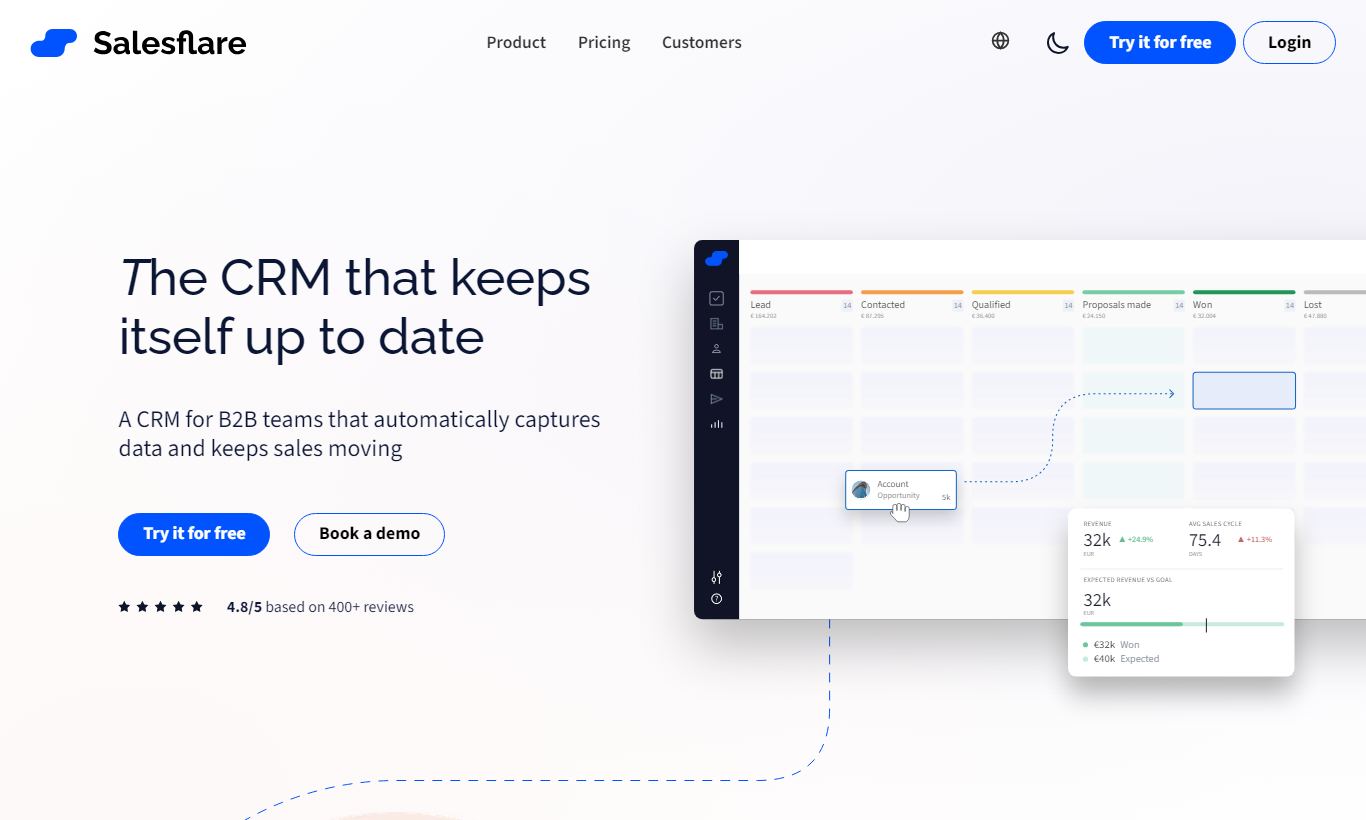
The pipeline view is a clean, drag-and-drop Kanban board where deals move through customisable stages. You can run multiple pipelines simultaneously, which is useful if you sell different product lines or have distinct sales motions (for example, inbound versus outbound). Each deal card shows the account name, deal value, last activity date, and a "days since last contact" warning that turns red when an account has gone cold. That visual urgency cue is more actionable than any report. You can filter by owner, stage, tag, or custom field, and the pipeline loads fast even with 300+ active deals.
Email Sequences and Tracking
Salesflare's built-in email automation lets you build multi-step outreach sequences, for example an initial cold email on Day 1, a follow-up on Day 4 if no reply, and a break-up email on Day 10. Sequences can be personalised with merge fields and are sent from your actual Gmail or Outlook account, so they don't hit the promotions tab. Email tracking shows you real-time open and click notifications, with a per-recipient history so you can see exactly when a prospect last engaged. This feature sits in the Growth and Pro plans and is genuinely competitive with standalone tools like Mailshake for simple outbound use cases.
LinkedIn Integration via Sidebar
The Salesflare Chrome extension adds a sidebar to LinkedIn that lets you add prospects to your CRM and to email sequences without leaving the LinkedIn tab. When you're browsing a prospect's LinkedIn profile, the sidebar shows you whether they're already in your CRM, which pipeline they're in, and their full interaction history. This is particularly valuable for SDRs doing targeted outbound prospecting. It removes the tab-switching friction that kills workflow momentum. The sidebar also works on Gmail and Outlook Web, giving you full CRM context right next to your inbox.
Suggested Tasks and To-Do Intelligence
Salesflare surfaces proactive follow-up suggestions based on deal activity. If a deal in your pipeline hasn't had any activity for 14 days, Salesflare adds it to your suggested tasks list and highlights it on the dashboard. You can set custom task reminders, log meeting notes directly against accounts, and use the mobile app to add voice notes on the go. Unlike Pipedrive's activity system, which requires manual task creation for every follow-up, Salesflare nudges you automatically, which is genuinely useful when you're managing a full pipeline.
Pricing
Salesflare offers three paid plans. All of them include a 30-day free trial, no credit card required. There's no permanently free plan.
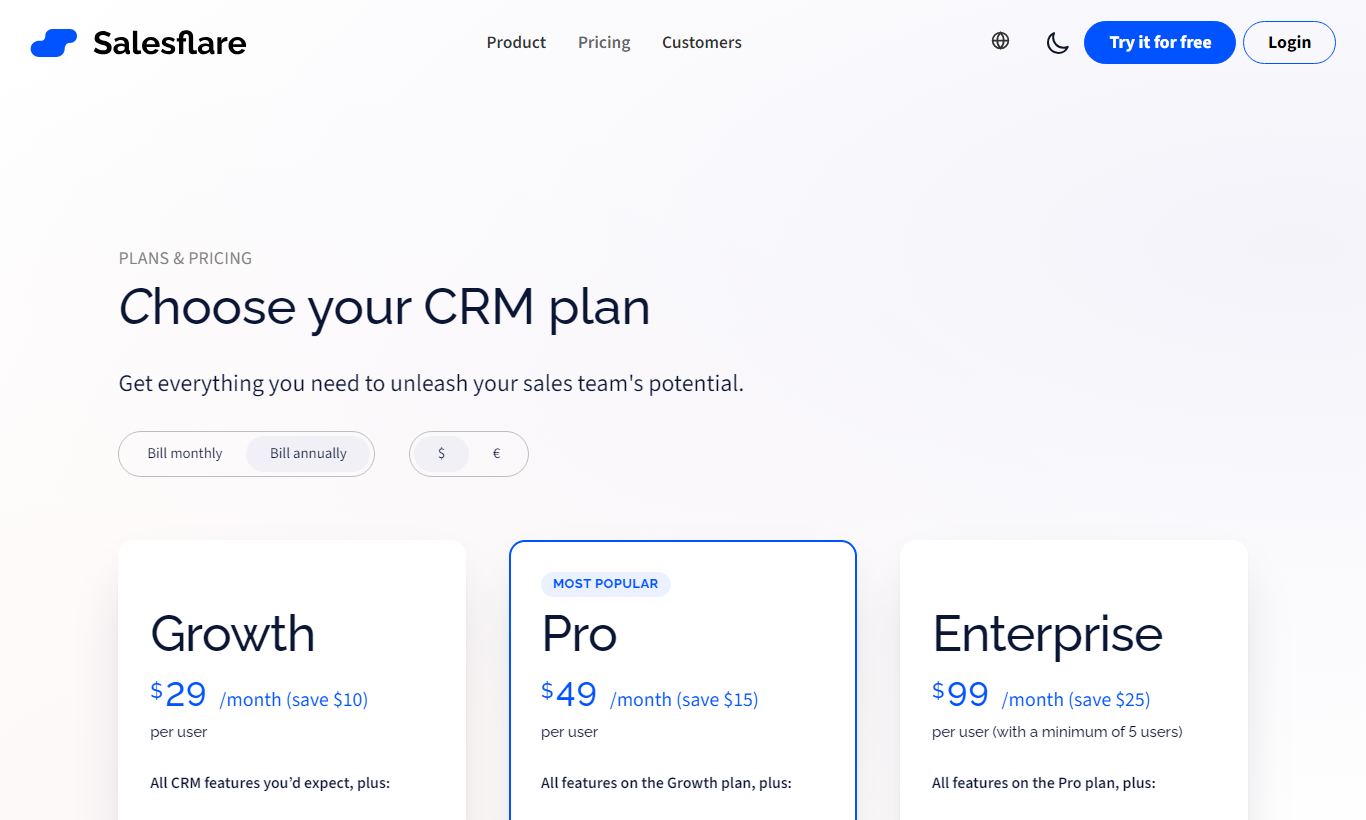
- Growth - $29/user/month (billed annually; $35/user/month billed monthly): Full CRM pipeline, automated data capture, email tracking, email templates, the LinkedIn sidebar, mobile apps, Zapier integration, and API access. This is the entry point and covers the core Salesflare experience. It works for solo founders and small teams up to about 5 people.
- Pro - $49/user/month (billed annually; $55/user/month billed monthly): Adds email sequences (multi-step automated outreach), workflow automation, and the ability to send sequences on behalf of team members. This is the plan for active outbound teams. Most growing B2B sales teams end up here.
- Enterprise - $99/user/month (billed annually; $99/user/month billed monthly): Adds a dedicated onboarding specialist, custom training, priority support, and custom integration assistance. It's priced for teams that need hands-on implementation or have complex data migration needs.
All plans are per-user, with no minimum seat requirement on Growth or Pro. Enterprise requires a minimum of 5 users. Compared to HubSpot Sales Hub, which can exceed $90/user/month for comparable outbound automation, or Salesforce Starter at $25/user/month but with steep add-on costs, Salesflare's Pro plan at $49 is a solid deal for outbound-focused small teams.
What We Love
- Automatic contact and interaction logging from Gmail, Outlook, LinkedIn, and mobile calls gets rid of the manual data-entry tax that kills CRM adoption on other platforms.
- Multi-pipeline Kanban view with real-time "days since last contact" indicators makes it obvious which deals need attention. No custom reports required.
- Email sequences sent from your real inbox (via Gmail/Outlook integration) land in primary inboxes rather than promotions tabs, with per-recipient open and click tracking.
- LinkedIn sidebar integration lets SDRs add contacts to sequences without leaving LinkedIn, cutting down on context-switching during prospecting sprints.
- 30-day free trial with no credit card required on all plans gives you enough time to run a real pilot. Import your contacts, run a live pipeline, and measure actual time savings before you commit.
Watch Out For
- Reporting is limited at all price tiers. Salesflare offers basic pipeline and revenue forecasting reports, but there's no revenue attribution analysis, multi-touch funnel reporting, or custom dashboard builder. Teams that rely on data-driven sales management will hit this ceiling fast.
- No native marketing automation. Salesflare integrates with Mailchimp and ActiveCampaign via Zapier, but there's no built-in lead nurturing, landing pages, or marketing email campaigns. It's a pure sales CRM. If you need marketing and sales aligned under one roof, look at HubSpot.
- Email sequences are limited to simple linear flows. The sequence builder doesn't support branching logic (for example, "if opened but didn't reply, send X, if didn't open, send Y"). For more sophisticated outbound automation, tools like Outreach or Apollo give you more conditional control.
- Small ecosystem compared to Salesforce or HubSpot. Native integrations cover the essentials (Slack, Trello, Zapier, Google Workspace, Stripe), but niche industry tools often need Zapier workarounds. Teams with complex tech stacks should check their integrations before committing.
Who Is It Best For?
The bootstrapped SaaS founder running outbound sales personally. If you're a solo founder sending 50 - 100 cold emails per week and juggling a pipeline of 80 - 150 prospects, you don't have time for CRM admin. Salesflare's automatic logging and email tracking pays off immediately here. The Growth plan at $29/month is the cheapest way to keep a pipeline organised without hiring someone to run sales ops for you.
A B2B agency or consultancy with a 3 - 8 person sales team. Account-based selling at agencies means long relationship cycles and a lot of email back-and-forth. Salesflare's automatic email threading and "last contacted" intelligence keep every account warm, so deals don't quietly slip through the cracks. The Pro plan's sequences also work well for reactivation campaigns aimed at dormant leads.
An SDR team doing LinkedIn-first prospecting. If your team's workflow starts on LinkedIn (finding prospects, checking profiles, sending connection requests), the LinkedIn sidebar will cut the time between spotting a prospect and getting them into a sequence. It's the one feature SDRs mention most often as the biggest workflow upgrade over Pipedrive.
How Does It Compare?
Salesflare vs Pipedrive: Pipedrive has a bigger integration ecosystem and more mature reporting. But it depends on manual data entry. Reps have to log every call and email themselves. Salesflare wins clearly on automation and data hygiene for teams that struggle to actually use a CRM.
Salesflare vs HubSpot: HubSpot's free CRM is hard to beat if you need marketing and sales combined, and its paid Sales Hub gives you deeper sequences and reporting. But HubSpot's costs climb fast as you add seats and features. Salesflare is simpler, cheaper, and quicker to set up for a pure sales team that doesn't need HubSpot's full marketing stack.
Final Verdict
Salesflare is one of the few CRMs that actually solves the adoption problem, and it does so by killing off the main reason reps avoid updating CRMs: manual data entry. The automated contact capture, email threading, and LinkedIn integration aren't gimmicks. They save real time and leave you with a CRM record that reflects what's actually happening with a deal. For B2B teams of 1 to 15 people running relationship-driven sales, it's one of the strongest options in the $29 to $49/user/month range.
Where it falls short is just as clear. It's not built for teams that need advanced reporting, marketing automation, or complex branching sequences. If your sales ops team practically lives in dashboards, or your marketing and sales motions need to stay tightly linked, HubSpot or a Salesforce setup will serve you better in the long run. But if you've tried either of those already and your reps still won't touch them, Salesflare might be the CRM that finally sticks.
Try Salesflare Free →FAQ
How much does Salesflare cost?
Salesflare has three plans: Growth at $29/user/month, Pro at $49/user/month, and Enterprise at $99/user/month, all billed annually. Monthly billing is available at slightly higher rates. There's no free plan, but every plan includes a 30-day free trial and no credit card is required.
Is Salesflare worth it for small businesses?
Yes, especially for small B2B sales teams of 1 to 15 people. Salesflare's automated data capture and email tracking cut out the manual admin that makes reps abandon their CRM. If a team is already paying for separate email tracking and LinkedIn tools, moving everything onto Salesflare Pro at $49/user/month usually brings the overall tool bill down.
Does Salesflare integrate with Gmail and Outlook?
Yes. Salesflare has native two-way integrations with both Gmail and Outlook. Emails, meetings, and contacts sync automatically. A browser sidebar extension puts full CRM context right in your inbox, so there's no tab switching.
How does Salesflare compare to HubSpot CRM?
HubSpot has a free CRM tier and deeper marketing automation, which makes it the better pick for teams that need marketing and sales working from the same system. Salesflare is simpler, cheaper for outbound sales teams, and much stronger at automated data capture. Teams that just need pipeline management usually find Salesflare easier to pick up and keep running.
Does Salesflare have a free plan?
No. Salesflare doesn't offer a permanently free plan. All three paid plans come with a 30-day free trial, no credit card required, which is enough time to properly test the software with real data.
Can Salesflare handle multiple sales pipelines?
Yes. Salesflare supports multiple simultaneous pipelines on every plan, including Growth. This helps companies running separate sales motions, say a new business pipeline alongside a renewals pipeline, or teams selling several distinct product lines.
Is Salesflare good for email outreach and sequences?
Salesflare's email sequence feature, available on Pro and Enterprise, holds up well for straightforward linear outreach, like a 3 to 5 step cold outbound sequence. It has no branching conditional logic, so teams running complex outbound playbooks will likely outgrow it and need a dedicated tool like Outreach or Apollo.
What CRMs are most similar to Salesflare?
The closest alternatives are Pipedrive (similar pipeline focus but less automation), Close CRM (stronger calling features), and Streak (Gmail-native CRM). HubSpot is the most common upgrade path once teams need marketing automation or advanced reporting on top of their CRM workflow.
We may earn a commission when you click affiliate links. This never affects our editorial scores.
| Best for | Automated CRM for B2B |
| Category | CRM Software |
Answer a few quick questions and we'll match you to the best tool for your needs.
→ Suggest a Tool