
Keap Review 2026: Is It Worth It?
Keap is an all-in-one CRM, marketing automation, and sales pipeline platform built for small businesses and solo entrepreneurs. It bundles contact management, email marketing, landing pages, appointment scheduling, invoicing, and automated follow-up sequences into a single subscription, so you don't have to stitch together five different tools. Pricing starts at $299/month for the Pro plan (up to 1,500 contacts), which is steep for early-stage businesses but makes sense for established operations generating $250K+ in annual revenue. Keap earns that price tag through its visual campaign builder and built-in payments and e-commerce functionality that most CRMs don't touch. It works best for service-based small businesses, coaches, consultants, and agencies who need automated lead nurturing without hiring a marketing team. A 14-day free trial is available.
What we love
Watch out for
Keap at a glance
What to test in your Keap trial
14-day free trial
- Build one complete automation workflow from lead capture to follow-up without coding
- Import your real contacts and test the smart list feature to auto-segment by a business-relevant tag
- Create and send an invoice with payment collection through Stripe to test end-to-end billing
- Set up SMS follow-up sequences alongside email campaigns to compare speed vs email alone
- Map a sales pipeline stage and trigger automated proposal sending when you move a deal
- Decide before day 14 if the learning curve and $299/month cost justify the ROI for your revenue
Quick Verdict
Keap is one of the most feature-complete CRM platforms available for small businesses, and one of the most expensive relative to its target audience. If you run a service-based business and you're tired of manually following up with leads, sending one-off invoices, and managing appointments across disconnected tools, Keap genuinely solves all of that in one place. The visual automation builder alone is worth serious consideration. You can build sophisticated "if this, then that" workflows that trigger emails, text messages, task assignments, or invoice requests based on client behavior, all without writing a line of code.
Keap demands real commitment, though. The learning curve is steeper than lighter-weight CRMs like HubSpot Starter, the pricing floor is high at $299/month, and some users find the contact-count-based pricing model punishing as their list grows. But for established small businesses ready to automate their sales and client nurturing end to end, Keap delivers exceptional ROI. A 14-day free trial lets you explore before committing.
Start Your Free Trial →What is Keap?
Keap was founded in 2001 under the name Infusionsoft, which makes it one of the longest-standing CRM platforms in the small business market. The company rebranded to Keap in 2019 to signal a shift toward simplicity and accessibility, while keeping the powerful automation engine that made Infusionsoft famous, and occasionally infamous, for its complexity. Today, Keap is headquartered in Chandler, Arizona, and serves over 25,000 small businesses globally. Its core promise is to replace the chaos of spreadsheets, sticky notes, and disconnected apps with a single platform that handles CRM, marketing automation, sales pipelines, e-commerce, and client communications.
Keap isn't built for enterprise teams or mid-market companies with complex CRM requirements. It's aimed squarely at small businesses with 1 to 25 employees, particularly service providers like coaches, consultants, marketing agencies, home service businesses, and health and wellness professionals. That focus shapes everything from the interface design to the pre-built automation templates available on day one.
Key Features
Feature Checklist
Visual Campaign Automation Builder
This is Keap's crown jewel. The Campaign Builder is a drag-and-drop canvas where you map out entire client journeys, from lead capture through nurture sequences to post-purchase follow-up, using visual flowchart logic. A practical example: a prospect fills out your contact form, gets tagged as a "new lead," receives a five-email nurture sequence over two weeks, and if they haven't booked a call by day 14, a task is automatically assigned to a team member to phone them. If they do book, the sequence stops and a new onboarding workflow fires. Building this takes about 30 minutes with no developer required. Competing platforms like ActiveCampaign offer similar builders, but Keap's tight integration with its own CRM, invoicing, and appointment tools makes the automation flow more smoothly.
CRM and Contact Management
Keap's contact records are genuinely rich. Each contact stores standard fields (name, email, phone, address) plus a full interaction history: every email sent, every form submission, every invoice, every appointment, all in a single scrollable timeline. Custom fields are unlimited, and contacts can be segmented dynamically using tags. A fitness coach, for example, could tag clients by membership tier, program type, and renewal date, then trigger different follow-up sequences for each segment. The smart contact list feature lets you build saved segments that update automatically as contact data changes. That means "clients due for renewal in 30 days" stays current without manual list exports.
Sales Pipeline Management
Keap's pipeline view is a Kanban-style board where deals move through custom stages you define. Each deal card links to the associated contact record and can display deal value, assigned owner, and days in stage. What sets Keap apart from basic Kanban tools is automation at the pipeline level: when you move a deal to the "Proposal Sent" stage, Keap can automatically send the proposal email and set a follow-up task for three days later. This is where the CRM and the marketing engine actually meet. Pipeline reporting shows conversion rates between stages and average deal value, helping you spot where prospects are getting stuck.
Invoicing, Payments, and E-Commerce
Most CRMs stop at "close the deal" and hand off to a separate billing tool. Keap includes native invoicing, recurring subscription billing, payment plans, and a checkout page builder. You can create a product catalog, set up one-click order forms, and collect payments via Stripe or Keap's own payment processing. For a service business charging $2,000 for a coaching package, this means the entire journey, lead capture, nurture, proposal, contract, payment, and onboarding, happens inside one system. The e-commerce capabilities aren't as deep as a dedicated platform like Shopify, but for service-based product bundles and digital products, they're more than enough.
Appointment Scheduling
Keap includes a native appointment scheduling tool that works much like Calendly. Prospects can book time directly from a shareable link or an embedded widget on your website. Appointments sync with Google Calendar and trigger automatic confirmation and reminder sequences. A consultant, for instance, can embed their booking page in a nurture email so that when a prospect clicks "Schedule Your Free Strategy Call," the appointment gets booked, a calendar invite goes out to both parties, and a pre-call preparation email fires 24 hours before the meeting, all without manual intervention.
Email and SMS Marketing
Keap's broadcast email tool supports segmented sends, A/B subject line testing, and a drag-and-drop email builder with a library of pre-designed templates. Deliverability is generally strong, thanks to Keap's dedicated sending infrastructure. Two-way SMS is available on all current plans, so you can run text message sequences alongside email campaigns. This is especially useful for appointment reminders and time-sensitive offers. SMS messages can be personalized with merge fields and triggered by the same automation logic as emails.
Pricing
Keap currently offers two main paid plans. There's no permanent free tier, but a 14-day free trial is available on both plans and you don't need a credit card to start one.
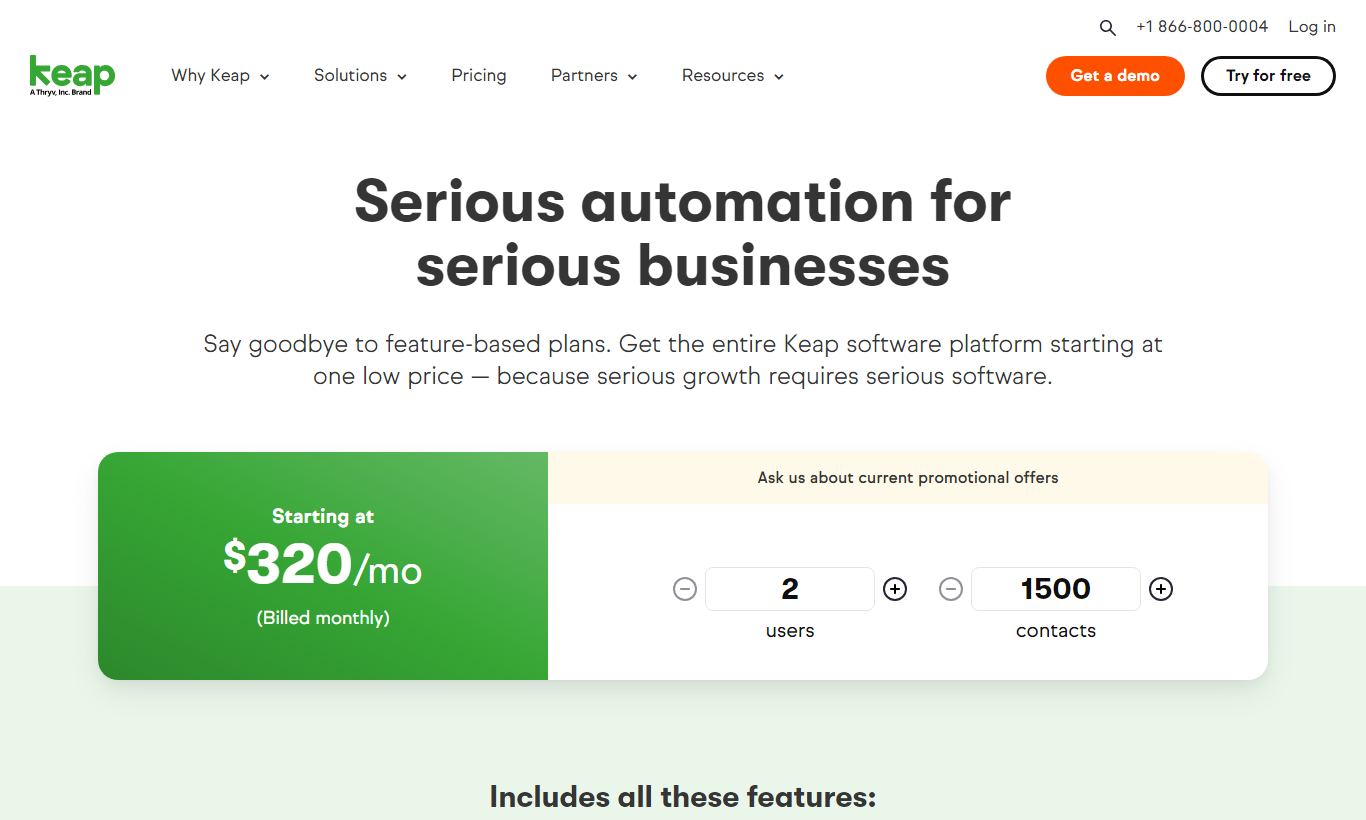
- Keap Pro - $299/month (billed monthly) or approximately $249/month billed annually. Includes 1,500 contacts and 2 users. Core features: CRM, campaign automation, pipeline management, invoicing, payments, appointment scheduling, email and SMS marketing, landing pages, and reporting. Each additional 1,000 contacts adds roughly $30/month.
- Keap Max - $399/month (billed monthly) or approximately $329/month billed annually. Includes 2,500 contacts and 3 users. Adds advanced e-commerce (promo codes, upsells, subscription management), lead scoring, company records for B2B accounts, advanced reporting, and priority support. Additional contacts and users cost extra.
Keap also offers an optional one-time Expert Coaching onboarding package ($499) that pairs new users with a certified Keap partner for implementation. Given the platform's learning curve, it's worth the money for most teams. There's no contract requirement, and you can cancel any time.
What We Love
- End-to-end automation without third-party tools: The Campaign Builder handles lead capture, nurture sequences, appointment scheduling, invoicing, and post-sale follow-up in a single workflow. You don't need Zapier for core operations.
- Native invoicing and payment collection: Keap is one of very few CRMs that lets you build, send, and collect payment on invoices inside the same platform where you manage contacts and deals.
- Two-way SMS built into all plans: Automated and manual text messaging is included without an add-on, so follow-up sequences respond faster than email-only systems can.
- Rich contact timelines with full interaction history: Every touchpoint, email opens, form fills, purchases, appointments, notes, shows up in a single contact record. Any team member gets instant context on a client relationship.
- Extensive pre-built automation templates: Keap ships with dozens of ready-to-use campaign templates for common workflows, including lead nurture, appointment reminders, and re-engagement. New users get to their first automation much faster because of it.
Watch Out For
- High price floor for early-stage businesses: At $299/month minimum, Keap is hard to justify for businesses below $150K - $200K in annual revenue. There's no entry-level plan under $299, and the contact-count-based overage model can push costs up faster than expected as your list grows.
- Steep initial learning curve: Despite the 2019 rebrand, Keap is still a complex platform. New users regularly report needing 2 - 4 weeks before they feel productive, and the Campaign Builder, powerful as it is, takes real time to master. The optional onboarding coaching package at $499 exists for a reason.
- Limited native integrations compared to competitors: Keap's native app integrations number in the dozens. HubSpot and Salesforce connect natively to hundreds of tools. Keap leans more heavily on Zapier for third-party connectivity, which adds cost and can introduce sync delays.
- Reporting depth lags behind CRM-focused competitors: Pipeline and campaign reports cover the basics, but Keap's analytics are noticeably less granular than Salesforce or even HubSpot's mid-tier plans. Custom report building is limited, and dashboards can't be shared across user roles.
Who Is It Best For?
The solo service provider doing $300K - $1M/year: A health coach, financial advisor, or marketing consultant with an established client base and a repeatable sales process will get enormous value from Keap's automation. They're likely already juggling 3 - 5 separate tools (email platform, scheduling tool, invoicing software, CRM) and paying nearly as much in total. Keap folds all of it into one system, and it adds a level of automation depth none of those point solutions offer on their own.
A small service agency with 2 - 10 employees: An agency managing ongoing client retainers needs structured pipelines, automated onboarding sequences, and recurring billing, all in one place. Keap's Pro plan handles all three. The team collaboration features, including task assignment, shared contact records, and pipeline ownership, are enough for small teams that don't want the overhead of enterprise CRM configuration.
A brick-and-mortar service business running local marketing: Picture a dental practice, a law firm, or a home renovation company that captures leads from a website form and needs to follow up systematically. Keap's SMS sequences, appointment scheduling, and automated review-request campaigns fit this use case well. A home renovation contractor, for instance, can auto-send a quote follow-up text two days after submitting a proposal, then trigger a job completion survey with a Google review link. No manual work required.
How Does It Compare?
Keap vs HubSpot: HubSpot's free and Starter tiers are far more accessible for budget-conscious businesses, and its reporting and native integrations run deeper. But HubSpot's automation on the lower tiers is much more limited. To match Keap's Campaign Builder capability, you'd need HubSpot's Marketing Hub Professional at $800/month. For small businesses that want automation without enterprise pricing, Keap wins on value. See our full Keap vs HubSpot breakdown.
Keap vs ActiveCampaign: ActiveCampaign is the closest competitor on automation power and pricing accessibility, with plans starting at $15/month. Its automation builder is more flexible, and its native integrations stretch further. But ActiveCampaign skips invoicing, native payment processing, and appointment scheduling. Keap stays the stronger pick for businesses that want a true all-in-one system. See our full Keap vs ActiveCampaign comparison.
Final Verdict
Keap earns a strong recommendation for one specific type of buyer: the established small business owner who has outgrown duct-taped tool stacks and is ready to invest in a system that automates the full client lifecycle. The $299/month price tag is real, but so is the platform's capability. The combination of deep automation, native invoicing, SMS, and appointment scheduling in one CRM is genuinely rare at any price point.
If you're pre-revenue, running a very lean operation, or mainly need a simple contact database with basic email blasts, Keap is overkill. HubSpot's free CRM or Mailchimp will serve you better. But if you're generating consistent revenue, losing deals because follow-up falls through the cracks, and tired of manually chasing invoices, Keap will pay for itself quickly. Use the 14-day free trial to build one automation sequence. That experience alone will tell you whether the platform is right for your business.
Try Keap Free →FAQ
How much does Keap cost per month?
Keap's Pro plan starts at $299/month (billed monthly) for up to 1,500 contacts and 2 users. The Max plan is $399/month for 2,500 contacts and 3 users. Annual billing drops these prices to roughly $249/month and $329/month. There's no free plan, but you can try either one free for 14 days.
Is there a free version of Keap?
No. Keap doesn't offer a permanent free tier. You do get a 14-day free trial on both the Pro and Max plans, though, and no credit card is required to start it.
Is Keap worth it for small businesses?
Yes, if you're generating $200K or more a year and have a repeatable sales process. Keap's all-in-one automation, invoicing, and CRM setup justifies the $299/month starting price for established service businesses. It's a poor fit for startups or anyone with simple CRM needs.
What is the difference between Keap Pro and Keap Max?
Keap Pro ($299/month) covers core CRM, automation, email/SMS, invoicing, and appointment scheduling for up to 1,500 contacts and 2 users. Keap Max ($399/month) adds advanced e-commerce features (promo codes, subscription management, upsells), lead scoring, company/B2B records, and priority support for up to 2,500 contacts and 3 users.
How does Keap compare to HubSpot?
HubSpot has a free CRM tier and deeper native integrations, so it's more accessible for early-stage businesses. Keap's automation, invoicing, and all-in-one setup are stronger at equivalent price points. Matching Keap's Campaign Builder in HubSpot requires the Marketing Hub Professional plan at $800/month, which makes Keap the better value for small businesses focused on automation.
Does Keap include email and SMS marketing?
Yes. Both email and two-way SMS marketing come included on all Keap plans at no extra cost. You can automate SMS messages through the Campaign Builder, personalize them with merge fields, and use them for appointment reminders, follow-up sequences, and broadcast campaigns.
Can Keap handle invoicing and payments?
Yes. Keap includes native invoice creation, payment collection (via Stripe or Keap Payments), recurring billing, and payment plans. This sets it apart from most CRMs, which need a separate invoicing tool like QuickBooks or FreshBooks. Keap handles billing on the same platform as your CRM and automation.
What is the Keap learning curve like?
Keap takes longer to learn than lighter CRMs. Most new users need 2 to 4 weeks before they feel fully productive, especially with the Campaign Builder. Keap offers an optional paid onboarding coaching package ($499) with a certified partner, and it speeds up setup considerably for businesses without in-house marketing operations expertise.
We may earn a commission when you click affiliate links. This never affects our editorial scores.
| Best for | CRM and automation for small business |
| Category | CRM Software |
Answer a few quick questions and we'll match you to the best tool for your needs.
→ Suggest a Tool