
HubSpot Review 2026: Is It Worth It?
HubSpot is one of the most capable CRM platforms you can get in 2026. Its free tier beats plenty of paid competitors, and the wider suite ties together marketing, sales, service, and operations in one place. The visual pipeline management, email automation, and reporting tools stand out for mid-market teams. Growing businesses that want one shared view across departments will get real value here. Costs jump fast once you move past the free tier though, and the full Marketing Hub Pro and Enterprise plans can cost as much as dedicated enterprise software. If you've got under 200 contacts or you're an early-stage startup, HubSpot's free CRM is tough to beat. Scaling teams that need real automation without blowing the budget should look at the Starter bundles. Large enterprises with complicated data models will likely run into configuration limits.
What we love
Watch out for
HubSpot at a glance
What to test in your HubSpot trial
14-day free trial
- Set up your sales pipeline with at least 10 deals to test drag-and-drop stage updates and inline value edits
- Build a 3-5 email sequence in Sales Hub with task reminders and test that it pauses when you reply to a prospect email
- Connect your Google or Outlook calendar to the meeting scheduler and test a booking link with your team
- Create a custom dashboard with 2-3 reports showing pipeline velocity and email open rates filtered to your business
Quick Verdict
HubSpot earns its reputation as the go-to CRM for ambitious growth teams, and that reputation holds up under scrutiny, not just marketing hype. The platform delivers an actually functional free tier that includes deal pipelines, contact management, meeting scheduling, and live chat, with no cost and no time limit attached. For early-stage businesses, that alone is remarkable. As you scale, the Starter Customer Platform at $15 to $20 per seat per month adds email sequences and basic automation that genuinely replaces the need for separate tools like Mailchimp or Calendly.
Where HubSpot distinguishes itself from simpler CRMs is the depth of its cross-functional suite. Marketing, sales, service, and operations data all live in one system. That means you can see your customer's journey from first blog visit to closed deal to renewal ticket, all in a single timeline. The pricing model rewards large teams and penalises list-heavy marketing operations, though. Send email to 50,000 contacts and the costs compound fast. Weigh this platform against your team size, contact volume, and automation goals before you commit.
Start Your Free Trial →What is HubSpot?
HubSpot was founded in 2006 by Brian Halligan and Dharmesh Shah at MIT, originally as an inbound marketing software company. Over two decades it has grown into a publicly traded platform (NYSE: HUBS) serving over 200,000 customers across 135 countries. The product has evolved from a marketing automation tool into a full customer platform, now comprising six interconnected Hubs: Marketing, Sales, Service, CMS (now called Content), Operations, and Commerce. Each Hub can be purchased independently or together as a bundled Customer Platform.
HubSpot is built mainly for B2B and B2C companies in the 10 to 500 employee range, the so-called "growth stage" market, though its Enterprise tier competes hard for mid-market contracts too. Its core idea is that marketing, sales, and service teams should share one database instead of stitching together siloed tools. That idea holds up in practice, which makes HubSpot an easy sell to companies tired of managing integrations between their CRM, email tool, helpdesk, and analytics platform.
Key Features
Feature Checklist
Contact and Company Management
HubSpot's contact records are genuinely best-in-class for their depth without complexity. Every contact page automatically aggregates email opens, page visits, form submissions, support tickets, and deal history into a chronological timeline. Sales reps can see that a prospect visited the pricing page three times in the past week without logging a single activity manually. Companies can be associated with multiple contacts, and deals and tickets link to both. That means revenue attribution flows naturally without custom configuration. Properties (fields) are highly customisable at all tiers, though custom objects for non-standard data models require Enterprise.
Visual Deal Pipeline Management
The drag-and-drop Kanban deal board remains one of HubSpot's most praised features. Sales reps can move deals through stages by dragging cards, update values inline, and see a pipeline-wide revenue total at the top of each stage column. Pipeline managers can create multiple pipelines for different product lines or sales motions, a handy option available even on the free tier. Forecast categories (Committed, Best Case, Pipeline) are assignable per deal and roll up into the Sales Hub forecasting tool at Professional tier. For a sales manager reviewing Monday morning pipeline health, this is a fast, intuitive interface.
Email Marketing and Automation
In Marketing Hub, the drag-and-drop email builder supports dynamic content blocks that personalise content based on contact properties. For example, it can show different CTAs to prospects versus customers. The workflow engine at Professional tier is genuinely powerful. You can branch logic based on deal stage, contact list membership, form submission, web page visit, or even a property change. Here's a practical example: a contact who downloads a pricing guide gets enrolled in a 5-email nurture sequence. If they book a demo instead, they're automatically unenrolled from the sequence and their sales rep gets notified. These multi-step, conditional automations are what separate HubSpot from simpler tools.
Reporting and Attribution
HubSpot's reporting has matured significantly. Custom dashboards pull from any object, including contacts, companies, deals, and tickets, and support filters, date ranges, and comparison periods. The attribution reporting in Professional and Enterprise tracks which marketing touchpoints contributed to closed revenue, supporting first-touch, last-touch, linear, and time-decay models. For a marketing director justifying spend, this matters a great deal. The pre-built reports library includes over 30 templates covering sales velocity, email performance, landing page conversion rates, and customer retention. Executives can be given view-only dashboard access without consuming a paid seat.
Sales Sequences and Meeting Scheduling
Sales Hub's email sequences let reps enrol a prospect in a pre-written, timed series of personalised emails and task reminders. Unlike marketing workflows, sequences send from the rep's own email address and pause automatically when a prospect replies. That keeps the human feel while cutting out manual follow-up work. The integrated meeting scheduler generates a personal booking link that syncs with the rep's Google or Outlook calendar, and it can route bookings round-robin across a team. When a prospect books, a contact record is created or updated automatically. This tight link between sequencing, scheduling, and the CRM record removes much of the friction that usually breaks outbound sales motions.
Pricing
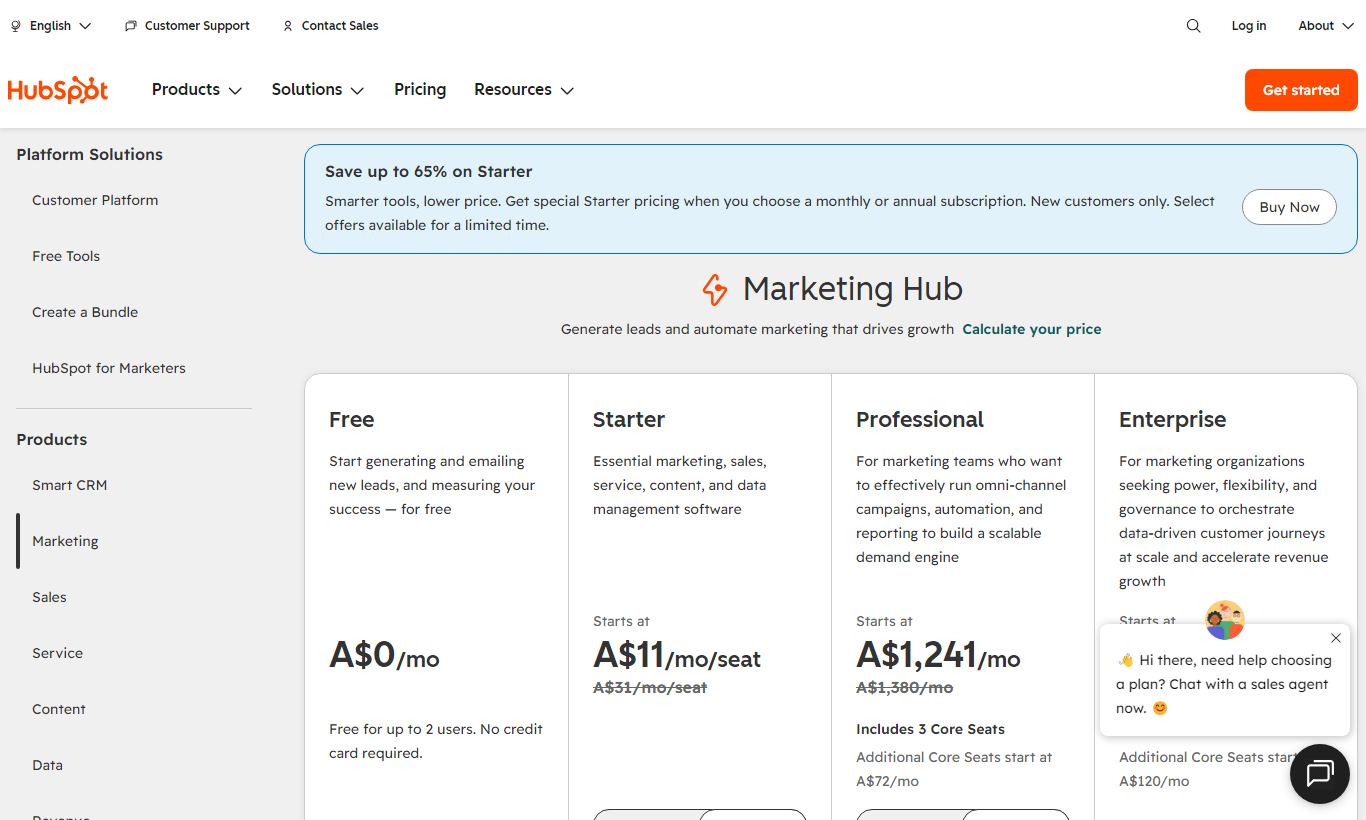
HubSpot's pricing isn't a single number. It varies by Hub, tier, number of seats, and, for Marketing Hub, how many contacts you have. Here's a practical breakdown of the main options in 2026:
Free CRM: Truly free, unlimited users, up to 1,000,000 contacts. Includes deal pipelines, basic email tracking, live chat, meeting scheduling, and reporting. There's no trial period because it's permanently free. This tier works well for very early-stage teams or anyone who just needs contact management.
Starter Customer Platform: $20/seat/month ($15/seat billed annually). Bundles Starter-tier Marketing, Sales, Service, Content, and Operations Hubs. Removes HubSpot branding, adds email marketing, basic sequences, and Stripe payments. Best for teams of 1 to 10 who need to move past the free tier without a big commitment.
Professional Customer Platform: $1,300/month for the bundle, starting at 5 seats ($1,170/month billed annually). This is where HubSpot turns into a serious platform: full marketing automation workflows, ABM tools, custom reporting, sales forecasting, and SLA-backed service tools. Marketing Hub Professional alone starts at $890/month for 2,000 contacts, and the price climbs as your list grows.
Enterprise Customer Platform: $4,300/month starting at 7 seats. Adds custom objects, predictive lead scoring, multi-touch revenue attribution, sandboxes, SSO, and advanced team partitioning. Built for companies with complex data needs and multiple business units.
A 14-day free trial is available on paid tiers. The free CRM has no trial limit, since it never expires. Annual billing pays off here. Monthly billing adds roughly 25 to 33% to the cost.
What We Love
- The free CRM tier includes unlimited users, deal pipelines, meeting scheduling, and live chat. It's genuinely useful without a credit card, and there's no forced upgrade timeline.
- Cross-hub data sharing means a marketing campaign, a sales deal, and a support ticket all reference the same contact record. That kills the data silos that wreck customer experience.
- The email sequence tool in Sales Hub Starter automatically pauses when a prospect replies. It keeps outreach feeling personal and takes manual follow-up off reps' plates.
- HubSpot's marketplace of 1,500+ apps includes native two-way Salesforce sync, Shopify product data ingestion, and deep Slack notifications, so you need less Zapier middleware to glue things together.
- The onboarding experience and in-app Academy training (HubSpot Academy), with free certifications, cut ramp time for new team members well below what you'd get with comparable platforms.
Watch Out For
- Marketing Hub Professional starts at $890/month for 2,000 contacts and scales up with list size. A company emailing 50,000 contacts will pay $1,580/month for that Hub alone, making it one of the pricier options for email-heavy marketing teams
- Custom objects, which matter for companies with non-standard data models like SaaS product usage data, multi-location inventory, or complex service hierarchies, are locked behind Enterprise. That's a steep cost jump for teams that actually need them
- Phone and in-app chat support is limited to Professional and Enterprise subscribers. Starter users are stuck with the community forum, chatbot, and knowledge base, which is a real gap when you're onboarding under time pressure
- HubSpot's CMS and content tools are improving, but they still lag behind dedicated platforms like WordPress for complex content architectures. Teams with heavy editorial workflows may find it limiting
Who Is It Best For?
A 15-person B2B SaaS company transitioning from spreadsheets: This is HubSpot's sweet spot. A team like this typically has a marketing person running campaigns, 3 - 5 sales reps managing pipelines, and a customer success function handling renewals. HubSpot's Professional Customer Platform gives all three functions a shared contact database, marketing automation for lead nurturing, deal pipelines for reps, and ticket management for CS. No IT department needed, and no Salesforce admin on payroll.
A solo consultant or freelancer managing under 100 active prospects: The free CRM is genuinely enough. Meeting scheduling links, email tracking, deal stages, and basic reporting are all available at no cost. There's no time pressure to upgrade, which makes it a low-risk default choice for independent professionals who want CRM discipline without a subscription.
A marketing director at a 100-person professional services firm running inbound content programmes: Marketing Hub Professional's workflow automation, landing page builder, SEO tools, and multi-touch attribution reporting justify the cost if the team is seriously investing in content-led demand generation. Tracing a blog reader through form submission, nurture sequence, and closed deal in one platform is hard to pull off with a patchwork of tools.
How Does It Compare?
Salesforce: Salesforce's Sales Cloud is more powerful for complex enterprise data models, custom objects at every tier, and highly configurable approval workflows. But it requires dedicated admin resources, has a steeper learning curve, and costs considerably more to implement and maintain. Teams without a Salesforce admin or a six-figure implementation budget will get to value faster with HubSpot. See our full HubSpot vs Salesforce breakdown.
Pipedrive: Pipedrive is a leaner, sales-focused CRM. It costs less per seat and offers an excellent pipeline UX, but it lacks native marketing automation, a service hub, and cross-functional reporting. Teams that only need pipeline management and email tracking may find Pipedrive sufficient and cheaper. Those wanting a unified customer platform will hit its limits fast. Compare them directly in our HubSpot vs Pipedrive guide.
Final Verdict
HubSpot is the most complete CRM platform for growth-stage companies that want marketing, sales, and service teams working from a single system. Its free tier is the most generous in the market. Its Professional tier, while expensive for list-heavy marketers, delivers automation and reporting depth that genuinely replaces four or five separate tools. The platform rewards companies that invest in using it properly. The teams who see mediocre results are usually the ones who underuse the workflow automation and attribution capabilities.
Who should look elsewhere: enterprise companies with highly complex data models that need custom objects at Professional tier pricing, or very small businesses with static contact lists who only need a pipeline tool. Those businesses would be better served by Pipedrive at a lower cost per seat. For everyone in between, especially companies planning to grow their marketing and sales headcount over the next 24 months, HubSpot is an investment that consolidates your stack and grows with you.
Try HubSpot Free →FAQ
Is HubSpot really free?
Yes. HubSpot's free CRM is permanently free with no time limit and no credit card required. It includes unlimited users, up to 1,000,000 contacts, deal pipelines, meeting scheduling links, live chat, and basic reporting. It's not a trial. You can use it indefinitely. Paid tiers unlock automation, advanced reporting, and additional send limits.
How much does HubSpot cost per month?
HubSpot's paid plans start at $15/seat/month (billed annually) for the Starter Customer Platform. The Professional Customer Platform starts at $1,170/month (billed annually) for a minimum of 5 seats. Enterprise starts at $4,300/month. Marketing Hub pricing also scales with contact list size, and that can push costs up a lot for larger lists.
Is HubSpot worth it for small businesses?
For small businesses with limited budgets, HubSpot's free CRM is genuinely worth using. It outperforms many paid CRMs on pipeline management and ease of use. The Starter tier at $15 to $20/seat/month adds email marketing and sequences that replace Mailchimp and Calendly subscriptions. The Professional tier usually pays for itself once a business has a dedicated marketing function and is investing seriously in demand generation.
HubSpot vs Salesforce: which is better?
HubSpot works better for teams that need fast implementation, strong marketing-sales alignment, and an easy interface without dedicated CRM administrators. Salesforce fits large enterprises with complex custom data models, heavy process automation needs, and the internal resources to configure and maintain the platform. Most growth-stage companies will get value faster with HubSpot.
Does HubSpot have a free trial on paid plans?
Yes. HubSpot offers a 14-day free trial on its paid tiers, including Professional and Enterprise. The free CRM itself needs no trial. It's permanently free. You can start with the free CRM and upgrade to a paid trial when you're ready to test advanced features like workflow automation, custom reporting, or sequences.
What are HubSpot's biggest limitations?
The most common complaints are pricing escalation at the Professional tier (especially for large contact lists), custom objects being locked to Enterprise plans, and thin support options for Starter users, who only get community forums and chatbot help. Some users also say HubSpot's CMS lags behind dedicated platforms like WordPress for complex editorial work.
Can HubSpot replace Mailchimp?
For most growth-stage businesses, yes. HubSpot's Marketing Hub includes email marketing, automation workflows, landing pages, and list segmentation that match or beat Mailchimp's core functionality, and it keeps all your data in the same CRM as your sales pipeline. That said, Mailchimp stays cheaper for teams that only need email marketing without CRM functionality, especially at high contact volumes.
We may earn a commission when you click affiliate links. This never affects our editorial scores.
| Best for | All-in-one CRM and marketing |
| Category | CRM Software |
Answer a few quick questions and we'll match you to the best tool for your needs.
→ Suggest a Tool