
Capsule CRM Review 2026: Is It Worth It?
Capsule CRM is a clean, focused customer relationship management tool built for small and mid-sized businesses that want clarity over complexity. Zestia founded it in 2009, and it offers contact management, sales pipeline tracking, task automation, and a growing set of integrations, all wrapped in one of the most intuitive interfaces in the CRM market. Pricing starts at a genuinely free tier for up to 2 users and scales to $54/user/month for enterprise-level features. It won't replace a heavy-duty platform like Salesforce for large sales teams. But for consultants, agencies, and SMBs managing under 50,000 contacts, Capsule delivers exceptional ease of use and real value. It's a strong pick for teams who've been burned by over-engineered CRMs and just want something they'll actually open every day.
What we love
Watch out for
Capsule CRM at a glance
What to test in your Capsule CRM trial
14-day free trial
- Import your actual contacts and test the Kanban pipeline with your real deals
- Set up multiple pipelines for different sales types and drag deals between stages
- Log 10-15 emails from Gmail or Outlook sidebar without leaving your inbox
- Create a workflow automation for a common event like deal won triggering a task
- Send a test email campaign using Transpond segmentation to a real contact list
- Review the pre-built reports available on your plan and decide if custom reports are essential before your trial ends
Quick Verdict
Capsule CRM earns its place as one of the most approachable and genuinely useful CRM platforms for small businesses and growing teams. It doesn't try to be everything to everyone, and that restraint is exactly what makes it work. You get a well-designed contact database, a visual sales pipeline, task management, and solid integrations, without a months-long onboarding process or a six-figure implementation budget. Most teams are up and running in under a day.
Where Capsule falls short is advanced marketing automation, deep reporting, and the kind of high-volume customisation that enterprise sales teams demand. If those matter to you, Salesforce or HubSpot may fit better. But if your priority is a CRM your team will actually open every morning, Capsule is one of the strongest contenders in its class. A 14-day free trial on paid plans lets you test the full feature set with no credit card required.
Start Your Free Trial →What is Capsule CRM?
Capsule CRM was founded in 2009 by Manchester-based company Zestia. It was built on a simple idea: a CRM should be easy enough that every team member actually uses it, but still give managers real visibility into their pipeline and customer relationships. Over the past 15 years it has picked up more than 10,000 paying customers across professional services, agencies, non-profits, and e-commerce businesses. It sits firmly in the SMB and mid-market segment, competing with tools like Pipedrive, Zoho CRM, and HubSpot CRM.
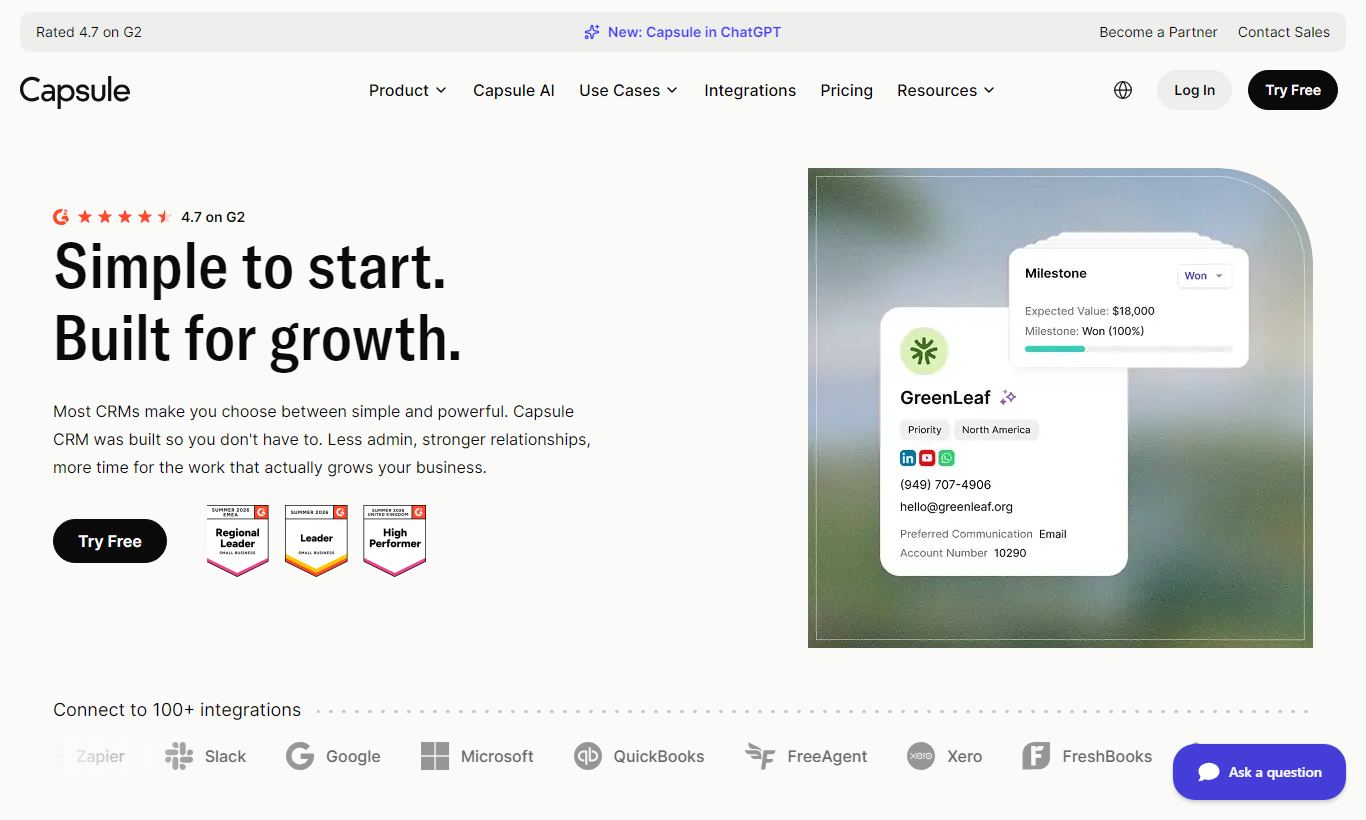
Unlike vendors that have piled on marketing suites, e-commerce tools, and customer support modules over time, Capsule has kept its scope narrow: manage your contacts, track your deals, collaborate on tasks, and understand your pipeline. That focus shows in an interface that feels genuinely designed rather than bolted together. The product is cloud-based, mobile-friendly, and connects with over 50 third-party tools including G Suite, Microsoft 365, Mailchimp, Xero, and Zapier.
Key Features
Feature Checklist
Contact & Relationship Management
At its core, Capsule is a contact database, and it's a very good one. Each contact record (person or organisation) holds standard fields like phone, email, and address, but also custom fields you define yourself, notes, files, emails (synced from Gmail or Outlook), and a full activity timeline. You can tag contacts with categories, assign them to team members, and track every interaction in one scrollable feed. A particularly useful touch: Capsule lets you log calls and meetings directly on the record with a timestamp and linked task, so nothing falls through the cracks between team members. For service businesses managing ongoing client relationships, this alone justifies the subscription.
Visual Sales Pipeline
Capsule's pipeline view is a drag-and-drop Kanban board where each opportunity card shows the deal name, value, expected close date, and assigned owner. You can create multiple pipelines, for example one for new business and one for upsells, which is surprisingly rare in tools at this price point. Milestone stages are fully customisable, and you can set a probability percentage per stage that feeds into the weighted pipeline forecast. A list view is also available for teams who prefer a spreadsheet-style overview. The pipeline is genuinely fast to navigate and doesn't need any configuration before you can start using it.
Task & Activity Management
Every contact, organisation, or opportunity in Capsule can have tasks attached to it: follow-up calls, proposal submissions, contract renewals, with due dates, assignees, and reminders. The Tasks view gives a unified list of everything due across all records, filterable by team member or date range. Capsule also tracks activity, so when a task is completed, it gets logged on the associated record's timeline automatically. This tight coupling between tasks and records means you always have context when you open a contact. You can see exactly what was promised, by whom, and when it got done.
Email Integration & Tracking
Capsule integrates natively with both Gmail (via a Chrome extension) and Outlook, letting you log emails to contact records directly from your inbox without switching tabs. The Transpond add-on (Capsule's own email marketing tool, formerly known as Futureanalytics) lets you build and send email campaigns to segmented lists pulled directly from your Capsule contacts. Open and click tracking is available within Transpond. For teams that rely heavily on email sequences and newsletters as part of their sales process, this native integration removes the need for a separate Mailchimp account for basic use cases.
Reporting & Analytics
Capsule's reporting suite covers the essentials: pipeline reports showing deal volume and value by stage, activity reports tracking tasks completed per user, and sales performance reports comparing won and lost opportunities over time. On the Growth and Advanced plans, you get a more granular Activity Reporting dashboard and the ability to export data to CSV. What's missing is a true custom report builder. You can't drag-and-drop metrics into custom-built dashboards the way you can in Salesforce or even Zoho. For most SMBs, the pre-built reports do the job. For data-heavy sales operations, this will feel limiting.
Workflow Automation
Capsule introduced automation in its higher-tier plans, letting you trigger actions, such as creating a task, sending an email notification, or moving a deal to a new pipeline stage, when specific events occur (say, an opportunity gets marked as won, or a contact gets added to a list). The automation builder is visual and easy to pick up, though it's less powerful than dedicated tools like HubSpot Workflows or ActiveCampaign. For straightforward sequences like "deal won, notify account manager, create onboarding task", it works well without any technical setup.
Pricing
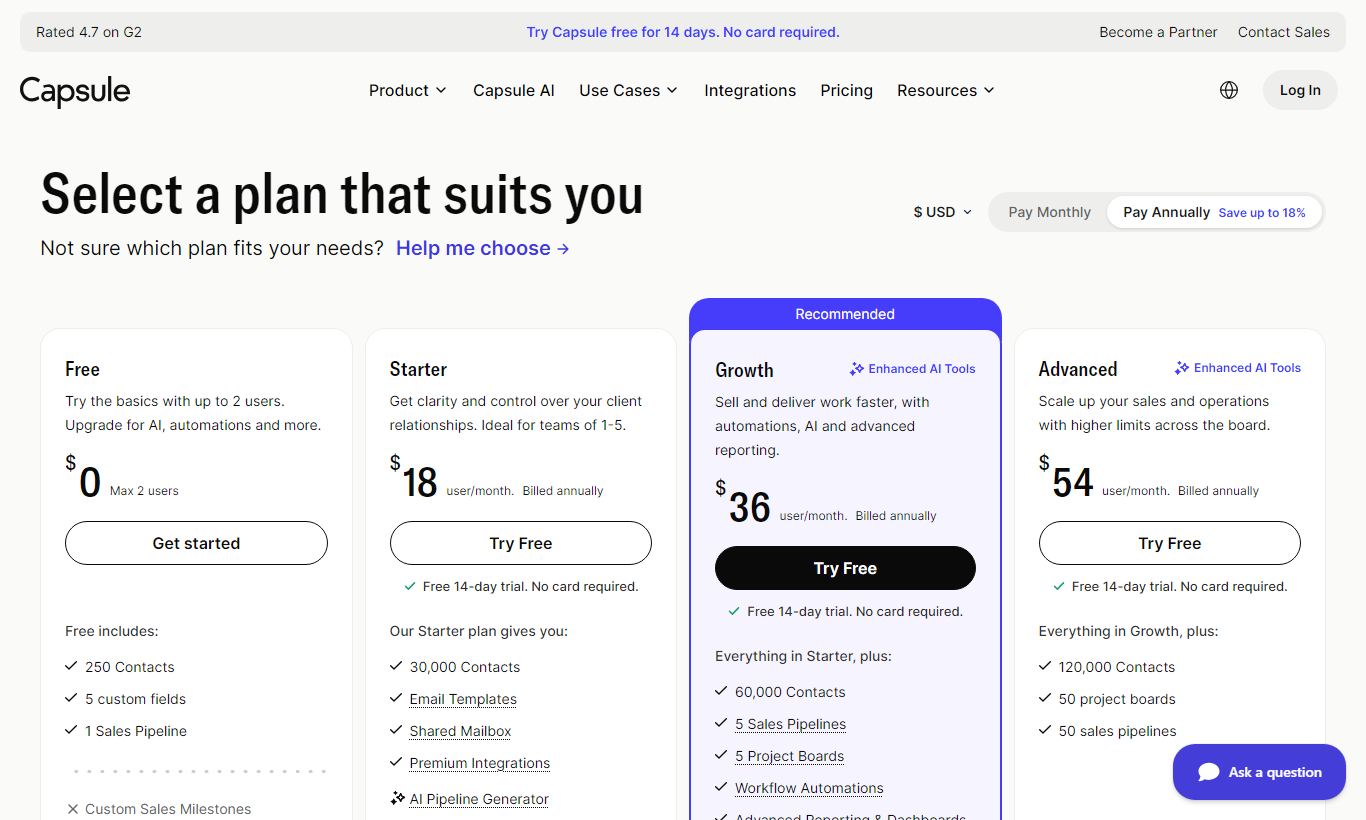
Capsule CRM offers five pricing tiers. All paid plans include a 14-day free trial, no credit card required. Pay annually and you save about 15% compared to monthly billing.
- Free: $0/month, for up to 2 users, 250 contacts, and 1 pipeline. Good for solo operators kicking the tires.
- Starter: $18/user/month billed monthly, or about $15/user/month billed annually. Up to 1,000 contacts, basic reporting, email integration, and tasks.
- Growth: $36/user/month billed monthly, or about $30/user/month billed annually. Up to 30,000 contacts, multiple pipelines, workflow automation, activity reporting, and Transpond integration. This is the tier most growing SMBs will land on.
- Advanced: $54/user/month billed monthly, or about $45/user/month billed annually. Up to 60,000 contacts, custom dashboards, advanced automation, and priority support.
- Ultimate: $72/user/month billed monthly, or about $60/user/month billed annually. Unlimited contacts, a dedicated account manager, custom training, and an enterprise SLA.
HubSpot's Sales Hub jumps from free straight to $90+/user/month. Capsule's climb is much gentler. The Growth plan especially is a strong deal for teams of 3 to 10 people who need multiple pipelines and basic automation without paying enterprise prices.
What We Love
- Multiple pipelines on mid-tier plans: Most competitors save this for enterprise tiers. Capsule includes it from the Growth plan at $36/user/month, which makes it genuinely useful for businesses managing both new sales and renewals.
- Near-zero onboarding friction: A new user can import a CSV of contacts, set up a pipeline, and log their first task within 30 minutes. The UI is clean enough that formal training is rarely needed.
- Native Gmail and Outlook sidebar: Logging emails directly from your inbox, without copy-pasting into a separate system, removes one of the biggest CRM adoption barriers for sales teams.
- Transpond email marketing built in: Instead of forcing you to pay for a separate Mailchimp or Klaviyo subscription for basic campaigns, Capsule's native email marketing tool handles list segmentation and send tracking directly from your contact database.
- Transparent, predictable pricing: No hidden modules, no "contact us for pricing" enterprise walls on core features. Every tier is clearly listed with exact contact limits and feature inclusions.
Watch Out For
- Reporting lacks a custom report builder: You're limited to pre-built report templates. Teams that need custom sales dashboards or cross-object reporting will find this frustrating. It's one of the most common complaints in user reviews on G2 and Capterra.
- Contact limits feel arbitrary at lower tiers: The Starter plan's 1,000-contact cap is tight for any business with a real prospect list. You'll likely be forced up to Growth sooner than you'd like, which effectively doubles your per-user cost.
- Automation is relatively basic: Capsule's workflow automation handles simple if/then triggers but lacks multi-step branching, conditional logic across multiple criteria, or native lead scoring. Teams with complex nurture sequences will need to supplement with Zapier.
- No built-in telephony or live chat: Unlike some competitors, such as Zoho CRM and Freshsales, Capsule has no native calling, VoIP integration, or live chat widget. All phone-based sales activity must be logged manually or through a third-party integration.
Who Is It Best For?
The independent consultant or small agency (2 - 10 people): A management consultant managing relationships with 200 clients and prospects, or a 5-person design agency tracking project opportunities, will find Capsule hits every requirement without extra overhead. The free plan may even work for solos. The Growth plan handles a small team without a hitch.
The B2B sales team moving off spreadsheets: A 15-person SaaS company whose sales reps are still tracking deals in Google Sheets will find Capsule's pipeline and task features a big step up. The Gmail integration means reps actually adopt it, since they don't have to change how they work day to day. Capsule lives inside the inbox they're already using.
The non-profit or membership organisation: Capsule's contact tagging, custom fields, and task management make it a strong fit for organisations tracking donor relationships, membership renewals, or grant applications, where "pipeline" means something beyond sales revenue. Several non-profits pick Capsule specifically for its clean contact management and its price relative to Salesforce Nonprofit.
How Does It Compare?
Capsule CRM vs Pipedrive: Pipedrive is the stronger choice for pure sales teams with high deal volumes. Its reporting, forecasting and email sequencing are more advanced. Capsule, though, is meaningfully cheaper at equivalent contact limits and far less overwhelming for non-sales users like account managers or project leads.
Capsule CRM vs HubSpot CRM: HubSpot's free CRM is hard to beat for getting started, but the cost climbs sharply once you need features like multiple pipelines, sequences or custom reporting. Those are exactly the areas where HubSpot's paid tiers get expensive fast. Capsule offers a more predictable cost curve for teams that don't need HubSpot's full marketing suite.
Final Verdict
Capsule CRM delivers exactly what it promises: an intuitive, well-priced CRM that teams actually adopt and use. Its strengths, visual pipelines, exceptional contact management, smooth email integration, and transparent pricing, make it a genuinely excellent tool for small businesses, professional services firms, and non-profits that want CRM benefits without CRM complexity.
Its limitations are real but predictable. If you need custom reporting dashboards, sophisticated multi-branch automation, or built-in telephony, you'll need to either supplement Capsule with integrations or move up to a heavier platform. For the majority of businesses with fewer than 50 users and a contact database under 50,000 records, though, Capsule CRM offers one of the best combinations of usability, value, and reliability on the market. Start with the 14-day free trial on the Growth plan. That's the tier where Capsule's full value becomes clear.
Try Capsule CRM Free →FAQ
Is Capsule CRM free?
Yes. Capsule offers a permanently free plan for up to 2 users and 250 contacts with 1 pipeline. Paid plans start at $18/user/month and include a 14-day free trial, no credit card required.
How much does Capsule CRM cost?
Capsule CRM pricing ranges from $0 (Free, 2 users) to $18/user/month (Starter), $36/user/month (Growth), $54/user/month (Advanced), and $72/user/month (Ultimate). Annual billing cuts costs by roughly 15%.
Is Capsule CRM good for small businesses?
Yes, it's one of the best CRMs built for small businesses. Its low onboarding friction, clean interface, and mid-tier pricing suit teams of 2 to 20 people who want a real CRM without enterprise complexity or cost.
How does Capsule CRM compare to HubSpot?
HubSpot's free CRM is broader out of the box, but paid tiers escalate quickly. Capsule is more affordable at equivalent feature levels and easier to use, though it lacks HubSpot's depth in marketing automation. For straightforward CRM use without a marketing suite attached, Capsule is often the better value.
Does Capsule CRM integrate with Gmail and Outlook?
Yes. Capsule integrates natively with both Gmail (via a Chrome extension sidebar) and Microsoft Outlook. You can log emails, view contact history, and create tasks straight from your inbox without switching to the CRM interface.
What are the contact limits on Capsule CRM plans?
The Free plan allows 250 contacts, Starter allows 1,000, Growth allows 30,000, Advanced allows 60,000, and the Ultimate plan offers unlimited contacts.
Does Capsule CRM have automation?
Yes, but it's fairly basic. Workflow automation is available on the Growth plan and above, and it supports simple if/then triggers, like creating tasks or sending notifications when a deal stage changes. Complex multi-branch sequences need Zapier or a dedicated automation tool.
Is Capsule CRM worth it in 2026?
For small and mid-sized businesses that need reliable contact management, visual pipeline tracking, and email integration without enterprise-level complexity, yes, Capsule CRM is worth it. Its pricing is transparent, its interface is best-in-class for usability, and most teams see adoption rates far higher than with heavier alternatives.
We may earn a commission when you click affiliate links. This never affects our editorial scores.
| Best for | Simple yet powerful CRM |
| Category | CRM Software |
Answer a few quick questions and we'll match you to the best tool for your needs.
→ Suggest a Tool