Notion Review 2026: Is It Worth It?
Notion is an all-in-one workspace that combines notes, databases, wikis, and project management into a single flexible platform. It's best suited for knowledge-driven teams (startups, agencies, remote-first companies) who want one tool instead of five. The free plan is genuinely generous, and paid tiers start at $12/user/month (billed annually). Notion's block-based editor and relational databases are genuinely powerful. But the platform has a steep learning curve for non-technical users, and its native time-tracking and reporting features lag behind dedicated project management tools like Asana or Monday.com. Teams that live in documents as much as tasks will get exceptional value from Notion. Teams that need Gantt charts, workload views, and deep reporting out of the box should look at a more structured PM tool instead.
What we love
Watch out for
Notion at a glance
What to test in your Notion trial
Free plan
- Build a project database with Kanban, timeline, and table views using the same data source
- Create an infinite page hierarchy with departments, teams, and projects to test wiki structure
- Set up a relational database linking tasks to projects to clients and test filtering by assignee
- Ask Notion AI a natural language question about your workspace to retrieve answers from pages
- Deploy a template for sprints or content calendar and customize it for your real workflow
- Decide before your trial ends if you need time tracking and Gantt dependencies, or if Notion fits your team
Quick Verdict
Notion earns its place as one of the most versatile productivity platforms on the market. But "versatile" is both its greatest strength and its most honest caveat. If your team needs a single home for project wikis, task databases, meeting notes, product roadmaps, and company documentation, Notion handles all of it without the duct-tape feeling of stitching together separate tools. The free plan supports unlimited pages and blocks for individuals, and the $12/user/month Plus plan covers most growing teams comfortably. That pricing is genuinely competitive for what's on offer.
Where Notion falls short is in the areas dedicated project management tools have spent years perfecting: native time tracking, resource workload views, and executive-level reporting dashboards. If those capabilities are non-negotiable for your team, Notion will always feel like it's one integration away from being complete. For everyone else, especially teams where documentation and project work are inseparable, Notion is a strong, well-priced bet.
Start Your Free Trial →What is Notion?
Notion was founded in 2013 by Ivan Zhao and Simon Last, and relaunched publicly in 2018 after a full rebuild. Headquartered in San Francisco, the company reached a $10 billion valuation in 2021 and has grown to serve millions of teams worldwide, from solo freelancers to enterprises like Figma, Pixar, and Nike. Its core premise is deceptively simple. Everything is a "block", text, images, databases, embeds, code snippets, and those blocks can be composed into pages that serve as documents, task boards, wikis, or dashboards. The result is a tool that resists easy categorization. Notion sits somewhere between Confluence (documentation), Trello (task management), and Airtable (relational databases), without copying any of them exactly.
The platform is primarily web-based, with native desktop apps for Mac and Windows and mobile apps for iOS and Android. In 2023, Notion introduced Notion AI, a built-in generative AI assistant, as an add-on. That move made its direction clear: it wants to be an intelligent workspace, not just a productivity canvas. The target buyer is a team between 5 and 500 people that values flexibility and a documentation culture over rigid, process-heavy workflows.
Key Features
Feature Checklist
Block-Based Editor and Page Hierarchy
Everything in Notion is built from blocks. A page can contain a paragraph block, then a to-do block, then an embedded database, then a callout box, all within the same document. That sounds abstract until you use it. A product manager can write a feature spec, embed the linked task database for that feature, and attach meeting notes, all on one page, with no switching context. Pages nest infinitely, so you can build a company wiki with top-level departments, sub-pages per team, and individual project folders beneath those. The hierarchy shows up in the left sidebar and you can navigate it with keyboard shortcuts, which power users will like.
Databases and Multiple Views
Notion's database system is its strongest feature for project management. Any database can be viewed as a table, board (Kanban), calendar, gallery, list, or timeline (Gantt-style). The same database can carry multiple views at once, so your engineering team sees a Kanban board while your PM sees a timeline view, and both are looking at the same underlying data. You can filter, sort, and group by any property: status, assignee, priority, due date, or custom fields. Relational database properties let you link tasks to projects, projects to clients, and clients to invoices, which means you can build a lightweight CRM or project-client pipeline without leaving the platform.
Here's a practical example: a content agency can build a single "Content Calendar" database with properties for author, publish date, status, and linked client. Writers filter by their name. Account managers filter by client. The editor sees everything sorted by publish date. No duplicate spreadsheets, no syncing issues.
Notion AI
Notion AI, available as a $10/user/month add-on (or included in the Business plan's AI add-on bundle), builds generative AI directly into the editor. You can ask it to summarise a long meeting note, draft a project brief from a bullet list, translate content, fix grammar, or generate action items from a page. More usefully for project teams, Notion AI can search across your entire workspace and pull answers from your existing pages, acting as an internal knowledge base assistant. In testing, the summarisation and action-item extraction features saved real time on post-meeting documentation. The Q&A feature ("Ask AI about your workspace") earns its keep once your workspace is well-populated, though it can invent details if your pages are sparse or inconsistently structured.
Templates and Workflow Automation
Notion's template library holds hundreds of pre-built setups for engineering sprints, OKR tracking, hiring pipelines, content calendars, and more. These aren't cosmetic. They include pre-configured databases, views, and linked pages that a team can customise and deploy in minutes. Button blocks let you create one-click automations within a page. Clicking a "Create Sprint Task" button can auto-populate a new database entry with preset fields. Native automations (available on Plus plans and above) let you trigger actions, like changing a status or sending a Slack notification, when database properties change, cutting down on manual status updates. These automations are less powerful than Zapier or Make, but for common workflows they clear out a fair amount of friction.
Permissions and Collaborative Editing
Notion supports real-time collaborative editing. Multiple team members can edit the same page at once, with presence indicators showing who's where. Permissions are granular: workspace-level, page-level, or block-level. You can share individual pages with external guests (clients, contractors) on all paid plans without giving them access to your full workspace. The Business plan adds private team spaces and advanced admin controls, which is where larger organisations will likely end up. One genuine limitation: Notion's inline commenting isn't as deep as Google Docs. Comments exist but don't support the same threaded back-and-forth, and that can frustrate teams used to heavy document collaboration.
Pricing
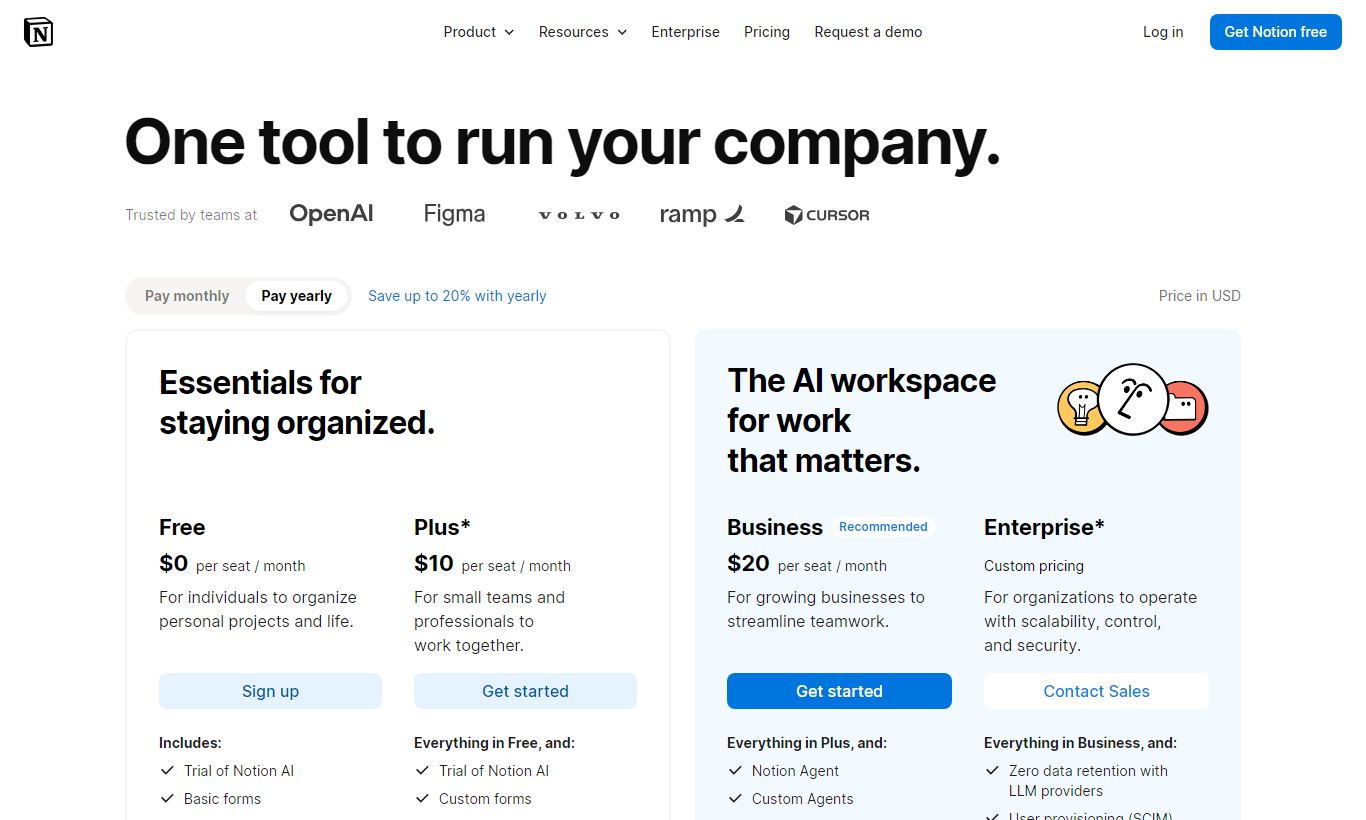
Notion's pricing is transparent and genuinely competitive for what it offers across four tiers:
- Free: $0/user/month. Unlimited pages and blocks for individuals. Up to 10 guests. 7-day page history. Limited file uploads (5MB per file). No automations. Good fit for solo users and small personal projects.
- Plus: $12/user/month (billed annually) or $16/user/month (billed monthly). Unlimited guests, 30-day page history, unlimited file uploads, 5 automations per workspace, and synced databases. This is the sweet spot for most small teams, roughly 5 to 25 people.
- Business: $18/user/month (billed annually) or $20/user/month (billed monthly). Adds private team spaces, bulk PDF export, advanced permissions, SAML SSO, and 90-day page history. Includes Notion AI for all members. Built for mid-sized companies with security and compliance needs.
- Enterprise: Custom pricing. Adds audit logs, advanced security controls, dedicated customer success, and SLA guarantees. Necessary for organisations that need SOC 2 compliance and enterprise SSO at scale.
Notion AI is available as a $10/user/month add-on on Free and Plus plans, or comes included at a discounted rate in the Business plan. A free trial of Notion Plus is available for new teams. No credit card is required for the free plan. Annual billing saves roughly 20 to 25% across paid tiers.
What We Love
- Relational databases with multi-view switching: You can link any two databases and view the same data as Kanban, timeline, calendar, or table, all from a single source of truth. That's genuinely rare at this price point.
- Notion AI's workspace Q&A: You can ask natural-language questions across your entire workspace and get cited answers pulled from existing pages. It cuts down the time you'd otherwise spend hunting through documentation.
- Infinite page nesting for deep wikis: Building a full company wiki with department-level spaces, project sub-pages, and meeting note archives feels clean and never gets clunky.
- Template library depth: The range and quality of official and community templates means most teams can go from signup to a working project system in under an hour, without building from scratch.
- Generous free plan for individuals: Unlimited blocks and pages at $0 gives Notion a real edge. Most alternatives cap the free tier much sooner.
Watch Out For
- No native time tracking: There's no built-in time-logging feature. Teams that bill by the hour or need timesheet reports have to bring in a third-party integration like Toggl or Clockify. That's a real gap for agencies.
- Learning curve for non-technical users: The block system and relational database structure can overwhelm users who are used to simpler task managers. Multiple user reviews on G2 and Capterra cite onboarding difficulty as the top frustration, especially in teams with mixed technical ability.
- Timeline view lags behind dedicated Gantt tools: The timeline (Gantt) view lacks dependency linking between tasks, a basic feature in tools like Asana, ClickUp, or Microsoft Project. Cross-task dependencies just aren't supported natively.
- Performance can degrade on very large workspaces: Pages with heavily nested databases or large embedded tables can load slowly, especially on mobile. Teams with thousands of pages report search performance getting sluggish over time.
Who Is It Best For?
The documentation-heavy startup (10 - 80 people): A Series A SaaS company juggling engineering specs, product roadmaps, hiring pipelines, and onboarding wikis needs a single place to keep it all straight, and Notion delivers that. Link a product spec page directly to its sprint tasks and both live in the same tool. That cuts out a huge amount of context-switching. Most teams like this land on the Business plan at $18/user/month.
The freelance consultant or solo operator: A solo UX designer or independent consultant handling 10 to 20 active clients can run the whole business on Notion's free plan. Client project pages, proposal drafts, invoice trackers, personal to-do lists, it all fits in one workspace. Upgrading to Plus only makes sense once clients need regular guest access.
The content or creative agency (5 - 30 people): An agency turning out editorial content, social campaigns, or brand deliverables gets a lot out of Notion's calendar database views, content brief templates, and per-client page structures. Sharing individual client workspaces with outside stakeholders, without exposing the rest of the agency's workspace, is a feature these teams actually use week to week.
How Does It Compare?
Notion vs. Asana: Asana wins on structured task management. Dependencies, workload views, and reporting dashboards are far more mature. But Asana offers almost no documentation or wiki functionality, so teams still need a separate tool for knowledge management. Notion is the better choice when docs and tasks matter equally. Notion vs Asana
Notion vs. ClickUp: ClickUp tries to do everything Notion does, plus native time tracking, goals, and more advanced Gantt features. It often wins on raw feature count, but that breadth comes with real UI complexity. User reviews consistently call ClickUp's interface overwhelming. Notion's cleaner, document-first experience makes it easier for a whole team to stick with over the long haul. Notion vs ClickUp
Final Verdict
Notion is the right tool for teams that treat knowledge and tasks as two sides of the same coin. Its block-based editor, relational databases, and multi-view flexibility give it a functional depth that few all-in-one tools can match, especially at the Plus tier's $12/user/month price point. Notion AI brings genuine use to daily work, not just flashy demos, and the template ecosystem means teams don't need to build their workspace from scratch.
If your team's primary need is structured task management with dependencies, workload balancing, and executive reporting, Notion will require workarounds that add up quickly. It's a documentation-first platform that has grown into project management, not a project management platform that added docs. Know which direction you're coming from before you commit. For most knowledge-driven teams, Notion is worth it.
Try Notion Free →FAQ
How much does Notion cost per month?
Notion's Plus plan costs $12/user/month (billed annually) or $16/user/month (billed monthly). The Business plan is $18/user/month annually. A free plan is available for individuals with unlimited pages and blocks. Enterprise pricing is custom.
Does Notion have a free plan?
Yes. Notion's free plan includes unlimited pages and blocks for individual use, up to 10 guests, and 7-day page history. It's one of the more generous free plans in the productivity space. It does lack automations, though, and caps file uploads at 5MB per file.
Is Notion good for project management?
Notion works well for teams that need documentation and task management in one place. Its Kanban boards, timeline views, and relational databases cover most PM workflows. It lacks native task dependencies and time tracking, though, so teams with complex scheduling needs may prefer Asana or ClickUp.
Is Notion better than Asana?
It depends on your use case. Asana is better for structured task management, dependency tracking, and workload reporting. Notion is better when documentation, wikis, and tasks need to live together. Teams that need both often choose Notion anyway to cut down on tool sprawl, accepting some trade-offs in task management depth.
Is Notion worth it for small teams?
Yes, especially for teams of 2 to 20 people. The free plan covers individuals and tiny teams well. The Plus plan at $12/user/month adds the guest access, file storage, and automations that growing teams need. Most small teams report strong ROI compared to paying for separate wiki and project management tools.
Does Notion have an AI assistant?
Yes. Notion AI is a built-in generative AI assistant that can summarise pages, draft content, extract action items, and answer natural-language questions across your entire workspace. It costs $10/user/month as an add-on on Free and Plus plans, and comes included in the Business plan.
What are the main limitations of Notion?
Notion's key limitations: no native time tracking, no task dependency linking in timeline views, a steep learning curve for non-technical users, and performance slowdowns on very large or heavily-nested workspaces. Teams with mature project management processes may find it less structured than dedicated PM tools.
Can I use Notion for client work?
Yes. Notion lets you share individual pages or spaces with external guests without exposing your full workspace. The Plus plan supports unlimited guests. That makes it practical for sharing project portals, briefs, or deliverable trackers with clients while keeping internal workspace content private.
We may earn a commission when you click affiliate links. This never affects our editorial scores.
| Best for | Docs, wikis and AI workspace |
| Category | AI & Productivity |
Answer a few quick questions and we'll match you to the best tool for your needs.
→ Suggest a Tool