
FreshBooks Review 2026: Is It Worth It?
FreshBooks is a cloud-based accounting platform built for freelancers, self-employed professionals, and small service-based businesses. It handles invoicing, time tracking, and expense management, and it wraps these tasks in an interface that non-accountants can actually use. Pricing starts at $19/month (Lite) and goes up to $55/month (Premium), with a 30-day free trial on all plans. FreshBooks isn't a good match for product-based businesses that need inventory management or companies that have outgrown simple bookkeeping. But consultants, agencies, and solo operators who bill by the hour or project get exceptional value from it. Our overall rating: 4.4 out of 5.
What we love
Watch out for
Freshbooks at a glance
What to test in your Freshbooks trial
30-day free trial
- Send an estimate to a real client and convert it to an invoice with one click
- Track time on a project for 3-5 days, then auto-populate those hours onto a client invoice
- Log expenses by photographing receipts and categorize them as billable to a client
- Set up automated late payment reminders and send one to a past-due client
- Invite your accountant to view reports as a free collaborator seat
- Before day 30, confirm whether you'll stay on Lite or upgrade to Plus based on your actual client count
Quick Verdict
FreshBooks earns its reputation as the go-to accounting tool for service-based freelancers and small teams, and for good reason. The platform strips away the complexity that makes tools like QuickBooks intimidating for non-accountants, while still covering the financial workflows a consulting firm, creative agency, or independent contractor needs daily. If your business model revolves around billing clients for time or projects, FreshBooks handles it better than almost anything else at its price point.
FreshBooks isn't trying to be everything to everyone. It lacks inventory management, has a fairly strict client limit on its entry-tier plan, and its double-entry accounting features, while present, aren't as deep as what you'd find in Xero or QuickBooks Online. If you run a product-based business or are scaling toward 50+ employees, you'll hit its ceiling. For the freelancer or boutique agency that wants clean invoices out the door, accurate time tracking, and a clear picture of cash flow without hiring a bookkeeper, FreshBooks is hard to beat.
Start Your Free Trial →What is FreshBooks?
FreshBooks was founded in 2003 in Toronto, Canada, originally as a simple invoicing tool built by owner Mike McDerment after he accidentally overwrote a client invoice in Microsoft Word. That origin story tells you a lot. FreshBooks has always been built from the perspective of the business owner, not the accountant. Over two decades, it has grown into a full-featured cloud accounting platform serving over 30 million users across more than 160 countries. The company is privately held and has consistently positioned itself as the "anti-QuickBooks": approachable, visually clean, and focused squarely on service businesses.
Its primary market is freelancers, consultants, creative professionals, and small agencies with up to roughly 50 clients. It isn't built for manufacturers, retailers, or enterprises. FreshBooks competes directly with Wave (free tier), QuickBooks Self-Employed, and Xero's entry plans, and it consistently wins on user experience and invoicing depth.
Key Features
Feature Checklist
Invoicing and Estimates
Invoicing is where FreshBooks genuinely shines. You can create a polished, branded invoice in under two minutes. Add your logo, set payment terms, attach expense receipts directly to the invoice, and include a "Pay Now" button that accepts credit cards, ACH bank transfers, or Stripe. Invoices can be set up as recurring billing schedules, which is a lifesaver for retainer clients. The estimates feature lets you send a formal project quote, and once the client approves it with a single click, FreshBooks converts it directly into an invoice with no re-entry required. Late payment reminders are automated. You define the schedule (for example, 7 days overdue, 14 days overdue), and FreshBooks sends professional follow-ups without you lifting a finger. In practice, users report getting paid an average of 11 days faster compared to manual invoicing methods.
Time Tracking
FreshBooks includes a built-in time tracker that works both in the browser and on its iOS/Android mobile app. You can start a timer against a specific project and client, or log hours manually after the fact. The one-click billing feature is what makes this genuinely useful. At invoice time, FreshBooks pulls all unbilled tracked hours for a client and appends them as line items automatically. For an hourly consultant, this cuts out an entire manual reconciliation step that eats hours every month. Team members can also log time independently, and the project owner sees a consolidated view of hours spent versus the project budget, a handy early-warning system for scope creep.
Expense Tracking and Receipt Capture
Expenses can be logged manually, imported via bank/credit card connection, or captured by photographing a receipt with the mobile app (OCR pulls out the amount and vendor automatically). You can categorise expenses to IRS-standard or custom categories, mark them as billable to a specific client, and attach them directly to an invoice. FreshBooks connects to over 14,000 financial institutions via its bank import feature. For tax purposes, the mileage tracker (available in the mobile app) lets you log trips and automatically calculates deductible mileage, a small feature that saves real money for consultants who travel to client sites.
Project Management and Collaboration
FreshBooks includes lightweight project management tools that go beyond what most pure accounting platforms offer. You can create projects, assign team members or contractors, set hourly budgets or flat-fee project totals, and track progress against those budgets in real time. A built-in client portal lets your clients log in, view their invoices and estimates, make payments, and leave messages, all without needing their own FreshBooks account. File sharing within projects keeps contracts, briefs, and deliverables organised alongside the financial data, which is particularly useful for creative agencies managing multiple concurrent client engagements.
Accounting and Reporting
FreshBooks added double-entry accounting in 2019, which means it now generates proper financial statements: Profit & Loss, Balance Sheet, General Ledger, Trial Balance, and Chart of Accounts. These matter for tax filing and working with an accountant. Reports also include an Accounts Aging report (so you know exactly who owes you money and for how long), a Tax Summary report, and revenue-by-client breakdowns. The reporting suite is solid for a small business, but it doesn't match the custom reporting depth of Xero or QuickBooks' higher tiers. You can invite your accountant to your FreshBooks account for free. They get their own login and can pull the reports they need without you acting as a go-between.
Pricing
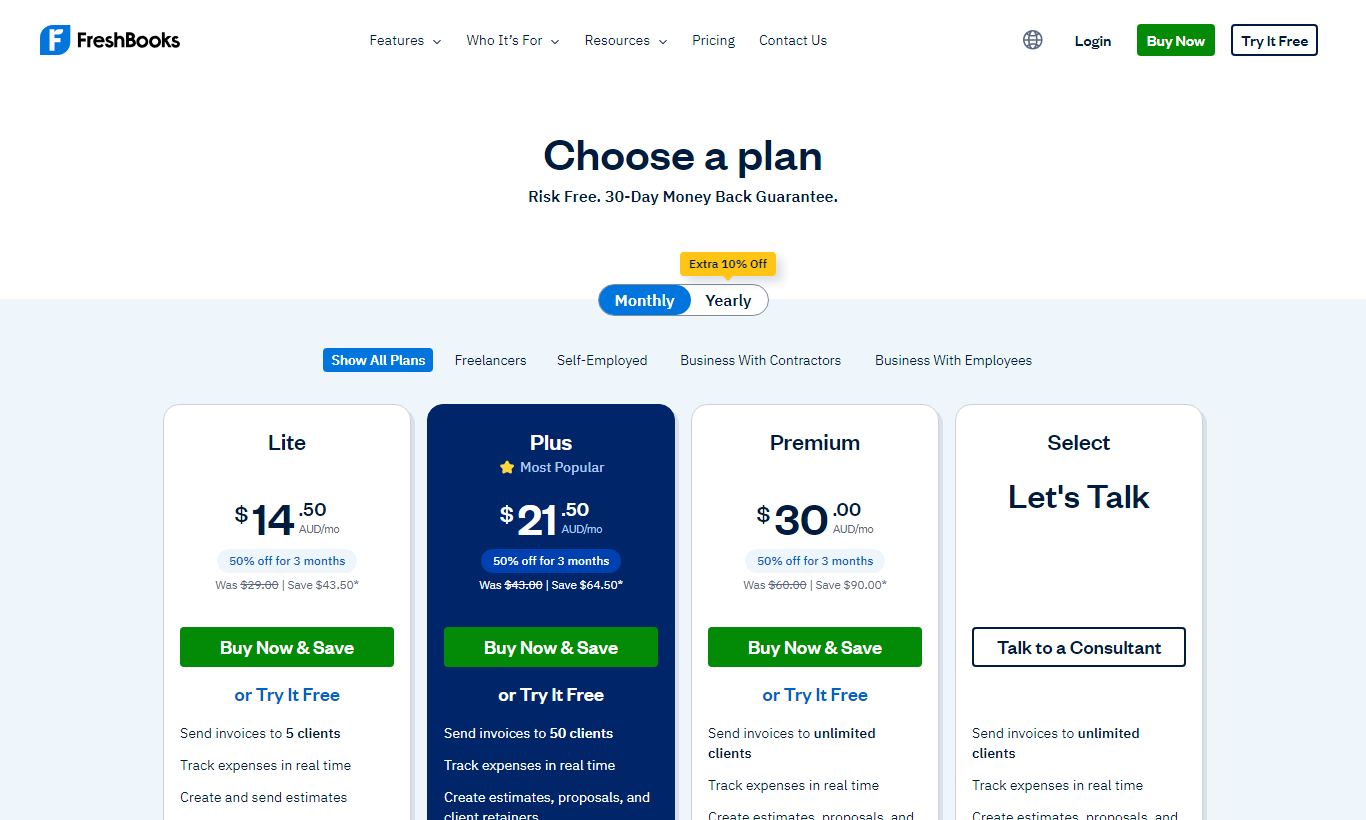
FreshBooks offers four paid plans and a 30-day free trial (no credit card required). All prices below reflect monthly billing. Annual billing cuts costs by roughly 10%.
- Lite, $19/month: Up to 5 billable clients, unlimited invoices, expense tracking, time tracking, and basic reports. Best for solo freelancers with a small, steady client roster.
- Plus, $33/month: Up to 50 billable clients, everything in Lite plus recurring invoices, double-entry accounting reports, business health reports, and client retainers. This is the most popular plan and the right starting point for most consultants.
- Premium, $55/month: Unlimited billable clients, everything in Plus plus bill tracking (Accounts Payable), budget vs. actuals comparisons, and a dedicated account manager. Suited for growing agencies managing many active clients at once.
- Select (Custom pricing): For businesses with complex needs: dedicated support, custom onboarding, a dedicated account manager, and access to lower credit card processing rates. You'll need to contact sales for a quote.
FreshBooks also charges separately for team members. Adding a team member costs $11/month per person on all plans. Payroll is available as an add-on via a Gusto integration (Gusto's own pricing applies). Payment processing fees run 2.9% + $0.30 per credit card transaction, or 1% for ACH bank transfers (capped at $10).
What We Love
- Estimate-to-invoice conversion in one click: Clients approve an estimate digitally, and FreshBooks turns it into a live invoice right away. No re-entering line items or pricing.
- Automated late payment reminders with custom schedules: Set the cadence once per client, and FreshBooks handles the follow-up. That cuts down the time you'd otherwise spend chasing overdue accounts.
- Built-in time tracker syncs directly to client invoices: Tracked hours show up as pre-populated line items when you invoice, so hourly-billing consultants skip the manual reconciliation.
- Free accountant access on all plans: Invite your CPA or bookkeeper as a read-only or full-access user without paying an extra seat fee. That's a real cost saving compared to competitors.
- 30-day free trial with no credit card required: A genuinely risk-free window, long enough to run a real billing cycle and put the full feature set to the test.
Watch Out For
- Strict client limits on the Lite plan: The 5-client cap on the $19/month Lite plan is a real constraint. Many freelancers outgrow it fast and end up jumping to the $33/month Plus tier, which makes that entry price less useful than it first looks.
- No inventory management: FreshBooks has no stock tracking, no purchase orders, and no inventory valuation. Product-based businesses, or anyone who needs to track physical goods, will need a different platform entirely.
- Team member add-on cost adds up quickly: At $11/month per additional user, a team of five tacks on $44/month on top of the base plan price. Competing tools like Zoho Books include more users in their base pricing.
- Reporting lacks the custom depth of Xero: The standard reports cover tax and basic P&L needs well, but power users who want highly customised reports, multi-currency consolidations, or granular budget tracking will find FreshBooks limiting.
Who Is It Best For?
The solo consultant or freelancer billing under 50 clients: A marketing consultant, independent copywriter, or IT contractor who invoices clients for time and project deliverables will find FreshBooks covers every financial workflow they need. The time tracker, automated reminders, and clean invoices make billing nearly frictionless, and the Plus plan at $33/month is genuinely affordable against the time it saves.
The small creative or professional services agency (2 to 10 people): A boutique design studio or accounting firm with a handful of staff and ongoing retainer clients gets real value from FreshBooks' project budgeting, team time tracking, and client portal. The retainer billing feature on the Plus plan suits agencies on monthly fixed-fee arrangements especially well.
The self-employed professional moving off spreadsheets: A newly independent therapist, architect, or financial planner who has been managing invoices and expenses in Excel will find FreshBooks the easiest possible migration. Onboarding is guided, the interface is genuinely intuitive, and you can get to your first invoice in minutes, not hours.
How Does It Compare?
FreshBooks vs. QuickBooks Online: QuickBooks Online handles inventory, payroll, and complex accounting better, but it costs a lot more and takes longer to learn. If you're a service-based freelancer, FreshBooks is easier to use and gives you more for your money. See our full FreshBooks vs QuickBooks Online breakdown.
FreshBooks vs. Xero: Xero pulls ahead on reporting depth, multi-currency support, and third-party integrations (1,000+ apps compared to FreshBooks' roughly 100). FreshBooks pulls ahead on invoicing UX, time tracking, and simplicity, a good fit for service businesses that don't need everything Xero offers. Read our FreshBooks vs Xero comparison for a detailed breakdown.
Final Verdict
FreshBooks is one of the most consistently well-designed pieces of business software available at its price point. It doesn't try to compete with enterprise accounting systems, and that restraint is exactly what makes it work so well for its target audience. The invoicing workflow is best-in-class, the time tracking integration is genuinely useful, and the move to double-entry accounting in recent years means your financial statements are now audit-ready.
Buy FreshBooks if you're a freelancer, consultant, or small agency that bills for services, wants to get paid faster, and doesn't want to spend your weekends learning accounting software. Look elsewhere if you sell physical products, need solid multi-user access without per-seat surcharges, or require deep custom reporting. For the right user, it's the obvious choice.
Try FreshBooks Free →FAQ
How much does FreshBooks cost per month?
FreshBooks plans start at $19/month (Lite, up to 5 clients), $33/month (Plus, up to 50 clients), and $55/month (Premium, unlimited clients). Enterprise pricing is available on the custom Select plan. Annual billing cuts costs by about 10%. Additional team members cost $11/month each.
Does FreshBooks have a free plan?
FreshBooks doesn't offer a permanent free plan. All paid plans include a 30-day free trial with no credit card required, so you get a full month to test the platform before you commit.
Is FreshBooks good for small businesses?
Yes. FreshBooks is built for small service-based businesses, freelancers, and self-employed professionals. It excels at invoicing, time tracking, and expense management. It's a weaker fit for product-based businesses or companies that need advanced inventory or payroll built directly into the platform.
FreshBooks vs QuickBooks: which is better?
FreshBooks works better for freelancers and service businesses that want ease of use and fast invoicing. QuickBooks Online suits businesses that need solid inventory management, complex payroll, or deeper accounting controls. QuickBooks also costs more and takes longer to learn.
Does FreshBooks handle taxes?
FreshBooks generates a Tax Summary report that sorts income and expenses by tax-deductible category, so self-employed professionals can file taxes easily or hand organised records to a CPA. It doesn't file taxes for you. Sales tax can be applied to invoices automatically based on rates you set up.
Is FreshBooks worth it for freelancers?
For most freelancers, yes. The Plus plan at $33/month pays for itself fast if it saves even one hour of admin time a month or helps you get paid faster on a single invoice. The time tracker, automated reminders, and professional invoicing all put money back in your pocket if you bill by the hour or project.
Can I use FreshBooks with my accountant?
Yes. FreshBooks lets you invite your accountant or bookkeeper as a collaborator on your account at no extra charge. They get their own login and can access reports, the general ledger, and transaction history without you having to export files or act as a middleman. This is available on all paid plans.
Does FreshBooks support multiple currencies?
FreshBooks supports invoicing in multiple currencies. You can set a currency per client, so each invoice automatically shows amounts in the client's local currency. It doesn't offer multi-currency bank reconciliation or consolidated multi-currency reporting though, which limits its use for businesses with significant international operations.
We may earn a commission when you click affiliate links. This never affects our editorial scores.
| Best for | — |
| Category | Accounting Software |
Answer a few quick questions and we'll match you to the best tool for your needs.
→ Suggest a Tool